
POS Features Checklist 2026: Must-Haves for Restaurants & Cafes

Introduction: Why Your POS System is the Heart of Your Hospitality Business
As the National Restaurant Association points out, more than three in four operators say technology gives them a competitive edge. Yet, during a busy lunch rush, juggling orders, payments, and staff without the right POS system can lead to errors, long waits, and frustrated customers. In today's market, your Point of Sale (POS) system is more than a till—it's the central nervous system of your restaurant, cafe, or food truck.
Choosing a new POS is a major decision, and the sheer number of features can be overwhelming. This actionable checklist is designed to demystify the process. We'll break down the essential POS software features into three clear categories—'Must-Haves', 'Should-Haves', and 'Nice-to-Haves'—to help you make an informed choice for your business's future.
The Checklist: Must-Have Restaurant POS Features for 2026 (The Non-Negotiables)
These are the absolute essentials. A modern POS system is incomplete without these core functions. They are the bedrock of an efficient, secure, and well-managed operation, whether you run a bustling cafe, a fine-dining restaurant, or a mobile food truck.
Core Order & Payment Processing
At its heart, a POS must make taking orders and getting paid fast and simple. Your staff should be able to fly through the interface, even on their first day. This is the most critical touchpoint in the customer experience.
- Intuitive Order Entry: A touch-screen interface that allows for quick additions, modifications, and notes.
- Reliable Payment Processing: Flawless acceptance of EFTPOS, credit/debit cards, and contactless payments like Apple Pay and Google Pay.
- Flexible Bill Management: Easy functions for splitting bills, managing open tabs, and processing refunds without a headache. As noted by Hospitality Technology Magazine, features like tableside ordering are becoming standard for enhancing efficiency.
Actionable Tip: When demoing a system, time how many taps it takes to place a common order. Fewer taps mean faster service. For a detailed breakdown of costs, see our 2026 Guide to POS System Pricing & Fees.
Cloud-Based System & Data Security
Your business data is invaluable. A cloud-based system means you can manage your business from anywhere and your data is always backed up and secure.
- Remote Access: Log in from your laptop at home to check daily sales, update menus, or manage staff permissions.
- Automatic Backups: Eliminates the risk of losing critical sales history if your hardware fails.
- PCI Compliance: Ensures all your customer's payment information is handled according to the highest security standards. According to industry research, a connected, secure ecosystem is vital for modern restaurants.
Actionable Tip: Ask providers about their server uptime and security protocols. For local businesses, a system that understands the nuances of the NZ market is key, as we explore in Why NZ Salons & Cafes Need a Hyper-Local POS System.
Basic Sales Reporting & Analytics
Even a basic POS should give you the insights to make smarter decisions. Gut feelings are important, but data tells the real story.
- End-of-Day Reports: A clear summary of your daily sales, taxes, and payment types.
- Product Mix Reports: Easily identify your best-selling and worst-selling items to optimize your menu.
- Sales Trends: Track performance over time to understand your busy periods and slow days.
Employee Management Features
Security and accountability start with managing who can do what on your POS.
- Individual Staff Logins: Every employee should have a unique PIN or login to track their activity.
- Role-Based Permissions: Control access to sensitive functions like voids, discounts, and refunds.
- Time Tracking: A simple clock-in and clock-out feature to simplify payroll.
Should-Have POS Features to Boost Growth & Efficiency
Once the basics are covered, these are the features that transform your POS from a simple tool into a growth engine. They help you increase revenue, improve margins, and deliver a superior customer experience.
Integrated Online Ordering
Customers now expect the convenience of ordering online. An integrated system brings those orders directly into your POS, eliminating manual entry and costly errors. Research from Boston University's School of Hospitality Administration highlights that mobile and online ordering are crucial for handling more orders with fewer staff. While third-party apps are an option, they charge hefty commissions and put a wall between you and your customers.
Actionable Tip: A direct, commission-free system means you keep 100% of the revenue and, more importantly, you Own Your Customer Relationships.
Kitchen Display System (KDS) Integration
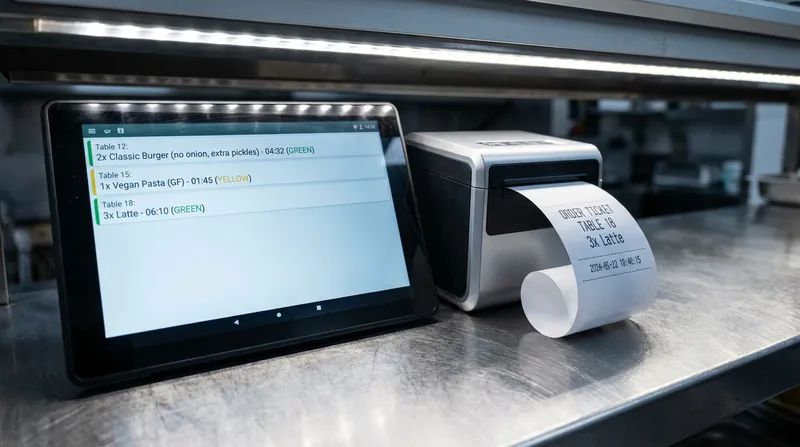
Lost paper tickets and messy handwriting cause delays and errors during a busy service. A Kitchen Display System (KDS) eliminates these issues by sending orders from the POS directly to a screen in the kitchen. This streamlines communication, reduces errors, and provides valuable data on prep times. Research from Cornell's School of Hotel Administration suggests that technology like a KDS is key to improving sales and profits. A happy, efficient kitchen leads to happy customers.
Actionable Tip: Use KDS data to identify bottlenecks in your kitchen workflow and Reduce Staff Stress & Boost Retention.
Customer Relationship Management (CRM) & Loyalty
A great POS helps you turn first-time visitors into loyal regulars. A built-in CRM lets you build customer profiles, track their visit history, and create a digital loyalty program (often included in premium plans) that keeps them coming back.
Actionable Tip: Use your CRM data to send targeted promotions, like a birthday voucher or a special offer to customers who haven't visited in a while. Explore more strategies in our guide to Low-Cost Marketing Ideas for NZ Restaurants & Cafes.
Advanced Inventory Management
This goes beyond simply counting what's on the shelf. Advanced inventory allows for ingredient-level tracking, so when you sell a burger, the system automatically deducts one bun, one patty, and a slice of cheese from your stock. This gives you a true understanding of your food costs and helps you reduce waste.
Multi-Location Management
If you're planning to expand, this is non-negotiable. A multi-location POS provides a central dashboard to manage menus, view sales reports, and maintain consistency across all your sites from a single login. It's the key to Scaling Your Business Without the Chaos.
Nice-to-Have Features for a Competitive Edge
These features are the differentiators. They can open up new revenue streams, cater to niche markets, and set you apart from the competition.
Mobile POS & Offline Mode
For food trucks, market stalls, or event caterers, a mobile POS that runs on an iPad or iPhone is essential. Look for a system with a robust offline mode, which allows you to continue taking payments even if the internet drops out. The system then automatically syncs all transactions once you're back online, ensuring you never miss a sale.
Integrated Booking & Reservation Management
For businesses that take appointments or reservations—like restaurants, massage shops, or beauty salons—an integrated booking system is a game-changer. It allows customers to book 24/7 through your website or Google, and the system automatically manages your table or room availability. This reduces no-shows and helps you Increase Table Turnover Rate.
Future-Proofing: AI Forecasting & Advanced Integrations
What's next? Forward-thinking POS systems are incorporating AI to help with sales forecasting, which can optimize your staff scheduling and inventory orders. Seamless integrations with accounting software like Xero or MYOB can save you hours in bookkeeping. Staying on top of 2025 POS Trends ensures your investment pays off for years to come.
How to Choose the Right POS System for Your Business
Feeling ready to evaluate your options? Follow this simple five-step process.
- Assess Your Unique Needs: Before you look at any software, list the top 5 problems you need your POS to solve. Are you losing money on third-party delivery fees? Are long queues hurting your lunch rush? Start with your pain points.
- Set a Realistic Budget: Consider all the costs involved: upfront hardware, monthly software fees, and payment processing rates. A clear budget will help you narrow down the options. For an in-depth look, check out our 2026 Guide to POS Pricing.
- Prioritise Local Support: Can you get help when you need it, in your time zone? A provider that understands the local market, including EFTPOS integration, is invaluable.
- Schedule Demos: Don't just watch a video. Get a live demo and ask questions specific to your business. This is your chance to see the software in action.
- Check References: The U.S. Small Business Administration (SBA) advises doing thorough research. Ask the POS provider for references from businesses similar to yours—and check if they have local success stories and support teams in your region. Hearing from a fellow owner is often the most valuable insight you can get.
Conclusion: Making an Informed Decision for Your Future
Choosing a POS system is a long-term investment in your business's future. It's no longer just a digital till—it's your command centre for sales, marketing, inventory, and customer relationships. By using the 'Must-Have, Should-Have, and Nice-to-Have' framework, you can move beyond flashy sales pitches and focus on the features that will truly help you operate more efficiently and grow your profits.
The right POS system becomes your business partner, not just software. Ready to see how an all-in-one platform can deliver on this checklist for your business? Explore how Lazygrid is built to meet the specific needs of local NZ and Australian hospitality.
Frequently Asked Questions
What's the difference between a restaurant POS and a retail POS?
A restaurant POS is specifically designed for the service industry, focusing on features like table management, course sending, kitchen display system (KDS) integration, bill splitting, and tipping. A retail POS, on the other hand, is built for managing products and focuses on features like barcode scanning, SKU management, and complex inventory matrices (like size and colour), which are not relevant for a hospitality environment.
How much should I budget for a new POS system in 2026?
Your budget will consist of two main parts: one-time hardware costs (e.g., iPads, printers, cash drawers) and an ongoing monthly software subscription. Modern cloud-based systems have significantly lower upfront costs than traditional systems. Monthly fees can range from around $30 for a basic plan to over $150 for a premium plan with advanced features like loyalty and online ordering.
Can I use an iPad as a POS system for my cafe?
Yes, and it's an excellent choice. iPad-based POS systems are incredibly popular for cafes and small restaurants because they are affordable, portable, and very easy for staff to learn. Their portability is a major advantage, enabling modern workflows like tableside ordering and queue-busting during busy periods.
What is the most important POS feature for a quick-service restaurant (QSR)?
For a QSR, the single most important factor is speed. Therefore, the most critical features are a fast and simple ordering interface that minimizes taps, integrated and rapid payment processing to complete transactions quickly, and a reliable KDS to get orders to the kitchen instantly and accurately.
Do I really need a cloud-based POS system?
For any modern business, a cloud-based POS is strongly recommended. The core benefits include the ability to access your sales data and manage your business from anywhere, automatic and secure data backups so you never lose information, seamless software updates without downtime, and the flexibility to easily scale your business or add new locations.