
Restaurant POS Systems NZ: A 2027 Cost & Pricing Guide

Introduction
Choosing a new Point of Sale (POS) system can feel overwhelming. You're faced with endless options, complex pricing tables, and the nagging fear of hidden fees. For a New Zealand business owner, this anxiety is amplified. In a market where every dollar counts-especially when, according to the Restaurant & Café Magazine, rising operational costs are a major strain-making the wrong choice can be a costly mistake. But it doesn't have to be this way. This guide provides a transparent, comprehensive breakdown of every potential POS system cost in NZ. We'll demystise the numbers and give you the confidence to choose a system that fits your budget and helps your business thrive in 2027 and beyond.
The Three Pillars of POS System Cost in New Zealand
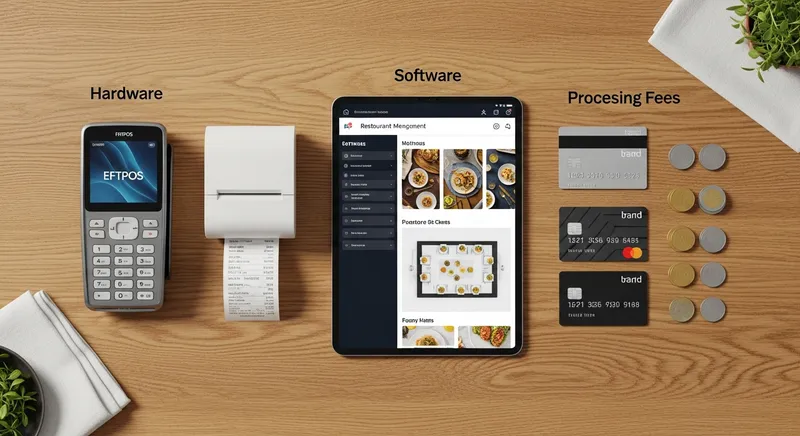
To accurately budget for a new POS system, you need to understand its Total Cost of Ownership (TCO). Instead of getting lost in confusing quotes, simplify your thinking by breaking costs down into three core pillars. A general framework from Forbes Advisor highlights that most POS expenses fall into hardware, software, and processing fees. By understanding these three areas, you can build a realistic budget and compare providers like a pro.
Pillar 1: Upfront POS Hardware Costs
This is the initial investment you make in the physical components of your system. While some cloud-based POS systems can run on an iPad you already own, a full professional setup for a cafe, restaurant, or bar often requires a few key pieces.
Here's a checklist of common hardware and their typical price ranges in New Zealand:
- POS Terminal: This is the brain of your operation. An Apple iPad (from $600) is a popular choice, while dedicated, all-in-one terminals can range from $1,500 to $3,000+.
- EFTPOS Terminal: To take card payments, you'll need a certified terminal. You can often rent these from your bank or POS provider for $30 - $80 per month.
- Cash Drawer: A standard, printer-driven cash drawer typically costs $100 - $250.
- Receipt Printer: A thermal receipt printer for fast, quiet printing costs between $300 - $500.
- Kitchen Display System (KDS): To streamline orders to the kitchen, a KDS screen (often a rugged tablet) can replace paper dockets. If you're considering this, our KDS Setup Guide NZ is a must-read.
- Barcode Scanners: Essential for retail or high-volume inventory, these range from $150 - $500.
Actionable Tip: Before you buy, create a list of your absolute 'must-have' hardware versus 'nice-to-have' upgrades. A food truck needs a compact, mobile setup, while a full-service restaurant will prioritise multiple printers and a KDS. Remember that technology, including POS hardware, is a key part of your initial business investment, often accounting for a significant portion of the total budget, as noted in JLL's fit-out cost guide.
Pillar 2: Ongoing Cloud POS Software Fees
Modern POS systems operate on a Software-as-a-Service (SaaS) model. Instead of a large one-time purchase, you pay a predictable monthly subscription. This fee gives you access to the software, regular updates, and customer support.
Software pricing in NZ is typically tiered:
- Basic Plan (~$50/month): Perfect for a small cafe or food truck, covering core transaction and reporting features.
- Standard Plan (~$100/month): For growing businesses, this often adds features like online ordering, advanced reporting, and integrations with tools like Xero. A seamless Xero POS Integration is crucial for simplifying accounting. Notably, some providers like Lazygrid include high-value features like commission-free online ordering and booking systems even in their standard plans, which can cost hundreds extra per month with other systems.
- Premium Plan (~$150+/month): Aimed at established restaurants or multi-location businesses, this tier unlocks loyalty programmes, detailed inventory management, and multi-site management.
Actionable Tip: Scrutinise what's included in each tier. A cheap basic plan might become expensive if you have to pay extra for essential features like a booking system or gift cards. Before speaking to any provider, write down your top five 'must-have' software features to ensure you're comparing apples with apples. If you're unsure where to start, our Best Cloud POS Systems for NZ Restaurants Buyer's Guide can help.
Pillar 3: Payment Processing & EFTPOS NZ Compliance
This is often the most confusing part of POS pricing, but it doesn't have to be. Every time you accept a card payment, a small fee is charged. These fees can be structured in a few different ways.
- Merchant Service Fees (MSFs): For credit card transactions (Visa, Mastercard), this is usually a percentage of the transaction value (e.g., 1.5% - 2.9%).
- EFTPOS Fees: For debit transactions through the EFTPOS NZ network, fees can be a low fixed cost per transaction or a flat monthly fee, which is often more cost-effective for high-volume businesses.
- Integrated vs. Standalone: An integrated terminal communicates directly with your POS, reducing errors and speeding up service. A standalone terminal requires you to manually enter the amount for each transaction, which is slower but can sometimes have lower rental costs.
EFTPOS NZ compliance is a critical factor. It means the provider's system is certified to work securely and reliably with New Zealand's payment network, which is used by over 50,000 merchants. Always confirm your chosen provider, like Lazygrid, is fully compliant.
Actionable Tip: Don't just look at the percentage rate. Ask for a full breakdown of all potential fees, including monthly rental, network fees, and any charges for different card types. You can estimate your monthly cost by calculating: (Projected Monthly Card Sales) x (Average Rate %) + (Fixed Monthly Fees). This is especially important when comparing international providers, as explored in our guide to better local POS alternatives.
For foundational advice, the New Zealand government's business.govt.nz portal offers clear guidance on understanding payment options and the rules around surcharging.
Beware the Hidden Costs of POS Systems
Your biggest fear is valid: many POS providers hide costs in the fine print. According to academic research from Unitec's Research Bank, high technology costs are a significant barrier for NZ hospitality businesses, and unexpected fees are a major part of that problem. Here's what to watch out for:
- Support Contracts: Is 24/7 phone support included, or is it a paid extra? What are the response times?
- Setup and Training: Is onsite setup and staff training included, or billed by the hour?
- Software Updates: Are future software updates free, or do you have to pay for new versions?
- Additional Terminals/Staff: Are there fees for adding more devices or staff accounts to the system?
- Data Migration: If you're switching systems, what is the cost to import your existing customer and product data?
- Cancellation Fees: What are the penalties if you need to break your contract early? Are you locked into a multi-year term?
The Unseen Cost of a Poor System
Beyond the contract, the biggest 'hidden cost' can be the operational drag of a bad system. Consider the financial impact of:
- Slow Service: A clunky, non-integrated payment process that adds 30 seconds to every transaction can lead to shorter queues, frustrated customers, and lost sales during peak hours.
- Manual Errors: Manually keying in amounts from the POS to a separate EFTPOS terminal inevitably leads to mistakes. These reconciliation errors at the end of the day cost you time and money.
- Wasted Admin Time: A system that doesn't integrate with your accounting software (like Xero) means hours of manual data entry each month. What is your time worth?
- Third-Party Commissions: Using a separate online ordering platform like Uber Eats can cost you 15-30% on every order. A POS with a commission-free online ordering module puts that revenue straight back into your pocket.
Actionable Tip: Before signing any contract, ask your sales rep these questions directly and get the answers in writing. A transparent provider will have no issue providing clear, upfront answers. A provider who is vague about these costs should be a major red flag.
Why Lazygrid is Different: A Transparent NZ Alternative
- All-In-One Pricing: All core features (POS, online ordering, bookings, loyalty) are included in one simple monthly plan. No expensive add-ons.
- Zero Commission: We never take a cut of your online or QR code orders. You keep 100% of your revenue.
- Local NZ Support: Our support team is based in Wellington, ready to help when you need it.
- EFTPOS NZ Certified: Fully certified for secure, reliable payments across the country.
- No Lock-In Contracts: We believe in our product, so we don't need to lock you into long-term contracts.
Calculating Your Return on Investment (ROI)
A great POS system is an investment, not just an expense. If it helps you save time and increase sales, it pays for itself. Here's a simple way to think about it:
If a new POS system costs $3,000 for the first year but saves you 5 hours of admin work per week (at a conservative $25/hour), that's a saving of $125 per week, or $6,500 per year. In this case, the ROI is massive.
Before you buy, ask yourself: How many hours will this save me on accounting? How many more customers can I serve per hour? How much will I save on third-party commissions? The answers will justify the investment.
POS Cost Scenarios for Common NZ Businesses
Let's make this real. Here are three estimated first-year cost scenarios for different New Zealand businesses, featuring Lazygrid's transparent pricing.
Scenario 1: The New Cafe in Ponsonby
- Needs: 1 iPad terminal, 1 EFTPOS terminal, cash drawer, receipt printer, and a plan with online ordering.
- Solution: Lazygrid Standard Plan ($59/month).
- Upfront Hardware: ~$1,500
- Ongoing Software & Rental: $59 (Lazygrid) + ~$40 (EFTPOS rental) = ~$99/month
- Estimated First-Year Cost: ~$2,688 + processing fees
Scenario 2: The Queenstown Food Truck
- Needs: 1 iPad, 1 mobile EFTPOS terminal, a simple plan with offline mode and QR code ordering.
- Solution: Lazygrid Basic Plan ($29/month).
- Upfront Hardware: ~$1,000
- Ongoing Software & Rental: $29 (Lazygrid) + ~$40 (EFTPOS rental) = ~$69/month
- Estimated First-Year Cost: ~$1,828 + processing fees
Scenario 3: The Busy Wellington Bar
- Needs: 2 iPad terminals, 2 EFTPOS terminals, KDS, advanced reporting, and staff management.
- Solution: Lazygrid Premium Plan ($149/month for multiple terminals).
- Upfront Hardware: ~$3,500
- Ongoing Software & Rental: $149 (Lazygrid) + ~$80 (2x EFTPOS rental) = ~$229/month
- Estimated First-Year Cost: ~$6,248 + processing fees
For a deeper dive into specific providers, our 2027 POS comparison for NZ bars and restaurants offers more detailed analysis.
Conclusion: Budgeting for Your Success in 2027
Calculating the true cost of a POS system in New Zealand comes down to three things: understanding the pillars of hardware, software, and processing; demanding transparency on hidden fees; and choosing a partner invested in your growth. A POS system isn't just a cash register; it's the central nervous system of your business. By investing the time to research properly, you're not just buying a piece of technology-you're setting the foundation for efficiency, growth, and long-term success.
If you're tired of confusing quotes and hidden fees, Lazygrid offers a refreshingly simple approach. With clear, all-in-one pricing and local NZ support, we give you everything you need to run your business, without the financial surprises.
Ready to see transparent pricing with no surprises? Book a free demo with our Wellington team and get a custom quote for your business.
Frequently Asked Questions
What is a reasonable monthly fee for a POS system in NZ?
A reasonable monthly fee for a quality cloud-based POS system in New Zealand typically ranges from $50 to $150 per terminal. For example, Lazygrid's plans range from $29 to $149/month, with all core features like online ordering and bookings included. Be cautious of systems advertised as 'free', as they often compensate with very high, non-negotiable payment processing fees that can cost you far more in the long run.
How much are Square or Lightspeed fees for a New Zealand business?
Both Square and Lightspeed are popular international providers. Square is known for a flat-rate processing fee (around 1.9% per transaction), while Lightspeed uses a tiered software model plus separate processing rates. While simple, these models can become expensive, especially with add-on costs for features that are standard in local alternatives. It's crucial to compare the total cost, including software, processing, and local support availability, not just the headline rate.
Can I just use my own iPad for my cafe POS system?
Yes, absolutely. Most modern cloud POS systems, including Lazygrid, are designed to run on standard Apple iPads. This is an excellent way to reduce upfront hardware costs. The main advantages are cost savings and a sleek, familiar interface. We just recommend investing in a sturdy, secure stand and a protective case to handle the rigours of a busy hospitality environment.
What is the cheapest POS system for a small business in NZ?
The 'cheapest' system is not always the 'best value'. An option with zero upfront cost might lock you into high transaction fees that cost thousands more over the year. The best approach is to find the best value: a system with transparent pricing, the flexibility to scale, and no hidden fees. A provider like Lazygrid, which includes commission-free online ordering in its base plans, often provides a much lower total cost of ownership than 'cheaper' alternatives.
How do I calculate the total 1-year cost of a POS system?
To accurately compare different POS quotes, you need to calculate the total estimated cost over at least one year. Use this simple formula as your guide:
(Total Upfront Hardware Cost) + (Monthly Software & Rental Fees x 12) + (Estimated Annual Card Sales x Average Processing Rate %) = Total 1-Year Cost.
By getting all three components (hardware, software, and processing) in writing from a provider, you can use this formula to see the true cost and avoid any unpleasant surprises.