
The Ultimate Guide to Multi-Location POS Systems for Scaling Your Business (2025)

Introduction: The Exciting (and Chaotic) Leap to Your Second Location
Congratulations! Your business is a success, and you're ready to take the exciting leap of opening a second location. Whether it's another cafe in Wellington, a new salon in Auckland, or the next restaurant in your growing chain, this is a milestone worth celebrating. However, the systems that made your first location a hit are about to be stretched to their breaking point.
Suddenly, you're wrestling with inconsistent menus, siloed sales data, and inventory that seems to have a mind of its own. This is the operational chaos that can derail even the most promising expansion. As we look towards 2025, the key to scaling smoothly isn't just working harder—it's working smarter with the right technology. Trends like AI-driven demand forecasting and hyper-automation are no longer future concepts; they are becoming essential tools for growth.
This guide is your strategic plan. We'll explore why a dedicated multi-location POS system is non-negotiable and break down the core features that provide clarity and control as you grow.
Why Your Business Needs a True Multi-Location POS System
When expanding, it's tempting to simply buy another standalone POS terminal for your new shop. This is a critical mistake. Running two disconnected systems creates data silos, doubles your administrative work, and makes getting a true picture of your overall business health nearly impossible. You're not running two separate businesses; you're running one brand with multiple locations.
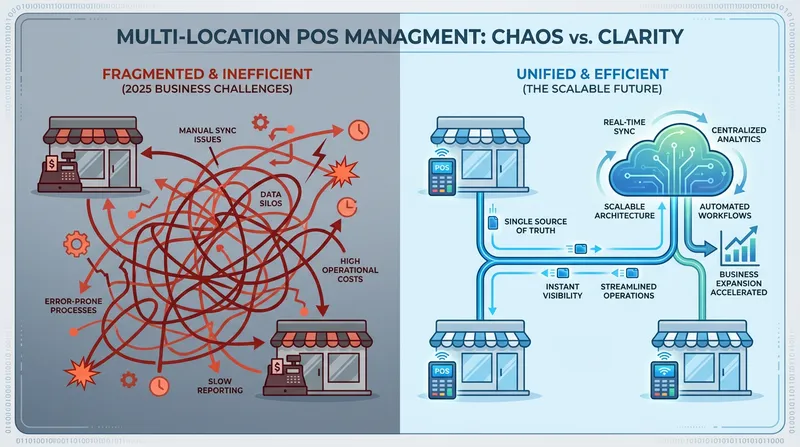
Consider this: the majority of restaurants are single-unit operations. Making the jump to a multi-unit brand is a significant operational challenge that demands specialized technology. The hidden costs of disconnected systems—wasted staff hours manually compiling reports, poor inventory control leading to waste, and an inconsistent customer experience—can quickly erode your profits. Investing in a true multi-location POS is a foundational step for sustainable growth, a topic we explore further in our 2025 POS Trends guide.
Core Features of a Scalable Multi-Location POS
A true multi-location POS system creates a single source of truth for your entire operation. It connects your headquarters, your branches, your staff, and your customers under one digital roof. Here are the core features that make scaling without chaos possible.
1. Centralized Operations & Menu Management
Imagine wanting to update a price or launch a seasonal special. Without a centralized system, you'd have to manually update the menu on every POS terminal at every location. It's tedious and prone to error.
A key feature is the ability to manage your products and menus across all locations from a single dashboard. With one click, you can roll out a new coffee blend, add a promotional combo, or adjust pricing across your entire brand. This not only saves countless administrative hours but also ensures absolute brand consistency. You can even manage location-specific menus—like offering a full menu at your flagship restaurant while providing a smaller, curated list at an express location—all from the same platform.
2. Unified Inventory Control
Inventory is a major headache for any hospitality or retail business, and it only gets worse with multiple locations. A unified inventory system is a game-changer. It tracks stock levels across all stores in real-time and facilitates stock transfers between locations, so you can move surplus from one shop to another that's running low.
For example, a growing Kiwi cafe chain could see that its Christchurch location is overstocked on oat milk while its Dunedin branch is running low. With a few clicks, they can arrange a transfer and prevent both waste and lost sales. Modern systems use this data to automate purchase orders and can even use AI to analyze sales data, predict demand, and minimize food waste.
3. Consolidated Sales & Performance Reporting
Which location is your most profitable? Who is your top-performing employee across the entire company? Answering these questions is impossible when your sales data is trapped in separate systems. A multi-location POS offers consolidated, roll-up reporting.
This allows you to instantly see a holistic view of your business's financial health or drill down to compare performance between locations. Data is increasingly recognized as essential for business owners, and an efficient POS is critical to harness it. You can track best-selling items across the brand, identify peak hours for staffing, and make strategic decisions based on comprehensive data, not guesswork.
4. Multi-Store Customer Loyalty & Marketing
Your customer's relationship is with your brand, not just one location. A multi-store loyalty program ensures a seamless experience. A customer should be able to earn points for a coffee at your downtown cafe and redeem them for a free pastry at your suburban outpost. This is only possible with a shared customer database.
According to the National Restaurant Association's 2025 State of the Restaurant Industry report, loyalty programs are more important than ever in influencing customers' decisions about where to dine out. A centralized system allows you to manage gift cards that work everywhere and run targeted marketing campaigns—like a 'we miss you' offer—to customers across all your locations. It's a powerful tool for building a loyal community and a core component of effective, low-cost marketing strategies.
5. Scalable, Role-Based Access & Staff Management
As you grow, you need to delegate. A scalable POS system allows you to set role-based permissions. A store manager can see their location's data and manage their team's schedule, while you, the owner, can see everything from a master account. This is especially critical for a franchise POS system, where franchisors need oversight while franchisees manage their own daily operations.
These systems are built on flexible, cloud-based architecture. Market analysis from Grand View Research shows that cloud-based systems accounted for over 54% of the market in 2024 and are projected to continue their rapid growth, making it easy to add your third or thirtieth location.
Beyond the Basics: The All-in-One Advantage
While the features above are crucial for multi-location management, a truly modern POS does more than just connect your stores. An all-in-one platform like Lazygrid integrates all the tools you need to run your entire business, eliminating the need for a patchwork of expensive, separate subscriptions.
Look for a system that unifies:
- Bookings & Appointments: Manage reservations for your restaurant or appointments for your salon across all locations from one calendar.
- Online Ordering: Offer click-and-collect or delivery, with orders sent directly to the correct location's kitchen display system (KDS).
- Self-Service Kiosks: Reduce queues and improve order accuracy by allowing customers to place their own orders.
- Advanced Hospitality Tools: Natively integrated table management, kitchen displays (KDS), and staff management tools that work seamlessly together.
Consolidating these functions into one system doesn't just simplify your tech stack—it unlocks deeper insights by connecting all your business data.
Choosing the Right POS for Your Growing NZ/AU Business
Not every multi-location POS is created equal. The best choice depends on your specific business type.
| Business Type | Key Needs | Top Examples | Lazygrid's Advantage |
|---|---|---|---|
| Cafes & Restaurants | Menu Control, KDS, Table Management, Online Ordering | Lightspeed Restaurant, TouchBistro | Combines all hospitality features with versatile multi-location tools at a fraction of the enterprise cost. |
| Retail Boutiques | SKU Management, Barcode Scanning, eCommerce Sync | Vend (by Lightspeed), Shopify POS | Strong inventory management, but Lazygrid adds integrated booking/service features for hybrid businesses. |
| Salons & Services | Appointment Booking, Staff Calendars, Client History | Fresha, Timely | Lazygrid integrates service bookings with powerful retail POS and multi-location management in one platform. |
| Mobile & Food Trucks | Offline Mode, GPS Sales Data, Fleet Management | Square for Restaurants | Robust offline mode and versatile hardware, perfect for businesses on the move or at events with spotty internet. |
When evaluating, consider these options:
The Versatile All-in-One (Lazygrid POS): Ideal for the modern, diversified business owner in New Zealand or Australia. If you run a mix of cafes, restaurants, or even service businesses like salons, you need a flexible platform. Lazygrid offers robust, EFTPOS NZ certified multi-location management for sales, inventory, and customers, combined with built-in tools for online ordering, bookings, and loyalty, all backed by Wellington-based support.
The Restaurant Powerhouse (e.g., Lightspeed Restaurant, TouchBistro): These are built for large, complex restaurant chains. They offer deep, kitchen-specific integrations but can be overly complex and expensive for cafes, salons, or smaller chains.
The Retail Specialist (e.g., Vend, Shopify POS): This type excels at managing thousands of SKUs and complex retail inventory. A strong choice for multi-location retail, but it often lacks the native service-based features crucial for hospitality, like table management and integrated booking systems.
Conclusion: Scale Your Brand, Not Your Chaos
Successful expansion is about building a scalable operational backbone. The right multi-location POS system transforms chaos into clarity, replacing data silos and administrative headaches with a single, unified view of your entire business.
By centralizing your operations, reporting, inventory, and customer data, you empower yourself to focus on the bigger picture—growing your brand, delighting your customers, and planning your next successful launch.
Ready to take control of your growth? Here are three steps you can take today:
- Audit your current pain points: Where are disconnected systems costing you time and money?
- List your must-have features: What capabilities do you need to scale smoothly for the next 3-5 years?
- See a true multi-location POS in action: See how a unified platform can streamline your entire operation.
Frequently Asked Questions
What is a multi-location POS system?
A multi-location POS is a centralized platform that connects the hardware, software, and data from multiple business locations into a single account. Instead of having separate systems at each store, it creates a 'single source of truth' allowing you to manage menus, view consolidated reports, and track inventory across all your businesses from one dashboard.
How does centralized inventory management work for multiple restaurants?
A centralized system tracks your inventory in real-time across all locations. When a latte is sold at Location A, the milk and coffee beans are deducted from a shared inventory pool visible to all locations. This allows for automated low-stock alerts for the entire company, easy stock transfers between branches, and smarter purchasing decisions based on total demand.
What's the difference between a multi-location POS and a franchise POS system?
A franchise POS is a specialized type of multi-location POS. It includes all the standard centralized features but adds tools specifically for the franchise model. These often include automated royalty fee calculations, tools to enforce brand-wide standards, and tiered reporting structures for franchisees, regional managers, and the corporate head office.
Can I manage different business types, like a cafe and a salon, on one POS system?
Yes, but it requires a versatile, cloud-based platform. Many POS systems are highly specialized. A flexible system like Lazygrid is designed for this exact scenario, allowing you to manage service appointments for a salon alongside menu items for a cafe, all from a single account with a shared customer database and loyalty program.
What does a multi-location POS system typically cost?
Pricing varies based on features and the number of locations. Some providers charge a high base fee plus a per-location cost. All-in-one platforms like Lazygrid often offer more value, with multi-location management included in higher-tier plans (e.g., starting from a Standard or Premium plan) without excessive enterprise-level pricing. Always ask about costs for adding hardware and new locations during a demo.