
Best Cloud POS Systems for NZ Restaurants: A 2027 Buyer's Guide

Introduction: Choosing Your Restaurant's Most Important Employee
It's the middle of the lunch rush. There's a queue to the door, the kitchen is humming, and then it happens. The EFTPOS terminal freezes. That cold feeling of dread is something no business owner should have to experience. Choosing a point-of-sale (POS) system is one of the most significant decisions you'll make, and the fear of getting it wrong is real. You're not just buying software; you're investing in a central partner for your daily operations, and a bad choice can lead to lost sales, wasted time, and endless frustration.
This anxiety is valid, especially in today's market. With the Restaurant Association of New Zealand reporting that rising costs are putting immense pressure on profit margins, efficiency isn't just a buzzword-it's essential for survival. This guide is here to cut through the noise. We'll demystify the world of cloud POS systems and give you a clear, actionable framework to choose a partner that will help your NZ business not just survive, but thrive.
What is a Cloud POS and Why Does Your NZ Business Need One?
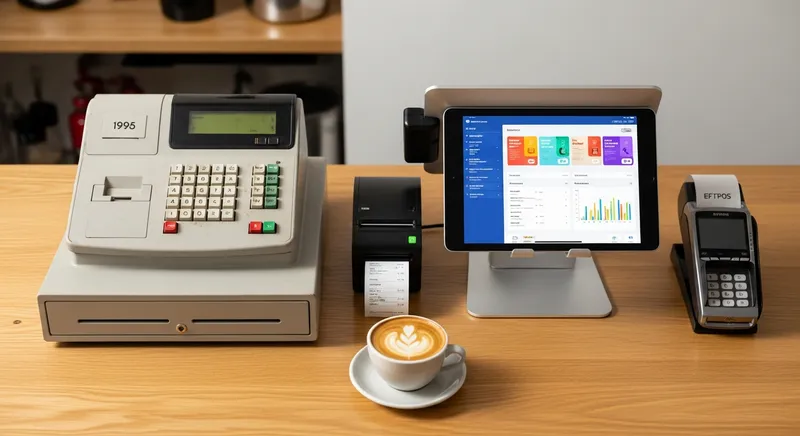
At its core, a cloud POS system is a modern point-of-sale where the software runs online and your data (sales, inventory, customer info) is stored securely in the "cloud." This represents a huge leap from traditional, or 'legacy', POS systems that required expensive, bulky hardware and stored all your precious data on a single computer in your back office. The image above shows this evolution perfectly: from a clunky, analogue till to a sleek, powerful tablet system.
Why is this change so important? The benefits are transformative for a busy business owner:
- Lower Initial Cost: Instead of paying thousands for proprietary hardware, you can run powerful POS software on an iPad or tablet.
- Automatic Updates: The software updates automatically, so you always have the latest features and security patches without needing an IT callout.
- Remote Access: Check your live sales data from your phone at home, on the beach, or anywhere with an internet connection.
- Greater Security: If your iPad is damaged or stolen, your data is safe. Simply log in on a new device and you're back in business instantly.
- Scalability: Easily add new terminals, new locations, or new features like online ordering as your business grows.
As the New Zealand government encourages businesses to embrace digital tools for better productivity, adopting a cloud POS is a foundational step towards building a more resilient and efficient operation.
Actionable Tip: Look at last month's sales reports. How much time did you or your accountant spend manually entering sales data into your accounting software or inventory spreadsheet? A cloud POS automates these tasks, saving you hours of admin work every week.
The 7 Non-Negotiable Features for a NZ Restaurant POS in 2027
A modern POS system is far more than a digital till. It's the central hub that connects your customers, your staff, and your operations. As you evaluate your options, use this checklist to ensure the system you choose is equipped to handle the unique demands of the New Zealand market.
1. Seamless EFTPOS & Payment Integration
In New Zealand, where Worldline reports that contactless payments are overwhelmingly preferred, clunky payment processing is a recipe for disaster. A truly integrated solution is non-negotiable. This means your POS communicates directly with your EFTPOS terminal, eliminating the need for staff to manually key in the sale amount. This single feature prevents costly keying errors, speeds up every transaction, and keeps the queue moving.
Actionable Tip: When talking to potential providers, ask them two specific questions: "Is your system certified with major NZ payment gateways like Worldline/EFTPOS NZ?" and "Do you offer integrated mobile EFTPOS options for tableside payments or food trucks?"
2. Flawless Xero POS Integration
For most Kiwi businesses, Xero is the language of accounting. A POS system that doesn't speak it fluently will create hours of frustrating administrative work. According to Xero's Small Business Insights, managing cash flow is critical, and manual data entry is a major barrier to clear financial reporting. A deep integration automatically syncs your daily sales totals, payment types, and GST information directly into Xero every night, ensuring perfect GST compliance and saving valuable time.
Actionable Tip: Don't just take their word for it. Ask for a live demo of the Xero integration. See for yourself how the data flows from a sale in the POS to a reconciled entry in your Xero account. For a deeper dive, check out our Xero POS Integration NZ: The 2026 Guide for Hospitality.
3. Integrated, Commission-Free Online Ordering & KDS
The era of juggling multiple tablets for different delivery apps is over. It's an inefficient workflow that eats into your profits with high commissions. A modern POS should offer a commission-free online ordering system that feeds orders directly into your POS and Kitchen Display System (KDS). This creates one seamless flow for all orders, whether placed in-store, online, or via a self-service kiosk. As industry data from Restaurant & Café Magazine shows, a significant portion of diners prefer ordering directly from a restaurant's own website.
Actionable Tip: Calculate the total commission fees you paid to third-party apps like Uber Eats last month. Compare that number to the monthly cost of a POS with an integrated, commission-free online ordering module. The savings are often staggering. Considering a kiosk? See our NZ Restaurant Kiosk Guide (2027): Boost Sales & Efficiency.
4. Real-Time Inventory Management
Effective inventory management goes far beyond a simple stock count. A powerful POS can track inventory at the ingredient level. This means when you sell a flat white, the system automatically deducts the correct amount of coffee beans, milk, and one cup from your stock levels. This provides incredible benefits:
- Accurate food costing and profit margin analysis on every menu item.
- Drastic waste reduction, with some businesses cutting food waste by up to 20% through smarter, data-driven ordering.
- Automated low-stock alerts so you never run out of a best-seller mid-service.
Actionable Tip: Use your current sales data to identify your top 5 best-selling menu items. With an advanced POS, you could instantly see the exact profit margin on each one and use that insight to engineer a more profitable menu. Learn more in our Complete NZ Guide to Beverage Cost.
5. Customer Relationship Management (CRM) & Loyalty
Your most valuable asset is your base of regular customers. A POS with built-in CRM and loyalty features helps you grow that base. It allows you to capture customer details (with their permission) and understand their behaviour. You can easily implement a digital loyalty program-like a "buy 9 get 1 free" digital stamp card that integrates with Apple Wallet-that keeps customers coming back without the hassle of paper cards.
Actionable Tip: Imagine you could get a list of every customer who hasn't visited in the last 90 days. What simple, compelling offer could you send them to win them back? A good POS makes this kind of targeted marketing easy. For more ideas, explore our tips on Menu Psychology NZ.
6. Advanced Reporting & Analytics
Gut feeling has its place, but data-driven decisions are what separate good businesses from great ones. A cloud POS gives you access to powerful analytics from any device. You can see your busiest hours, your most effective staff members, and your most profitable products at a glance. For growing businesses, look for systems that offer consolidated reporting across multiple locations.
Actionable Tip: Use your sales-by-hour report to optimize your staff roster. You might discover you can reduce staff by one person during a proven quiet period on Tuesday afternoons, saving significant wage costs over a year. Improving your visibility starts with getting found, something our Google Maps Ranking for NZ Hospitality: 5-Step Guide (2026) can help with.
7. Support for Diverse Hospitality Types
Your business is unique, and a one-size-fits-all POS is rarely the right fit. The needs of a busy urban cafe are different from a food truck, which are different again from a full-service restaurant or bar.
- Busy Cafe: Needs lightning-fast order entry and a strong loyalty program.
- Food Truck: Needs reliable mobile connectivity (4G/5G), a robust offline mode, and compact hardware.
- Restaurant/Bar: Needs table management, course-holding, and an integrated booking system, ideally one that syncs with Reserve with Google.
Actionable Tip: Before you start your search, write down the top three most unique operational challenges for your specific business. For each POS provider you evaluate, ask them to demonstrate exactly how their system solves those three specific problems. If you run a cafe, start with our guide to the 5 Best POS Systems for NZ Cafes: A Guide to Handling the Morning Rush (2026).
How to Choose: A Buyer's Guide to NZ POS Systems
Now that you know what to look for, how do you compare providers and make the final call? This is where you need to be a savvy buyer and look past the slick marketing to find a true partner. Focus on three key areas: total cost, hardware, and local support.
1. Uncover the Total Cost of Ownership: Don't be swayed by a low monthly fee. The true cost is often hidden. Create a checklist and ask every provider for these numbers:
- Monthly Software Subscription: Is it per terminal or per site? Are key features like online ordering and loyalty included or expensive add-ons?
- Payment Transaction Fees: What is the percentage and per-transaction fee for integrated EFTPOS?
- Setup & Training Fees: Are these included or an extra cost?
2. Check Hardware Requirements & Costs: Ensure you know the full hardware investment. Ask about:
- Core Hardware: What is the price for iPads, printers (e.g., Epson, Xprinter), cash drawers, and EFTPOS terminals?
- Compatibility: Can you use hardware you already own, or do you need to buy a specific package from the provider?
3. Vet the Quality of Support: When your system goes down on a busy Saturday night, an email response 24 hours later is useless. This is where local support is invaluable.
- Location: Is the support team based in New Zealand? Can you speak to someone in your time zone (e.g., a Wellington-based team)?
- Hours: What are the support hours? Is weekend and evening support available?
- Contact Method: Can you call and speak to a human, or are you stuck with a chatbot?
Actionable Tip: Create a simple spreadsheet to compare your top 3 providers. Have columns for each of the cost, hardware, and support questions listed above. This will give you a clear, apples-to-apples comparison. For a head start, see our Best POS Systems for NZ Bars & Restaurants: A 2026 Comparison.
Conclusion: Your Partner in Profitability
In New Zealand's increasingly competitive hospitality market, a modern cloud POS system is no longer a luxury; it's a foundational tool for efficiency and growth. The right system automates admin, provides invaluable business insights, and helps you deliver a better customer experience.
As you make your choice, remember to look beyond features and focus on the core partnership. Prioritize systems with seamless NZ EFTPOS and Xero integration, transparent pricing with commission-free online ordering, and an accessible, New Zealand-based support team that has your back. Choose a provider that feels less like a software vendor and more like a partner invested in your success.
Ready to see how a POS built for NZ can transform your business? Book a no-pressure demo with our Wellington-based team and see Lazygrid's NZ-focused features in action.
Frequently Asked Questions
How much does a POS system cost in NZ?
The cost has three parts. First, the monthly software subscription, which for a provider like Lazygrid can range from $24 to $149 per month depending on the features you need. Second are payment processing fees, typically 1-2.5% per transaction. Finally, one-off hardware costs for iPads, printers, and terminals can range from $500 to over $3,000. Always ask for a full quote to understand the total cost, and check which features are included vs. paid add-ons.
What is the best POS system for a small cafe in NZ?
For a small NZ cafe, the best POS excels at speed, reliability, and loyalty. You need a system like Lazygrid with an intuitive iPad interface for fast ordering during the morning rush. It must have deeply integrated EFTPOS for quick, error-free payments. Finally, a great cafe POS should include a simple digital loyalty program, like Lazygrid's virtual stamp card that works with Apple Wallet, to keep regulars coming back.
Can I use an iPad as a POS system in New Zealand?
Yes, absolutely. iPad-based POS systems like Lazygrid are incredibly popular across New Zealand for their affordability and ease of use. They are perfect for cafes, food trucks, and restaurants wanting to take orders at the table. The key is ensuring the software is designed for iPadOS and integrates seamlessly with NZ-certified payment devices.
Which POS systems integrate with Xero in NZ?
Most modern cloud POS providers in NZ, including Lazygrid, offer Xero integration, but the quality differs. A superior 'deep' integration, like Lazygrid's, automatically syncs detailed end-of-day sales, payment summaries, invoices, and GST information directly into your Xero account. This level of automation saves hours of manual reconciliation each month.
Do I need a special POS for a food truck?
Yes, it is highly recommended. A food truck needs a POS with specific features like reliable 4G/5G connectivity and a robust offline mode that lets you keep taking sales if the internet drops out at an event. Lazygrid offers a powerful offline mode and works on portable iPads, making it ideal for mobile operations. An integrated mobile EFTPOS terminal is also essential. For a deeper look, check out our guide on Square for NZ Food Trucks? The 2026 Guide to Better Local POS Alternatives.