
Best POS System for NZ QSR & Takeaway: 2026 Guide
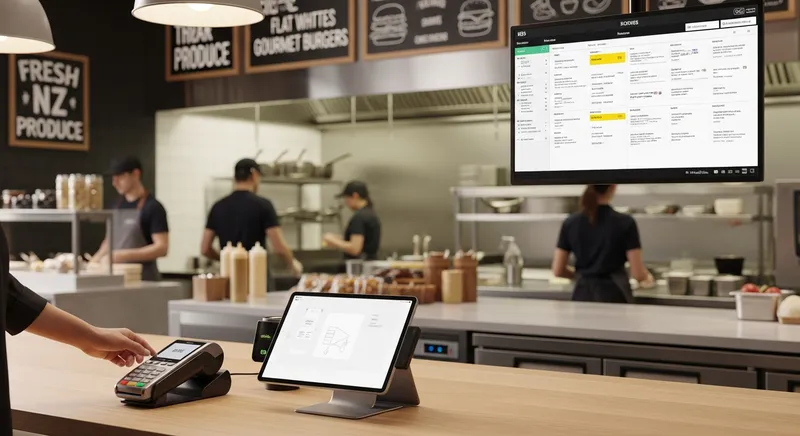
Best POS System for NZ QSR & Takeaway: 2026 Guide
The lunch rush. A queue of hungry customers snakes out the door, the phone rings incessantly with pickup orders, and the kitchen is a frantic symphony of sizzling and shouting. For a Quick Service Restaurant (QSR) or takeaway owner in New Zealand, this scene is both a sign of success and a source of immense stress. One mistake, one slow payment, one lost order, and the whole system can grind to a halt, costing you sales and customer trust.
The New Zealand fast food and takeaway market is a booming industry, with projections from IBISWorld showing it would reach $4.5 billion in 2026. In this high-volume, low-margin environment, efficiency isn't just a goal; it's the key to profitability. Yet, many businesses are still trying to manage the chaos with generic restaurant POS systems that simply aren't built for speed.
This guide is for you. We'll cut through the noise and show you exactly what to look for in a QSR POS system for 2026. We'll break down the non-negotiable features your takeaway shop needs to thrive, helping you turn operational chaos into profitable, repeatable success.
Why Your QSR Needs More Than Just a Standard Restaurant POS
Choosing the right Point of Sale (POS) system can feel overwhelming. Many systems claim to be for 'restaurants', but the needs of a sit-down bistro are fundamentally different from a busy takeaway burger joint. A standard restaurant POS focuses on table management, split bills, and coursing. A QSR POS must focus on one thing above all else: speed.
Think of it like this: a family car and a race car are both vehicles, but you wouldn't take a family sedan to a Formula 1 race. Using a generic restaurant POS in a QSR environment is like trying to win a race in the wrong car. It's slow, clunky, and not designed for the high-octane demands of your business.
Your profitability depends on what we call the 'QSR Profitability Triangle':
- Speed: How many customers can you serve per hour?
- Accuracy: How many orders are made correctly the first time?
- Experience: How easy and pleasant is it for customers to order and pay?
A slow, confusing POS system breaks this triangle. It creates bottlenecks at the counter, leads to order errors in the kitchen, and results in frustrated customers. With operational costs continuing to rise, as highlighted in reports from industry bodies like the Restaurant Association of New Zealand, maximizing efficiency is no longer optional. You need a system purpose-built to solve these unique challenges.
If these issues sound familiar, you're not alone. Many of the key problems restaurant owners face are amplified in a high-volume QSR setting.
The 6 Non-Negotiable Features for Any QSR & Takeaway POS System in NZ
When evaluating a POS system for your fast-food or takeaway business, don't get distracted by flashy features you'll never use. Focus on this essential checklist. If a system can't deliver on these six core areas, it's not the right fit for your QSR.
1. Lightning-Fast Order & Payment Processing
In a QSR, seconds matter. A 10-second delay per order can easily add up to an hour of lost service time over a busy day. Your POS should be an accelerator, not a brake.
What to look for:
- An intuitive User Interface (UI): Staff should be able to take a complex order with just a few taps. The menu layout must be simple, logical, and customisable.
- Rapid Payment Integration: The system must seamlessly connect with certified NZ EFTPOS terminals to process tap-and-go payments in seconds. According to Payments NZ, the move towards a modern, secure payment infrastructure makes this integration vital.
- Minimal Taps: The system should be designed to complete a standard transaction with the fewest possible screen touches.
Actionable Tip: Take a stopwatch to your current system during a peak rush. Time how long it takes from the moment a customer starts their order to the moment their payment is approved. If it's consistently over 30 seconds, your POS is costing you money.
2. Robust Kitchen Display System (KDS) Integration
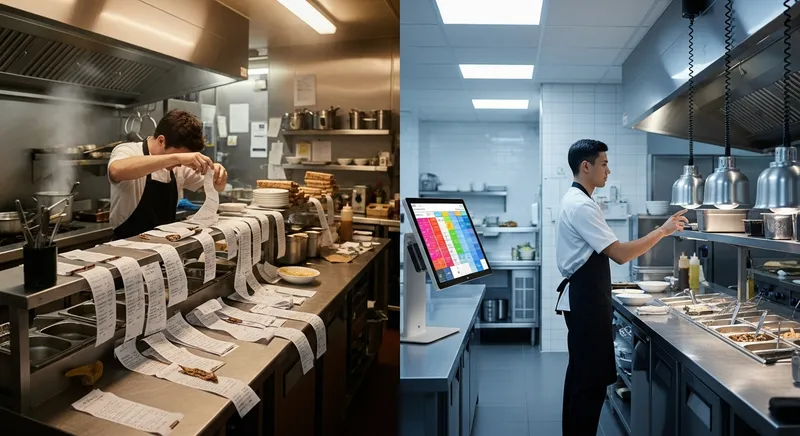
The biggest point of failure in many takeaways is the communication gap between the front counter and the kitchen. Shouted instructions and messy, handwritten paper dockets are recipes for disaster.
A Kitchen Display System (KDS) replaces paper tickets with digital screens, sending orders instantly and clearly to the correct kitchen station. This is the central nervous system of an efficient QSR.
What to look for:
- Real-time order display: Orders should appear on the KDS the instant they are placed on the POS.
- Order status and timing: The KDS should track how long orders have been waiting, often using colour codes (e.g., green for new, yellow for aging, red for urgent) to help staff prioritise.
- Multi-station routing: The ability to send different parts of an order to different screens (e.g., burgers to the grill station, drinks to the beverage station).
Actionable Tip: Review your orders from the last week. How many mistakes were due to lost tickets or misread instructions? Each mistake represents food waste and a potential lost customer. A KDS directly reduces these errors, providing an immediate return on investment. A KDS is a core component of the best restaurant management systems.
3. Seamless Self-Service Kiosk & Online Ordering Compatibility
To truly maximise throughput, you need to break free from the single-file queue at the counter. Self-service technology is the most effective way to do this.
- Self-Service Kiosks: These ordering stations reduce queues, free up staff, and consistently lead to higher average order values as customers can browse the menu without feeling rushed.
- Integrated Online Ordering: This captures revenue from customers before they even walk in the door, allowing them to skip the queue entirely.
Critically, both of these channels must feed directly into your POS and KDS in real-time. If your staff have to manually re-enter online orders into the POS, you haven't solved the problem, you've just moved it. Research shows that customers are more likely to use kiosks that are easy and even enjoyable to use, so a simple interface is key.
Actionable Tip: Not ready for a physical kiosk? Start with a commission-free online ordering system. Use the data from your online sales to identify your most popular items and modifiers. This data provides the perfect blueprint for designing your future self-service kiosk menu. Learn more in our NZ hospitality guide to self-service tech.
4. Essential NZ-Specific Integrations: Xero & Local EFTPOS
Your POS system doesn't exist in a vacuum. For New Zealand businesses, two integrations are absolutely essential: EFTPOS and Xero.
- Local EFTPOS: Your POS must be fully certified to work with major New Zealand EFTPOS providers. This ensures reliable, fast, and secure transactions that comply with local standards.
- Deep Xero Integration: The end-of-day reconciliation is a major headache for busy owners. A POS with deep Xero integration automatically syncs your daily sales totals, payment types, and GST information directly into your accounting software. This can save you hours of manual data entry each week. As data from Xero Small Business Insights shows, the hospitality sector is recovering, making efficient financial management more important than ever.
Actionable Tip: When a POS provider says they have "Xero integration," ask for details. Does it just create a simple invoice, or does it automatically reconcile sales, payment methods, and account for GST? The difference can mean hours of saved admin time. This level of detail is crucial for accurately managing your restaurant's profit and loss statement.
5. Integrated Customer Loyalty & Retention Tools
In a competitive market, turning a one-time visitor into a regular is crucial for long-term profitability. A modern QSR POS should do more than just process sales; it should help you build relationships with your customers.
What to look for:
- Built-in Loyalty Programs: The ability to easily create a points-based or stamp-card-style loyalty program that works across in-store, online, and kiosk orders.
- Vouchers & Gift Cards: Simple tools to create, sell, and redeem digital gift cards and promotional vouchers.
- Customer Database (CRM): A system that tracks customer visit history and purchase data, allowing you to understand your regulars and tailor offers.
Actionable Tip: Start a simple "buy 10, get one free" digital loyalty program. A POS with these features built-in makes it effortless to manage and removes the hassle of paper stamp cards. This encourages repeat visits and gives you a direct line to your most valuable customers.
6. Built for Mobility: Solutions for Food Trucks & Pop-Ups
The food truck and pop-up scene in New Zealand is vibrant and growing. These businesses have unique needs that a traditional, fixed POS system cannot meet. A flexible, tablet-based system is essential.
What to look for:
- iPad or Tablet-Based: A system that runs on a portable, durable, and affordable device like an iPad.
- Mobile EFTPOS: Seamless integration with a mobile EFTPOS reader for payments anywhere.
- Offline Mode: The ability to continue taking orders and processing cash sales even if your internet connection is spotty or unavailable, and then sync everything once you're back online.
- Cloud-Based: All your data is stored securely in the cloud, so you can manage your business from anywhere.
Actionable Tip: Before choosing a POS for your food truck, check its offline mode capabilities. Can it store hundreds of transactions securely? How does it sync back up? Does it alert you when you are offline? Running out of battery or internet shouldn't mean you have to stop taking sales. For those starting, understanding these tech costs is a key part of your NZ cafe startup budget.
Why NZ Businesses Choose Lazygrid
Beyond the features, local context matters. Choosing a partner who understands the New Zealand market provides a significant advantage.
- Wellington-Based Support: Get help from a local team that understands your challenges and operates in your time zone.
- EFTPOS NZ Certified: Guaranteed compatibility and reliability with New Zealand's payment infrastructure.
- No Lock-in Contracts: Flexibility for your business with simple monthly plans.
- Transparent Pricing: Clear, upfront costs for software and hardware without hidden fees.
2026 NZ QSR POS Review: How Lazygrid, Square, & Lightspeed Compare
Let's see how some of the most popular systems in New Zealand stack up against our six non-negotiable QSR features.
| Feature | Lazygrid POS | Square POS | Lightspeed (K-Series) |
|---|---|---|---|
| 1. QSR-Optimised Speed | Excellent | Good | Good |
| 2. Integrated KDS | Excellent | Limited | Excellent |
| 3. Integrated Self-Service Kiosk | Excellent | No | Good |
| 4. Deep Xero Integration | Excellent | Excellent | Excellent |
| 5. Integrated Customer Loyalty | Excellent | Good | Good |
| 6. Mobile/Food Truck Ready | Excellent | Excellent | Good |
Analysis:
Square POS is a fantastic entry-level system, perfect for very small cafes or market stalls. Its tap-to-pay on iPhone is a great feature. However, it lacks a deeply integrated, purpose-built solution for KDS and self-service kiosks, which are critical for high-volume QSRs.
Lightspeed (K-Series) is a powerful and feature-rich platform, especially for complex businesses. It has strong KDS and inventory features, but its complexity can sometimes be a drawback in a QSR environment where simplicity and speed are paramount. Its mobile and kiosk solutions often feel more like add-ons than core, seamlessly integrated parts of the system.
Lazygrid POS is purpose-built for the speed and efficiency demanded by New Zealand's QSR and takeaway businesses. With transparent pricing starting from accessible monthly rates, it's designed for growth. The tight, native integration between the POS, KDS, Online Ordering, Kiosk, and Loyalty creates a single, seamless workflow designed to eliminate bottlenecks. It's designed from the ground up to solve the core pain points of a high-volume food business.
Conclusion: Choosing the Right POS is an Investment in Speed & Sanity
For a busy QSR or takeaway owner in New Zealand, your POS system is more than just a till. It's the heart of your operation. Choosing the wrong system leads to daily frustration, lost sales, and a constant feeling of being overwhelmed. Choosing the right one is an investment in speed, efficiency, and your own sanity.
Before you make a decision, come back to the six non-negotiable features:
- Lightning-Fast Processing
- Robust KDS Integration
- Seamless Self-Service & Online Ordering
- Essential NZ Integrations (Xero & EFTPOS)
- Integrated Customer Loyalty Tools
- Mobility for Food Trucks & Pop-ups
By focusing on these core requirements, you can cut through the marketing hype and find a system that truly supports your business model. You'll empower your staff, reduce errors, and, most importantly, serve more happy customers, faster.
Ready to stop fighting your technology and start growing your business? Book a free, no-obligation demo of Lazygrid to see how a purpose-built QSR POS can transform your New Zealand takeaway.
Frequently Asked Questions
What is the average cost of a POS system for a small takeaway in NZ?
The cost of a POS system is broken into two main parts: monthly software fees and one-off hardware costs. For a quality cloud-based QSR POS in New Zealand, you can expect software subscriptions to range from approximately $79 to $199 per month, depending on the features you require. Hardware is a separate, upfront investment. A complete starter package including an iPad, a commercial-grade receipt printer, a cash drawer, and an EFTPOS terminal typically costs between $1,000 and $4,000.
Can I use an iPad as a POS system for my food truck?
Yes, absolutely. iPad-based POS systems are the ideal solution for most food trucks in New Zealand. Their portability, durability, and user-friendly interface are perfect for a mobile environment. The most important features to look for are a reliable offline mode, which allows you to keep selling even without an internet connection, and seamless integration with a mobile, battery-powered EFTPOS reader for taking payments anywhere.
How difficult is it to switch from an old cash register to a modern POS system?
While it might seem daunting, switching to a modern POS is much easier than you think. Most cloud-based systems are designed for intuitive, straightforward setup. The process generally involves working with the provider to import your menu, configuring your new hardware (which is often plug-and-play), and running a short training session with your staff. A good provider will offer dedicated support to guide you through every step, from migrating your data to going live.
Do I really need a Kitchen Display System (KDS) for a small cafe?
If you are a very small cafe with one person managing both orders and food preparation, you might not need a KDS on day one. However, a KDS becomes an essential tool for growth. The moment you hire a second person for the kitchen or find that order mistakes are increasing during busy periods, a KDS will solve those problems. It eliminates verbal miscommunication and lost paper tickets, ensuring accuracy and improving speed as your business scales.
Which POS systems integrate with Xero in New Zealand?
Most modern POS systems popular in New Zealand, including Lazygrid, Square, and Lightspeed, offer some form of Xero integration. The key is to look for the 'depth' of that integration. A basic integration might only create a single daily sales invoice. A deep integration, which is far more valuable, will automatically sync and reconcile all sales totals, break them down by payment type (cash, EFTPOS, online), and correctly account for GST. This level of automation can save you or your bookkeeper hours of manual work each month.