
Best POS Systems for NZ Bars & Restaurants: A 2026 Comparison
Best POS Systems for NZ Bars & Restaurants: A 2026 Comparison Guide
It's the classic Friday night scenario. The bar is three-deep with customers trying to open tabs. The restaurant is fully booked, with a large table wanting to split their bill twelve different ways. A drink order just printed in the kitchen for the third time, and your host is trying to manage the waitlist on a paper notepad. This is the nightly chaos for New Zealand business owners running a hybrid bar and restaurant-a unique model that generic point-of-sale systems simply weren't built for.
Running a successful hospitality venue in New Zealand is challenging enough. According to the Restaurant Association of New Zealand, many operators are facing tough times despite revenue growth, as rising costs squeeze already thin margins. The last thing you need is a POS system that adds to the stress instead of solving it. This guide provides a clear, feature-focused comparison to help you find a hospitality POS in NZ that tames the chaos, empowers your team, and boosts profitability.
Why Your Bar & Restaurant Hybrid Needs a Specialist POS
Your business is effectively two operations under one roof: a fast-paced, transactional bar and a service-oriented, long-duration restaurant. A standard retail or cafe POS fails because it can't manage the conflicting demands of both. The bar needs speed and simple tab management, while the restaurant needs detailed table layouts, course firing, and complex bill-splitting capabilities.
When your technology can't handle this duality, you see the classic failure points:
- Confused Orders: Drink dockets printing in the kitchen and food orders lost in the shuffle.
- Billing Nightmares: Staff spending ten minutes manually calculating a complex split bill, leading to queues and frustrated customers.
- Lost Revenue: Missed upsells, incorrect billing, and slow service that reduces table turnover.
Running a Food Truck? While this guide focuses on hybrid venues, the core principles of speed, mobile ordering, and intelligent inventory management are even more critical for your compact operation. A POS with robust offline capabilities and simple menu management is key to serving customers quickly, no matter your location.
Choosing the right technology is a critical strategic decision. As academic research published in the Journal of Hospitality and Tourism Technology highlights, implementing the right IT can fundamentally improve a venue's performance, operational efficiency, and competitive position. Your POS shouldn't just process sales; it should be the central nervous system that orchestrates your entire operation.
6 Must-Have Features for a True Bar & Restaurant POS
When evaluating any POS system for your hybrid venue, don't get distracted by flashy but irrelevant features. This is your ultimate checklist. These six capabilities directly address the most common and costly pain points you face every single day.
1. Advanced Tab and Bill Management
This goes far beyond a simple 50/50 bill split. In a hybrid environment, customers move, groups merge, and payment becomes complex. Your POS must handle this fluidly. Look for the ability to:
- Transfer tabs seamlessly from the bar to a dinner table.
- Merge multiple tabs when two groups decide to join each other.
- Split bills effortlessly by item, by person, or by custom percentage.
- Hold tabs open securely by associating them with a customer profile, not by physically holding a credit card.
Actionable Tip: During any sales demo, present this exact scenario: "Show me how your system handles a 10-person table where three people leave early and pay for their items, and the remaining seven split the rest evenly." Their ability to perform this task quickly and intuitively will tell you everything you need to know.
2. Intelligent Order Routing & Kitchen Display Systems (KDS)
That pain point of cocktail orders printing on the kitchen docket? It's entirely solvable. A purpose-built hospitality POS allows for intelligent order routing based on item category. This means you can configure the system to send specific orders to specific prep stations automatically:
- Cocktails and beers print at the bar printer or appear on the bar's KDS.
- Appetisers and mains print at the kitchen printer or appear on the kitchen's KDS.
- Desserts and coffees can even be routed to a separate barista or pastry station.
Using a mobile POS for tableside ordering further enhances this, reducing human error and sending orders to the correct station the second they are taken. For even greater efficiency, consider how technology like self-service kiosks can streamline the ordering process, as detailed in our NZ Restaurant Kiosk Guide.
Actionable Tip: Before you shop for a POS, draw a simple map of your physical prep stations (main kitchen, bar, pizza oven, etc.). Use this map to question providers on whether their system can create a logical digital workflow that matches your physical one.
3. Automated Promotions & Happy Hour Pricing
Manually updating prices for your happy hour and then remembering to change them back is inefficient and prone to error. A modern POS system eliminates this completely. You should be able to pre-schedule all your promotions, including:
- Happy Hours: e.g., $8 house pints, every weekday from 4 pm to 6 pm.
- Daily Specials: e.g., "Two-for-One Pizzas" every Tuesday.
- Combo Deals: e.g., "Burger and a Beer for $25."
The system should automatically apply the correct pricing based on the time and day, no manual intervention required. This not only saves you time but also empowers staff to upsell promotions confidently, knowing the price will be right. These strategies are a core part of building a more profitable menu, a topic we explore in our guide to Menu Psychology in NZ.
Actionable Tip: Calculate the staff time you currently spend managing promotions manually over a month. Then, estimate the potential revenue from promotions that are missed or charged incorrectly. This calculation gives you a clear ROI for a system with automated pricing.
4. Integrated Table & Floor Plan Management
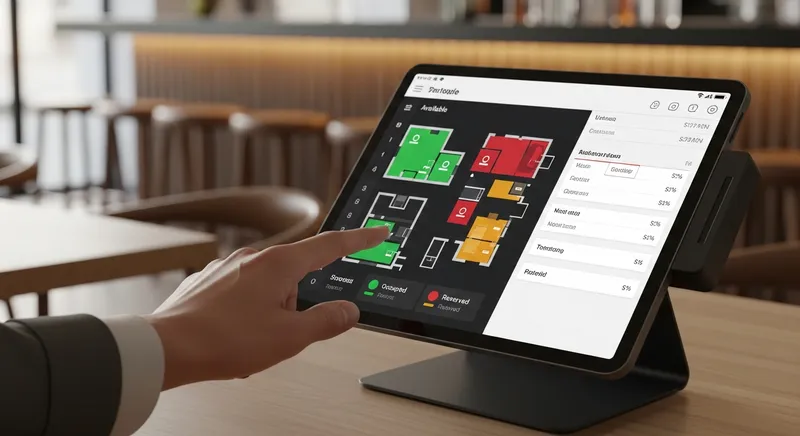
For the restaurant side of your business, a visual, interactive floor plan is non-negotiable. Your front-of-house team needs a real-time overview of the entire floor, with tables that are colour-coded by status: available, seated, reserved, or needs clearing. This allows your host to make smarter seating decisions, helps managers identify bottlenecks, and gives you valuable data on table turnover rates.
Modern systems can also integrate with online booking platforms, including high-value channels like Reserve with Google, to manage all your bookings and walk-ins in one place.
Actionable Tip: When assessing a POS, ask how easy it is to modify the floor plan. You should be able to add, remove, or rearrange tables yourself to accommodate a large party or a seasonal change (like adding outdoor seating) without needing to log a support ticket.
5. Robust Inventory Management for Food & Drink
Your inventory is one of your biggest costs, and it's uniquely complex. You need to track whole items (bottles of wine), liquids (beer kegs), and individual ingredients (kilos of flour, grams of spices). A powerful POS inventory system handles this by:
- Deducting fractional ingredients from inventory when a recipe (a dish or a cocktail) is sold.
- Tracking both food and beverage costs in one unified system.
- Providing low-stock alerts to prevent you from running out of a key ingredient mid-service.
This gives you a true, real-time understanding of your cost of goods sold (COGS) and profit margins on every single item you sell. For a deeper dive into managing your beverage costs specifically, check out our Complete NZ Guide to Beverage Cost.
Actionable Tip: Ask providers if their system allows for stock-taking using a mobile device or tablet. The ability to walk around your storeroom and bar and update counts directly in the system dramatically speeds up what is often a tedious and time-consuming task.
6. Staff Management & Permissions
In a busy hybrid venue, you need to control who can perform sensitive actions. A robust POS should include staff management features that allow you to set granular permissions. This means you can:
- Restrict access to functions like voiding sales, applying discounts, or processing refunds to managers only.
- Track sales performance by individual staff members to reward top performers.
- Use unique staff PINs or logins for accountability and security.
This protects your revenue and ensures team members only have access to the tools they need to do their jobs effectively.
Actionable Tip: Ask a potential provider to show you how a manager's view differs from a standard server's view on their POS. Check how easy it is to set up a new employee and assign them a specific role.
2026 Comparison: Top POS Contenders for NZ Bars & Restaurants
When you apply the 6 must-have features as a lens, the crowded POS market becomes much clearer. Here's how some of the main players stack up for the specific needs of a hybrid NZ bar and restaurant.
| Feature | Lazygrid POS | Lightspeed Restaurant | Square for Restaurants |
|---|---|---|---|
| Advanced Tabs & Splits | ✅ Excellent (Merge, transfer, complex splits) | ✅ Good (Splitting is strong, transfers can be complex) | ✔️ Basic (Splitting is available, less advanced tab management) |
| Intelligent Order Routing | ✅ Excellent (Category-based routing to any printer/KDS) | ✅ Good (Requires specific setup, can be less flexible) | ✔️ Basic (Generally routes to one kitchen printer) |
| Automated Promotions | ✅ Excellent (Full scheduling engine for happy hours/deals) | ✅ Good (Has a promotions module, may be an add-on) | ✔️ Basic (Discounts are mostly manual or simple) |
| Integrated Floor Plan | ✅ Excellent (Customizable, real-time status) | ✅ Excellent (A core feature of their restaurant product) | ✅ Good (Visual layout is available in the Plus plan) |
| Hybrid Inventory | ✅ Excellent (Tracks recipes, ingredients, and liquids) | ✅ Good (Advanced inventory is a key feature) | ✔️ Basic (More suited to item-level retail stock) |
| Offline Mode | ✅ Excellent (Full functionality, syncs when back online) | ✔️ Basic (Limited functionality) | ✔️ Basic (Limited functionality) |
| Pricing (indicative) | From $24/month | From $69/month | From $0/month + higher fees |
| NZ-Specific Support | ✅ Excellent (Wellington-based team) | ✔️ Good (Local presence but global structure) | ❌ Limited (Primarily online/international support) |
- Lazygrid POS: Best for hospitality-first NZ venues like gastropubs or hybrid bars that need powerful, all-in-one features and local support without an enterprise price tag.
- Lightspeed Restaurant: A strong global contender with deep features, it's best for larger, more complex restaurant groups that have the budget for higher-tier plans and add-ons.
- Square for Restaurants: Best for simpler operations like cafes or takeaway spots that are just starting out. It can struggle with the complex workflows of a true bar and restaurant hybrid. If your business is more cafe-focused, our guide to the best POS systems for NZ cafes might be more suitable.
Hardware & Compatibility
A modern POS system is a combination of software and hardware. When choosing a system, you must consider compatibility. Most cloud-based POS systems in New Zealand run on consumer-grade tablets like iPads for their flexibility and ease of use. You will also need peripherals such as:
- Receipt Printers: Thermal docket printers for customer receipts and kitchen/bar orders.
- Cash Drawers: Secure, printer-driven drawers for cash handling.
- EFTPOS Terminals: Ensure the POS provider has a certified integration with a modern, compliant NZ EFTPOS terminal for seamless payments.
Always confirm hardware compatibility and sourcing options with the POS provider before committing.
Essential NZ-Specific Considerations: EFTPOS, Xero & Local Support
Beyond features, your POS must fit into the New Zealand business ecosystem. Three factors are non-negotiable:
Seamless Xero Integration: As the dominant accounting software for NZ small businesses, your POS must sync flawlessly with Xero. According to Xero's own developer guides, proper integration involves mapping payment types to your chart of accounts to automate daily reconciliation. This saves hours of manual data entry and reduces accounting errors. For more detail, see our 2026 Guide to Xero POS Integration.
Certified EFTPOS & Payments: Your system must work with payment terminals certified for the New Zealand network. As the governing body Payments NZ outlines, only registered devices are allowed to connect, and older models are regularly phased out for security. An integrated solution ensures smooth, fast, and secure transactions that comply with local standards.
Local Support: When your system goes down during a Saturday night dinner rush, an international call centre on a different time zone is useless. Having a local, New Zealand-based support team that understands your business hours and the local market is invaluable. This aligns with the broader industry focus on building resilience and capability, with bodies like Hospitality New Zealand highlighting digital transformation as a key strategic priority.
Your Next Step: Choose a Partner, Not Just a Product
For an NZ bar and restaurant owner, choosing a POS system isn't just about buying software; it's about choosing an operational partner. The right system does more than take payments. It brings order to the chaos, empowers your staff, and gives you the data you need to make smart decisions that directly impact your bottom line.
A generic POS will force you to create messy workarounds. A purpose-built hospitality POS system will streamline your unique workflows from day one. By focusing on the six must-have features and ensuring the system is built for the New Zealand market, you can invest in a solution that helps your business thrive.
Ready to see how a purpose-built POS can transform your venue? Book a free, no-obligation demo to see these features in action.
Frequently Asked Questions
How much does a restaurant POS system cost in NZ?
The cost of a POS system in New Zealand is broken down into three main parts: software, hardware, and payment processing.
- Software: Most modern systems use a subscription model (SaaS), ranging from around $24 per month for essential plans to over $150 per month for premium packages.
- Hardware: This is often a one-time cost for iPads, printers, cash drawers, and EFTPOS terminals, which can range from $1,000 to $5,000+. Some providers offer hardware leasing.
- Payment Processing: These are transaction fees, typically a small percentage of each sale. It's vital to look at the total cost of ownership, as a 'free' software plan might hide expensive processing fees.
Can I use my existing EFTPOS machine with a new POS system?
Sometimes, but it's not always ideal. Whether you can use your existing terminal depends on if the new POS provider has an official, certified integration with your specific EFTPOS machine and provider. Using a non-integrated terminal means your staff have to key in the sale amount on both the POS and the EFTPOS machine, doubling the work and increasing the risk of errors. An integrated solution is highly recommended.
What's the difference between a cloud-based POS and a traditional one?
A traditional POS system stores all your data on a local server in your back office. A cloud-based POS stores your data securely online. This allows you to access your sales reports and manage your business from any device with an internet connection. The benefits include lower upfront costs, automatic software updates, and greater flexibility.
How important is Xero integration for a hospitality business?
For any New Zealand hospitality business using Xero, it is absolutely critical. A seamless, direct integration automates your end-of-day process by syncing all sales data, payment types, and totals directly into your Xero account. This can save hours of manual data entry each week and eliminate costly human errors.
Do I really need a system with QR code ordering?
While not essential for every venue, QR code ordering is a powerful tool for boosting efficiency and sales. It is particularly effective for venues with large outdoor seating areas or those wanting to offer a contactless experience. By allowing customers to order and pay from their own device, you can often increase average order value and free up your staff to focus on high-value tasks.