
Cafe POS & Kiosks: Beat the NZ Morning Rush
Cafe POS & Kiosks: Beat the NZ Morning Rush
It is 7:30 AM on a Tuesday. The queue at your cafe is stretching out the door, and the noise level is rising. As an owner, your first instinct is usually to find a way to take orders faster. You might think that adding a self-checkout kiosk is the magic bullet to eliminate the line.
However, many cafe owners completely misunderstand the morning rush. Long lines are not just an ordering problem, they are a workflow pacing problem. If you install a self-ordering kiosk that takes 50 orders in three minutes, you have not solved the bottleneck. You have simply moved the bottleneck from the front counter to the espresso machine, completely crushing your barista in the process.
To truly master the morning rush, you need a system that balances order intake with production capacity. In this comprehensive guide, we will explore how to use the best cafe pos system nz has to offer, integrate self-service technology, and use smart order throttling to keep both your customers and your staff happy.
What is a Modern Cafe POS System?
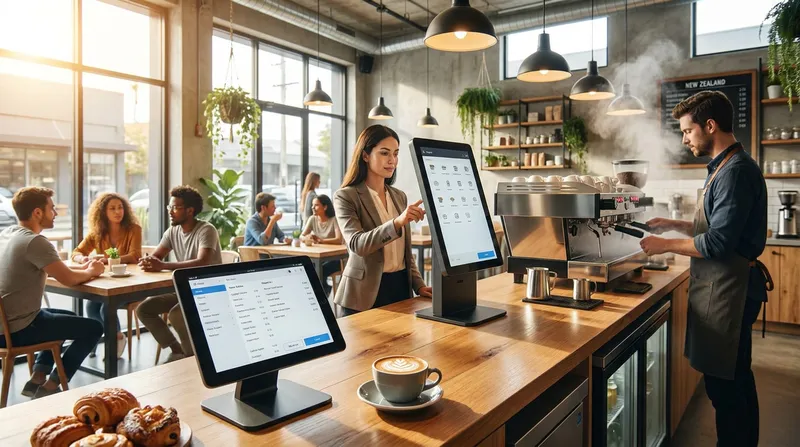
A modern coffee shop pos software setup is no longer just a digital cash register. It is the central nervous system of your hospitality business. Running on accessible hardware like iPads, these systems manage everything from taking payments to tracking inventory and routing tickets to the kitchen.
For a busy New Zealand cafe, a cloud based pos coffee shop solution provides real-time data, offline mode capabilities for when the internet drops, and seamless integration with local payment providers. Most importantly, it allows you to connect multiple ordering channels (counter service, QR codes, and kiosks) into one unified workflow.
If you are still using a clunky legacy system, you are likely missing out on critical features that could be saving you hours of admin work. You can learn more about transitioning to modern software in our guide on Cloud POS for NZ Small Businesses: Cut Admin, Boost Sales.
The Barista Bottleneck: Why Taking Orders Faster Is Not Always Better
This is the core pain point that generic POS providers fail to address. When you implement a cafe self-checkout kiosk without a pacing strategy, you risk overwhelming your production line.
Imagine a scenario where a commuter bus drops off 15 people. They all use your new kiosk to order complex variations of flat whites, trim lattes, and long blacks within two minutes. If your system prints 15 dockets simultaneously, your barista will experience instant order anxiety, leading to mistakes and burned milk.
The Solution: Smart Order Throttling
To fix this, you need proper kitchen display system (KDS) integration. A smart KDS allows you to pace the tickets. Instead of printing a massive backlog of paper dockets, a digital screen displays orders based on the barista's actual capacity.
Actionable Tip: Set up your KDS to display a maximum of 6 to 8 drink tickets at a time. As the barista bumps an order (marks it complete), the next order drops in. This keeps the barista focused on the immediate task, improving drink quality and reducing stress. For a deeper dive into setting this up, read our Square KDS vs Integrated Kitchen Systems: NZ Guide.
Why Self-Ordering Kiosks Are a Game Changer for NZ Cafes
When implemented correctly alongside order throttling, a self service kiosk for restaurants and fast-casual cafes is a game changer. It allows you to serve more customers with the exact same number of staff members, which is vital given the current hospitality labour shortages in New Zealand.
Recent data from RBR Data Services shows that 76% of kiosk-enabled restaurants successfully reduced wait times, and 67% increased their average check sizes.
Here is why kiosks are becoming essential for the quick service restaurant pos environment:
- Line Busting: Customers who know exactly what they want can bypass the main queue, tap in their order, and wait at the pickup counter.
- Order Accuracy: Customers input their own complex modifiers (e.g., oat milk, extra hot, half shot). If a mistake happens, it is not on your staff.
- Visual Menu: High-quality images of your food and drinks tempt customers to try new items.
The Hybrid Approach: Balancing Kiosks with Counter Service
One of the biggest fears NZ cafe owners have is losing the personal touch. Kiwi coffee culture is built on relationships. Your regulars want to chat about the rugby, hand over their reusable keep cup, and hear you call them by name.
Transitioning older, loyal customers to contactless ordering cafe systems requires a delicate touch. You do not want to alienate your base. This is where the Hybrid Approach comes in. You do not replace your counter staff, you split the traffic.
Research from Temple University proves that customers experience more stress and tend to change their ordering behaviour when using self-service kiosks as a single line forms directly behind them.
Actionable Tip: Position your kiosk away from the main entrance to avoid ordering anxiety. Use the kiosk for introverts, rushed commuters, and tourists. Keep one staff member at the main POS register to greet regulars, take cash, and handle keep cups. This dual-flow system is the ultimate form of cafe queue management.
How to Reduce Cafe Wait Times: A Digital Ordering Workflow
To truly reduce cafe wait times, you need a documented digital ordering workflow for your peak hours. By integrating features like Online Ordering and a digital Loyalty Programme, you can streamline your operations significantly. Let us break down a successful strategy for the chaotic morning window.
| Phase | Time Window | Strategy | Key Features Used |
|---|---|---|---|
| Pre-Arrival | 7:00 AM to 7:30 AM | Commuters order via smartphone on the train. Coffee is ready upon arrival, removing bodies from the physical queue. | Integrated Online Ordering, Digital Loyalty Programme |
| Peak Surge | 7:30 AM to 8:30 AM | Split traffic. Main POS takes regulars, kiosk catches overflow. Deploy a mobile iPhone POS for line busting if needed. | Self-Checkout Kiosk, Mobile POS, Smart KDS Throttling |
| Food Rush | 8:30 AM to 9:00 AM | Coffee rush transitions to breakfast. Automated upselling prompts customers to add food items to their drinks. | Automated Upselling, Visual Kiosk Menu |
According to a study in the Journal of Hospitality and Tourism Technology, kiosk convenience significantly enhances consumer satisfaction primarily through reduced waiting time and streamlined ordering processes.
For more ideas on streamlining your table service during these hours, check out our 7 Best QR Ordering Systems for NZ Restaurants.
Cloud-Based vs Traditional POS Systems for NZ Cafes
The hospitality sector in New Zealand is currently facing a challenging economic environment. Data from the Restaurant Association of New Zealand shows that the NZ restaurant and cafe sector saw a modest 0.7% growth in Q2 2024. This emphasizes the absolute necessity for operators to maximize average order value and reduce operational costs to stay profitable.
| Feature | Legacy Traditional POS | Modern Cloud POS |
|---|---|---|
| Hardware Costs | High upfront costs for proprietary hardware. | Low upfront costs running on standard iPads. |
| Updates | Requires manual updates or expensive IT callouts. | Automatic, seamless software updates. |
| Payment Processing | Often locked into high-fee, restrictive processors. | Integrates seamlessly with local EFTPOS NZ terminals. |
| Remote Access | Tied to the physical back-office computer. | Accessible anywhere via cloud dashboards. |
Curious about the actual costs? Read our breakdown in Restaurant POS Systems NZ: A Cost & Pricing Guide.
Increasing Average Order Value with Automated Upselling
One of the most powerful reasons to adopt a digital ordering workflow is the ability to increase average order value cafe metrics without relying on staff to remember to upsell.
Staff are human. During a massive rush, they will forget to ask, "Would you like a muffin with your coffee?" A self-service kiosk, however, never forgets. Automated upselling works because it is visual and low-pressure.
Actionable Tip: Audit your menu and create three specific upselling rules in your POS backend.
- Link all hot coffees to a discounted pastry add-on.
- Link all breakfast items to a premium side (like avocado or halloumi).
- Prompt all standard milks with a premium plant-based milk upgrade.
These small additions can help increase your daily revenue, as industry data shows kiosk orders are often 20% to 30% higher in value with zero extra marketing effort.
Hardware, KDS Integration, and Analytics
To make this all work, your hardware needs to communicate perfectly. A reliable restaurant pos integration means your front-of-house iPad talks instantly to your kitchen and coffee station.
If you run a hybrid setup with both a kitchen and a coffee machine, you need intelligent docket routing. Your POS should be configured so that when an order contains both an Eggs Benedict and a Cappuccino, the food ticket goes to the kitchen printer (or KDS), and the coffee ticket goes to the barista KDS.
After the morning rush, use your POS Reporting and Analytics features to review your hourly sales data. This allows you to optimise your staffing levels and inventory for the next day, ensuring you are always prepared.
If you prefer paper for the kitchen but digital for the barista, you can easily mix and match. We highly recommend using EPSON ethernet thermal printers for areas where digital screens are not feasible. Learn exactly how to configure this in our guide to KDS Printers NZ: Your Guide to a Bulletproof Hybrid Kitchen Setup.
Frequently Asked Questions
Will a self-ordering kiosk replace my cafe staff in NZ?
No, a kiosk is not about replacing staff, it is about reallocating them. Given the current labour shortages in NZ, finding good staff is hard. A kiosk handles the transactional work of taking orders, freeing up your existing staff to focus on making high-quality coffee, running food to tables, and providing excellent customer service.
How do I introduce a self-checkout kiosk to older, loyal Kiwi customers?
The best approach is the Hybrid Method. Do not force regulars to use the kiosk. Keep your main counter open for those who want a chat and prefer traditional service. Position the kiosk slightly away from the main entrance, and have a staff member guide interested customers through their first order during a slower period.
How much does a cloud based pos coffee shop setup cost?
Modern cloud systems are highly affordable because they run on iPads you might already own. For example, Lazygrid POS starts at just $24/month for a Lite plan, with the popular Standard plan at $59/month. Hardware bundles typically start around $999 NZD, a fraction of the cost of legacy hardware.
What happens to a cloud based pos coffee shop system if the internet goes down?
The best cafe POS systems feature a robust offline mode. If your local internet drops, the system will continue to take orders, print tickets to the kitchen, and process cash payments. Some systems also store card transactions locally and automatically sync them once the connection is restored.
Does integrating a Kitchen Display System (KDS) slow down the barista?
No, it actually speeds them up when configured correctly. A KDS eliminates the time spent managing and reading handwritten dockets. By using smart order throttling, the KDS feeds the barista exactly what they can handle, which reduces mental fatigue and prevents the espresso machine from becoming a bottleneck.
Can self service kiosks handle complex coffee modifiers?
Absolutely. A modern cafe POS system allows you to build deep modifier groups. A customer can easily select a large latte, choose almond milk, specify "extra hot", and add a note for "half strength". This actually improves order accuracy.
Are EFTPOS NZ certified terminals compatible with iPad POS systems?
Yes, leading cloud-based POS providers in New Zealand integrate directly with EFTPOS NZ certified terminals. This means when an order is finalized on the iPad, the total is sent automatically to the terminal, eliminating manual double-entry.
Conclusion
Beating the morning rush requires more than just taking orders faster. It requires a strategic approach to cafe queue management, a deep understanding of the barista bottleneck, and the right technology to pace your workflow.
By implementing the best cafe pos system nz has to offer, utilizing self-service kiosks for line busting, and integrating a smart KDS to throttle orders, you can serve more customers, increase your average order value, and keep your staff happy.
Remember, technology should enhance your hospitality, not replace it. Use a hybrid approach to keep the personal touch alive for your regulars while offering lightning-fast convenience for commuters.
If you are ready to take control of your morning rush, cut down on admin, and boost your sales without hiring extra staff, it might be time to upgrade your system with an accessible $24/month Lite or $59/month Standard plan.
Ready to transform your cafe operations? Start your free Lazygrid trial today or explore our pricing plans to find the perfect fit for your business.