
iPad POS Setup Guide for NZ Businesses (2026)
The Complete iPad POS System Setup Guide for NZ Businesses (2026)
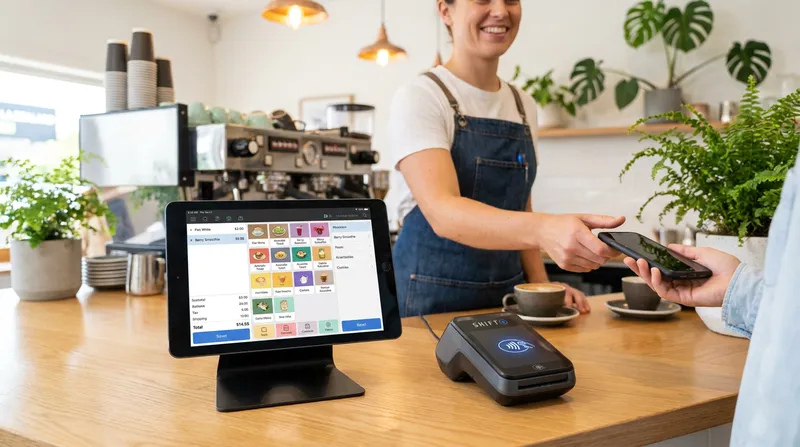
Picture this: It is 8:00 AM on a Tuesday. Your cafe is packed, the coffee machine is roaring, and your staff are rushing to keep up. But there is a bottleneck at the counter. Your sleek new iPad POS system refuses to communicate with your local New Zealand EFTPOS terminal. Your cashier is forced to manually type in transaction amounts for every single order. In the rush, a stressed staff member types $4.50 instead of $45.00. You lose money, the queue grows longer, and your customers check their watches in frustration.
This is the core pain point for thousands of business owners across New Zealand. You invest in a modern iPad cash register app, only to discover it lacks native integration with local payment providers.
Whether you run a bustling Auckland restaurant, a mobile food truck in Wellington, or a serene massage shop in Christchurch, your point of sale system must be reliable, integrated, and tailored to your specific workflow. In this comprehensive guide, we will show you exactly how to set up a Lazygrid iPad POS system in New Zealand, integrate it flawlessly with your EFTPOS terminal, and use it to grow your revenue.
Why iPad Cash Register Apps Are Replacing Traditional Tills
A digital Kitchen Display System (KDS) and Lazygrid POS dashboard on an iPad in a New Zealand restaurant.
The days of bulky, expensive legacy tills are over. According to the Ministry of Business, Innovation and Employment, modern digital systems significantly increase business functionality by automatically coordinating sales data in real time and eliminating manual accounting errors. This global shift is highly visible in New Zealand's hospitality sector.
Traditional systems often require proprietary hardware that costs thousands of dollars and becomes obsolete within a few years. In contrast, cloud POS software in New Zealand offers a hardware-agnostic approach. You can use the Apple devices you already own, downloading the Lazygrid app to transform your standard iPad into a powerful business management hub.
Key Benefits of Cloud-Based iPad Systems
- Lower Upfront Costs: Use your existing iPad (5th generation or newer) instead of buying a $5,000 legacy terminal.
- Automatic Updates: Cloud software updates automatically, ensuring you always have the latest features without requiring IT support.
- Mobility: Perfect for food trucks and table-side ordering in restaurants.
- Real-Time Analytics: Access your daily sales reports from your smartphone while relaxing at home.
Actionable Tip: Check the model of your current iPad by going to Settings, then General, then About. If it runs iPadOS 15 or later, it is ready to be used as your new cash register.
Solving the Core Problem: Seamless EFTPOS Integration in NZ
The biggest mistake New Zealand hospitality and retail owners make is choosing a generic overseas POS system that cannot talk to local payment terminals. When your POS and EFTPOS do not sync, you suffer from double-entry errors and slower service times.
Data from Stats NZ shows that New Zealanders make hundreds of millions of electronic card transactions every month. Your business needs to process these payments flawlessly.
Connecting to Local Payment Networks
To eliminate manual entry, your iPad POS must integrate directly with local providers. Shift4 New Zealand (formerly Smartpay) powers over 56,000 active EFTPOS terminals across the country. When your Lazygrid iPad POS integrates directly with a certified terminal, the exact order total is pushed instantly to the card reader.
- Verifone iPad Integration: Many businesses rely on Verifone terminals provided by EFTPOS NZ. Ensure your chosen POS software has native API connections to these specific models.
- Smartpay POS Integration: If you use Smartpay (now Shift4), direct integration means the terminal lights up with the correct amount the second you tap "Charge" on your iPad.
The Mechanics of Direct EFTPOS Integration
When a customer taps their card, an integrated EFTPOS machine instantly receives the exact monetary value from the iPad POS. It then sends a secure request to the acquiring bank to verify funds. Because the POS and the terminal are talking directly to each other via your local network, the approval message is sent back to the iPad instantly, automatically closing the sale and printing the receipt.
Without this integration, your staff member must read the total on the iPad, turn to the terminal, manually type the amount, wait for the customer to pay, and then manually close the order on the iPad. This introduces two points of human error and adds at least 15 to 20 seconds to every single transaction. During a busy lunch rush, those seconds compound into lost revenue and angry customers.
Actionable Tip: Before signing up for any POS software, ask the provider explicitly: "Do you offer direct, native integration with my specific model of Verifone or Shift4 terminal in New Zealand?"
Transparent Pricing: Hardware Bundles and Software Tiers
Many POS companies hide their costs until you are locked into a contract. Let us break down exactly what you need for a complete setup and what it should cost in New Zealand Dollars.
Hardware Packages
- The Starter Package (Perfect for Food Trucks and Small Shops): Includes one 64GB iPad, a compatible wireless thermal printer (like the Xprinter series), and a standard cash drawer. Estimated at $999 GST exclusive. It is compact and runs on mobile data or local Wi-Fi.
- The Standard Package (Ideal for Cafes and Restaurants): Includes two 64GB iPads (one for the counter, one for the kitchen), two thermal printers, and a cash drawer. Estimated at $1,999 GST exclusive. This setup routes orders directly from the front counter to the kitchen, drastically reducing ticket times.
Lazygrid Software Subscription Tiers
To give you full visibility into ongoing costs, here are our transparent monthly software plans:
- Lite ($24/month): Perfect for new businesses needing basic point of sale functionality and reporting.
- Standard ($59/month): Our most popular tier, adding inventory management, staff tracking, and advanced integrations.
- Premium ($149/month): Designed for high-volume venues requiring KDS, multi-location management, and "Reserve with Google" capabilities.
Tailored Setup Blueprints for Your Specific Industry
A beauty shop does not operate like a fast-paced burger joint. Your iPad POS system must adapt to your specific workflow.
1. Multi-Station Cafes
Cafes live and die by their morning rush. You need features that process orders in seconds.
- Self-Service Kiosks: Turn a secondary iPad into a self-service station. Industry benchmarks show kiosk orders are often 20 to 30 percent larger because customers have time to browse add-ons without feeling rushed.
- Digital Loyalty Programmes: Ditch the paper stamp cards. Integrate a digital loyalty system linked to your customers' phone numbers to increase repeat visits.
2. Mobile Food Trucks
Food truck operators face unique challenges, primarily limited space and unreliable internet connections at festival grounds.
- Offline Mode: This is critical. If the 4G network drops, your iPad POS must continue to record cash sales and queue card payments locally until the connection is restored.
- Online Pre-Ordering: Allow customers to order via a branded web link before they arrive, reducing the physical queue outside your window.
3. Full-Service Restaurants
Restaurants require complex communication between the front of house and the kitchen.
- Table Management: Use a visual floor plan on your iPad to track table turnover, manage reservations, and assign servers.
- Kitchen Display System (KDS): Replace messy paper tickets with a digital screen in the kitchen. Orders are color-coded by urgency, ensuring no dish is forgotten.
4. Massage and Beauty Shops
Service-based businesses need a POS that doubles as a customer relationship manager.
- Integrated Booking System: Allow clients to book appointments online 24/7. Premium plans also include "Reserve with Google", allowing customers to book directly from Google Search or Maps. Automated SMS reminders can cut no-shows by up to 50 percent, according to standard industry benchmarks.
- Customer Management (CRM): Track client preferences and purchase histories to provide a highly personalized experience.
Revenue Growth and Customer Data
Your Lazygrid iPad POS is not just a cash register; it is a revenue-generating tool. When you rely on third-party delivery apps like UberEats or DoorDash, you surrender your customer data and pay commission fees between 15 and 30 percent on every order.
By utilizing your POS system's native commission-free online ordering, you take back control. You keep 100 percent of the profits, and your online menu synchronizes instantly with your in-store stock. If you run out of an ingredient, marking it out of stock on your iPad automatically removes it from your website.
Furthermore, owning your customer data allows you to build a fiercely loyal customer base. The psychology behind digital loyalty programs is powerful. Digital progress bars motivate completion behavior, and because accounts are tied to a phone number, they are never lost. If a regular cafe customer has not visited in 30 days, your CRM can flag this, allowing you to send them a personalized "We miss you" discount voucher. It costs five times more to acquire a new customer than to retain an existing one.
For more insights on leveraging your database, check out our guide on advanced POS tips for NZ hospitality businesses.
Advanced Reporting and Staff Management
Making decisions based on gut feeling is a recipe for disaster. A robust iPad POS system acts as a comprehensive business intelligence dashboard, offering daily summaries, product performance metrics, and labor optimization tools.
Employee management is equally critical. Shared passwords on an old till make it impossible to track accountability. Modern systems provide individual PIN logins, built-in time clocks for streamlined payroll, and role-based permissions that restrict sensitive actions to managers only.
For more strategies on managing your team during peak hours, read our guide on managing staff during peak service hours.
How to Migrate from a Legacy System to an iPad POS
Switching your core operational software can feel daunting, but a structured approach minimizes disruption.
- Audit Your Current Menu: Clean up your product list, update pricing, and organize items into logical categories.
- Check Your Network Infrastructure: Cloud POS software relies on a stable internet connection. Invest in a high-quality commercial router.
- Train Your Staff Off-Peak: Set up your new Lazygrid POS alongside your old system for a few days to build muscle memory.
- Go Live on a Slow Day: Choose your quietest day of the week (often a Monday or Tuesday) to make the official switch.
Conclusion
Transitioning to an iPad POS system in New Zealand is the smartest operational move you can make for your hospitality or retail business. By choosing a hardware-agnostic platform, you save thousands on upfront costs. By ensuring native integration with local EFTPOS providers like Shift4 and Verifone, you eliminate manual errors and speed up your checkout process.
Whether you need offline mode for your food truck, table management for your restaurant, or automated booking reminders for your beauty shop, the right cloud-based software will streamline your operations and boost your bottom line.
If your current setup is costing you time and money, it may be worth exploring what a fully integrated NZ-built system could do for your workflow. Backed by our Wellington-based support team, Lazygrid is designed to help your New Zealand business thrive. For more expert advice on upgrading, explore our guide on optimizing your POS setup for growth.
Frequently Asked Questions
Can I connect my iPad POS directly to a Smartpay or Verifone terminal in NZ?
Yes, you absolutely can. Leading iPad POS systems in New Zealand offer direct API integration with local EFTPOS providers like Shift4 (formerly Smartpay) and Verifone. This native integration ensures the exact transaction amount is pushed directly from your iPad to the terminal, eliminating manual entry errors.
What happens to my iPad POS data if the internet goes down?
A high-quality cloud POS software includes a robust offline mode. If your internet connection drops, the iPad will continue to record cash sales and queue up card payments locally. Once your Wi-Fi or 4G connection is restored, the system automatically syncs all offline data back to the cloud.
Do I need a special receipt printer to work with an iPad cash register app?
You do not need an expensive proprietary printer, but you do need a compatible network printer. Standard USB printers will not work directly with an iPad. You need a thermal receipt printer with Ethernet or Wi-Fi capabilities, such as the EPSON TM series or Xprinter wireless models.
Can I use an older iPad model for my cafe POS system?
It depends on the age of the device. Most modern POS apps require your iPad to run at least iPadOS 15. This generally includes the iPad 5th generation (released in 2017) and newer, as well as all iPad Pro models and recent iPad Airs.
How do I set up a kitchen display system (KDS) with my iPad?
Setting up a KDS is straightforward. You simply mount a secondary iPad in your kitchen and download your POS provider's KDS app. Connect it to the same Wi-Fi network as your front-of-house iPad. Orders placed at the counter will instantly appear on the kitchen screen, complete with color-coded urgency alerts.