
KDS vs. Kitchen Printer: Is it Worth it for Small Restaurants?
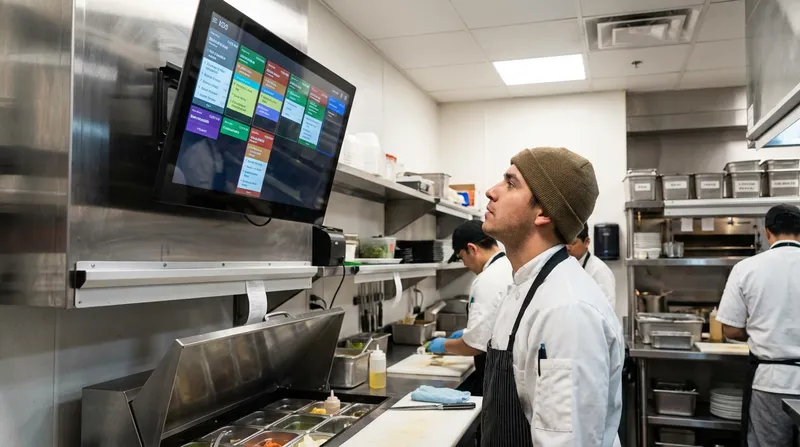
Introduction: Is Your Kitchen Ready for the Future?
The scene is all too familiar: the lunch rush is at its peak, the printer is spewing out a long ribbon of tickets, and a new order docket just got lost behind the prep counter. The air is thick with steam, stress, and the sound of a chef shouting, "Did you fire the mains for table seven yet?" This is the organised chaos that many restaurant owners accept as normal.
But what if it doesn't have to be? As technology continues to reshape the hospitality industry, the tools you use in your kitchen are more critical than ever. The central question is no longer if you should adopt technology, but which technology gives you the best advantage. As we look towards the future, the debate between a traditional kitchen printer and a modern Kitchen Display System (KDS) is at the forefront.
This guide will provide a direct, honest comparison of KDS vs. kitchen printers. We'll break down the pros and cons in terms of speed, accuracy, cost, and overall workflow to help you make the smartest choice for your restaurant, cafe, or food truck.
What Is a Kitchen Display System (KDS) and How Does It Work?
A Kitchen Display System, or KDS, is a digital screen that replaces traditional paper tickets in a commercial kitchen. Think of it as the digital heart of your kitchen operations, displaying orders sent directly from your Point of Sale (POS) system in real-time.
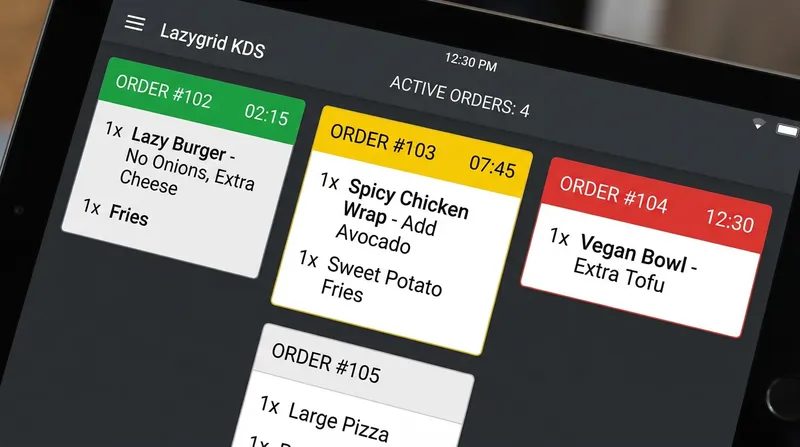
The workflow is simple and seamless:
- A server takes an order at the table or counter using a POS terminal.
- The order is instantly transmitted to the KDS screen in the kitchen.
- Chefs view the order, along with any special requests or modifiers, and begin preparation.
- Once an item or entire order is complete, the chef taps the screen to 'bump' it off the display, often notifying front-of-house staff automatically.
Modern KDS solutions, like the one integrated with Lazygrid POS, go beyond just displaying orders. They are powerful tools for improving kitchen workflow with features like colour-coded order statuses, cook time tracking, and intelligent routing that sends specific items (like drinks or desserts) to the correct prep station.
The Old Guard: Understanding Traditional Kitchen Printers
For decades, the humble kitchen printer has been the workhorse of the restaurant industry. These devices print physical dockets for every order, creating a paper trail for your chefs to follow. They are familiar, seemingly simple, and have a lower upfront cost, which explains their continued presence in many kitchens.
There are two main types you'll encounter:
- Impact Printers: The classic, noisy printers that use a ribbon to print on regular paper. They are durable but can be slow and loud.
- Thermal Printers: Faster and much quieter, these printers use heat-sensitive paper. They are the most common type today, but the paper can be sensitive to heat and the print can fade over time.
While printers have served their purpose, they represent an older way of operating that is increasingly out of step with the demands of a modern restaurant.
KDS vs. Kitchen Printer: A Head-to-Head Comparison
Let's put these two systems side-by-side and compare them across the factors that matter most. This is more than just a technology choice; it's a decision that impacts your profit, your staff's stress levels, and your customers' experience.
Speed, Efficiency, and Table Turnover
Kitchen Printers: The process is entirely manual. A ticket prints, a chef has to grab it, place it on a ticket rail, and mentally prioritise it. During a rush, this leads to delays, disorganisation, and slower service as chefs struggle to manage a long rail of paper.
Kitchen Display System (KDS): Orders appear on screen instantly and are automatically organised by time. With timers tracking every ticket, your team can see exactly which orders need attention. According to research from Cornell University's Center for Hospitality Research, technology that improves the customer experience leads to more frequent visits. A KDS directly contributes to this by getting food out faster and more consistently, which is a crucial part of increasing your table turnover rate without rushing guests.
Actionable Tip: Use the data from your KDS to identify bottlenecks. Lazygrid's KDS cook time reports, for example, allow you to see exactly which dishes slow down service, so you can re-evaluate the recipe, prep process, or station layout to improve efficiency.
Accuracy and Reducing Order Errors
Kitchen Printers: Paper tickets are vulnerable. They can be smudged by grease, damaged by water, faded by heat from the pass, or simply lost. A misread ticket leads to incorrect orders, food waste, and unhappy customers—all of which cost you money.
Kitchen Display System (KDS): Orders on a KDS are always clear, legible, and permanent until bumped. Modifiers and allergy notes are displayed prominently, eliminating guesswork. When an item is '86'd' (made unavailable), a modern POS like Lazygrid instantly updates, preventing staff from ordering something you don't have. This is especially vital when you're managing orders from multiple channels, a key part of boosting sales with online ordering.
Cost Breakdown: Initial Investment vs. Long-Term ROI
Kitchen Printers: The appeal of a printer often comes down to its low initial cost, typically between $300 and $500 NZD. However, this ignores the significant ongoing costs of paper rolls, ink ribbons, and maintenance. These small costs add up substantially over the life of the printer.
Kitchen Display System (KDS): A KDS traditionally has a higher upfront investment. However, with modern POS systems, the cost is more accessible than ever. For example, a complete Lazygrid KDS setup can be added to our Standard plan, making the transition affordable. The return on investment (ROI) is significant. You eliminate all paper and ink costs, drastically reduce food waste from errors, and increase revenue through faster service. In an industry where, as global restaurant consultants Aaron Allen & Associates note, labour costs are continually rising, investing in efficiency technology is no longer a luxury—it's a necessity for protecting your profit margins.
The Paperless Kitchen: Hygiene and Environmental Impact
Kitchen Printers: Paper tickets create constant clutter and waste. More importantly, they are unhygienic. Staff handle tickets that may have been touched by multiple people, and the paper itself can absorb grease and bacteria.
Kitchen Display System (KDS): A KDS creates a clean, paperless kitchen—a significant operational advantage. There's less clutter, less waste, and a smoother, more hygienic workflow. The environmental benefits are also massive. According to a report from Green America, producing paper receipts in the U.S. alone consumes millions of trees and billions of gallons of water annually. Furthermore, government sources like the Minnesota Pollution Control Agency warn that most thermal receipt paper is coated with BPA or BPS, chemicals that can pose health risks to staff who handle them frequently.
Which System is Right for Your Business?
While a KDS is the superior choice for most, the specific benefits can vary depending on your business type.
KDS for a Small Restaurant or Cafe: Don't assume a KDS is only for large chains. A single-screen system, often accessible through affordable plans like Lazygrid's subscription options, can revolutionise a small kitchen. Consider a busy cafe in Wellington: by replacing their printer with a KDS, they could reduce average ticket times by 30%, eliminate errors from online orders, and serve more customers during the morning rush—all while maintaining a calm, organized kitchen.
Kitchen Order System for a Food Truck: For a food truck, a KDS is a game-changer. Paper tickets are easily lost to a gust of wind or misplaced in a cramped space. A durable KDS screen provides the speed and accuracy needed to handle long queues and pump out orders quickly.
For Service Businesses: The concept extends beyond food. A KDS-like service display can manage client queues for a salon or track service timers in a massage shop, replacing messy whiteboards and creating a more professional client flow.
As noted by industry publication Foodservice Equipment & Supplies (FE&S), the drive for efficiency and managing labor shortages is pushing operators towards smarter equipment choices, and a KDS is a prime example of this trend in action.
Beyond Display: The KDS as Your Integrated Kitchen Hub
A modern KDS is more than just a screen; it's the central nervous system connecting your entire operation. It's where your front-of-house, back-of-house, and online presence all meet. An integrated system like Lazygrid's ensures that:
- Online Orders are Seamless: Orders from your website or third-party delivery apps appear directly on the KDS. This eliminates the need for multiple tablets and the costly errors that come from manual re-entry.
- Data Drives Decisions: The data from your KDS—what's being ordered, how fast it's being prepared—feeds back into your POS. This helps you understand customer preferences, optimize your menu, and even inform your loyalty program rewards.
- Your Entire Tech Stack is Connected: A KDS is a key part of a fully integrated ecosystem that can include your POS, online ordering system, and customer loyalty programs, all working together to create a more efficient and profitable business.
The Future is Now: A Foundational Investment for Your Business
Choosing between a printer and a KDS isn't just about how you'll handle orders tomorrow; it's about preparing your business for the future. The National Restaurant Association's State of the Restaurant Industry report shows a clear and accelerating trend towards digitalization.
A KDS is a foundational piece of that puzzle. It's the data collection hub that connects your entire operation, from online orders to in-house service. This data will be essential for integrating with the next wave of restaurant technology, from AI-powered inventory forecasting to advanced business analytics. By adopting a KDS now, you are building the digital infrastructure your business needs to stay competitive and profitable, a key theme explored in our look at 2025 POS trends.
Conclusion: Ditching Chaos for Clarity
While the familiar kitchen printer has a lower barrier to entry, it's a technology that keeps your business tethered to the past. It fosters a reactive, often chaotic environment that costs you money in mistakes, waste, and inefficiency.
A Kitchen Display System, on the other hand, is an investment in clarity, control, and future growth. It is unequivocally the better choice for nearly every modern food, beverage, or service business. It transforms your kitchen from a source of stress into a streamlined, data-driven engine for your business.
By solving the everyday chaos of lost tickets and misread orders, a KDS allows you to focus on what truly matters: creating amazing food and delivering an exceptional customer experience. If you're ready to see how an integrated POS and KDS solution can modernise your operations, explore Lazygrid's features or contact us to learn more.
Frequently Asked Questions
Is a KDS worth the cost for a small cafe or food truck?
Absolutely. While the initial investment is higher than a printer, the long-term savings from eliminating paper costs, reducing order errors, and serving customers faster provides a strong and rapid return on investment. For a food truck, the durability and speed in a compact, often windy, environment make it a particularly smart choice.
How much does a kitchen display system cost in NZ?
Costs vary, but modern subscription-based POS systems make it very affordable. A complete single-station setup, including commercial-grade hardware and software, typically starts in the range of $1,000 to $3,000 NZD. With a plan like Lazygrid, you can get started for a low monthly fee.
Does a KDS integrate with online ordering and delivery apps?
Yes, this is one of its most powerful features. A modern KDS, like Lazygrid's, consolidates orders from all your channels—dine-in, takeaway, your website, and third-party delivery apps—into a single, unified display. This eliminates the need for multiple tablets and manual order entry, drastically reducing errors.
Can a KDS work without an internet connection?
Yes, many modern systems are designed for this. A well-designed, cloud-based POS and KDS like Lazygrid will continue to operate on your internal local network even if the internet connection drops. Orders will still flow from the POS to the kitchen. Once your internet is restored, the system automatically syncs all the sales data to the cloud.
How difficult is it to train kitchen staff to use a KDS?
The transition is usually very smooth. Most staff are already comfortable with screen-based technology, and the interfaces are designed to be intuitive. Tapping an order to 'bump' it is much simpler than managing a crowded ticket rail. Most kitchens fully adapt within just a few shifts.
Do I need special hardware for a KDS?
Yes, using commercial-grade hardware is highly recommended. A kitchen is a harsh environment with high heat, grease, and moisture. Consumer-grade tablets are not built to withstand these conditions. Investing in a rugged, heat-resistant touch screen and a dedicated KDS controller ensures reliability and longevity. For more tips on running your business, check out the Lazygrid Blog.