
NZ Restaurant Kiosk Guide (2027): Boost Sales & Efficiency
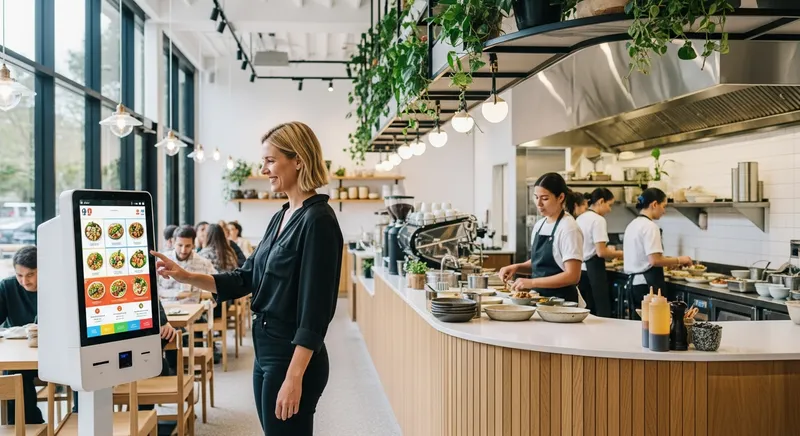
NZ Restaurant Kiosk Guide (2027): Boost Sales & Efficiency
Introduction: Are You Leaving Money on the Table?
The lunch rush hits. A queue snakes out the door, your staff are stretched thin, and you can see potential customers walk away rather than wait. It's a scene that's become all too common for hospitality business owners across New Zealand. You're wrestling with rising food and labour costs, persistent staff shortages, and the constant pressure to do more with less. It feels like you're being squeezed from all sides.
What if you could serve more customers, increase your average order value, and reduce the stress on your team, all at the same time? This isn't a fantasy. It's the strategic advantage that self-service kiosks offer. According to analysis from Deloitte, the hospitality industry is at a crossroads where technology is the key to overcoming these exact challenges. This guide is your roadmap. We'll cut through the confusion and provide a clear, NZ-specific framework to help you choose the right kiosk technology and make a confident investment in your business's future.
Why 2027 is the Year to Invest in a Self-Ordering Kiosk in NZ
If you're wondering whether your customers are ready for kiosks, the answer is a resounding yes. The shift in consumer behaviour is no longer a trend; it's the new standard. Your customers are already living in a digital-first world, and they expect the businesses they support to keep up.
Consider the data from right here in New Zealand. Research from Payments NZ reveals that by 2024, a staggering 88% of Kiwis were using contactless payments, with digital wallet use steadily climbing. Customers no longer fumble for cash; they expect to tap and go. A kiosk perfectly caters to this ingrained behaviour.
Furthermore, the Restaurant Association of New Zealand found that a significant portion of diners prefer ordering directly from an establishment's own app or website. This shows a clear desire for a direct, convenient, and digitally enabled relationship with your business. Investing in a kiosk isn't about forcing new habits, it's about finally meeting the expectations your customers already have. For a deeper dive into this trend, see our NZ Hospitality Guide: Boost Sales with Self-Service Tech.
The First Big Decision: Kiosk Hardware
Your first major decision is choosing the physical unit. This choice impacts cost, aesthetics, and durability. There are two main paths for New Zealand businesses, and the right one depends entirely on your specific needs. Lazygrid's software is designed to work flawlessly on both, giving you ultimate flexibility.
For a general overview of different hardware setups, our guide on How to Use Your Own Tablet or iPad as a POS System in NZ (2026 Guide) can provide additional context.
| Feature | iPad Kiosk Setup | Dedicated All-in-One Unit |
|---|---|---|
| Upfront Cost | Lower ($1,000 - $1,500) | Higher ($3,000 - $5,000+) |
| Durability | Good (with commercial-grade enclosure) | Excellent (purpose-built for 24/7 public use) |
| Footprint | Very Small & Flexible | Larger & more permanent |
| Components | Separate iPad, stand, and payment terminal | Integrated screen, payment, printer, & scanner |
| Aesthetics | Sleek & Modern | Professional & Robust |
| Best For | Food trucks, market stalls, pop-ups, small cafes | QSRs, busy takeaways, large cafes, high-volume venues |
iPad Kiosk: The Flexible & Cost-Effective Starter
This setup uses a standard Apple iPad in a secure stand or enclosure, paired with a separate payment terminal. It's a popular entry point into the world of self-service. The familiar interface means customers and staff already know how to use it, and its small footprint is perfect for businesses with limited counter space.
If you're running a mobile business, you might also be interested in our analysis of POS alternatives for NZ food trucks.
Dedicated Unit: The All-in-One Powerhouse
A dedicated kiosk is a purpose-built, all-in-one unit that typically includes a touchscreen, integrated payment terminal, scanner, and receipt printer in a single robust housing. If you have high customer traffic and your primary goal is processing a large volume of orders with maximum speed and reliability, a dedicated unit is the superior long-term investment.
For businesses focused on speed, our Best POS System for NZ QSR & Takeaway Guide offers more insights.
Must-Have Kiosk Software Features for NZ Businesses
Great hardware is just a shell; the software inside is the engine that drives your success. As experts at Cornell's School of Hotel Administration note, a modern kiosk must be part of an integrated platform, not just another isolated gadget. Here are the non-negotiable features you should demand:
Seamless EFTPOS Integration: This is critical. Your kiosk's software must communicate directly with your NZ EFTPOS terminal. A non-integrated system forces staff to re-enter the amount manually, which defeats the purpose of self-service, slows down the process, and introduces errors.
Intuitive User Interface (UI): The ordering process should be effortless for a first-time user. This means large buttons, high-quality images, and a logical flow. A great UI uses principles of menu psychology to guide customers and make ordering simple and enjoyable.
Full Menu & Order Customisation: Your software must handle all your order variations. Customers need the ability to add modifiers ('no tomato'), select from options ('choose your sauce'), and respond to automated upsell prompts ('make it a large for $1?').
Kitchen Display System (KDS) Integration: To truly boost efficiency, kiosk orders must fire directly to a screen in the kitchen in under two seconds. This eliminates lost paper dockets and misheard orders, dramatically improving speed and accuracy by up to 25%. Look for a system with a dedicated Best KDS for NZ Restaurants & Cafes: A 2026 Guide component.
Backend Reporting & Analytics: The kiosk is a powerful data collection tool. Your POS system should provide reports on what's being sold through the kiosk, peak usage times, and the success of upsell prompts. This data is gold for making smarter business decisions.
Critical for NZ: Xero Integration
For any modern New Zealand business, seamless integration with Xero is non-negotiable. Your kiosk and POS system should automatically sync daily sales totals, payment types, and other financial data directly into your accounting software. This saves hours of manual data entry, reduces human error, and makes bank reconciliation effortless. For a full breakdown, see our Xero POS Integration Guide.
Calculating the Real ROI of a Restaurant Kiosk
How do you know if the investment will actually pay off? Let's move beyond generic claims and create a simple framework you can use to estimate the return on investment (ROI) for your business.
Academic research published in the International Journal of Hospitality Management confirms that self-service technology leads to higher profits. Here's how it breaks down:
- Increased Average Order Value (AOV): Kiosks are patient, effective salespeople. They never forget to offer an upsell, showcase high-margin items with appealing photos, and make it easy to add extras. This consistently results in a 15-30% increase in AOV.
- Labour Cost Re-allocation: The goal isn't to fire staff, it's to make them more effective. A kiosk automates order-taking, freeing up your team to focus on what humans do best: customer service, quality control, and creating a welcoming atmosphere. You can handle a much larger volume of customers with the same or even a smaller team.
- Increased Throughput: How many more orders could you take in your busiest hour if the queue wasn't a bottleneck? A kiosk can process an order in under 60 seconds. This increased speed directly translates to more sales during your most critical periods.
ROI in Action: A Real NZ Example A Wellington cafe with 200 daily customers and an $18 average order value (AOV) introduced a kiosk. Their AOV increased by just 15% to $20.70. This small change added $540 in extra revenue per day, or over $16,000 per month, paying for the kiosk technology in a matter of weeks.
Actionable Tip: Your ROI Formula
(Increase in Daily Sales from higher AOV) + (Value of Re-allocated Labour Hours) - (Daily Cost of Kiosk) = Your Daily Profit Gain
For more ideas on controlling expenses, check out our guide on calculating beverage cost.
Your Action Plan: The NZ Kiosk Provider Checklist
Feeling empowered? Good. When you talk to providers, use this checklist to cut through the sales pitch and get the answers you need.
Payments & Integration
- Is your system fully and seamlessly integrated with an EFTPOS NZ-certified terminal?
- Can you provide a full breakdown of all transaction fees (software, gateway, and EFTPOS provider)?
- Does your software integrate with Xero for easy reconciliation?
Software & Usability
- Can I easily update menus, prices, and images myself, instantly across all kiosks?
- Do you offer a fully integrated Kitchen Display System (KDS)?
- Show me the backend reporting. How easily can I see my kiosk-specific sales data?
Hardware & Support
- What are the warranty and replacement options for the hardware here in New Zealand?
- Is your support team based in New Zealand, and what are their hours of operation?
How Lazygrid Kiosks Meet the Needs of Modern NZ Businesses
We designed Lazygrid POS with the specific challenges of NZ hospitality owners in mind. Our kiosk solution is the logical extension of that philosophy. We handle the complex technology so you can get back to what you do best: creating amazing experiences for your customers.
- Total Flexibility: Use your own iPad for a low-cost entry, or opt for our robust, all-in-one dedicated units for high-traffic environments.
- Seamless NZ Integration: Our software features certified integration with NZ EFTPOS networks and a one-click connection to Xero.
- Built to Boost Sales: The user interface is clean, intuitive, and built to drive up average order value through smart, automated upselling.
- Local Support: Our support team is based right here in New Zealand, ready to help when you need it.
To see how we help cafes handle their busiest times, take a look at our guide to the best POS systems for NZ cafes.
Frequently Asked Questions
What is the average cost of a restaurant kiosk in NZ?
The cost is best understood in two parts: upfront hardware and ongoing software. For an iPad-based setup, expect a hardware investment of around $1,000 to $1,500 for a new iPad, a secure commercial-grade stand, and an integrated EFTPOS terminal. For a durable, all-in-one dedicated kiosk, the upfront cost typically ranges from $3,000 to $5,000. The software is usually a monthly subscription, from $50 to $150 per month depending on the features you need.
Will my older, non-tech-savvy customers use a kiosk?
This is a common concern, but experience and data show that user-friendliness wins. A well-designed kiosk with a simple interface is surprisingly easy for everyone. Research shows a strong preference for self-service across all demographics. The key is to present the kiosk as an additional option, not a replacement. By keeping your traditional counter open, you empower customers to choose the method they prefer, which reduces queues for everyone.
Can a self-ordering kiosk work for my food truck or small cafe?
Yes, absolutely. These businesses often see the most significant benefits. An iPad-based kiosk is perfect for environments where space is at a premium. For a food truck, it can handle the queue at the window while your team focuses on cooking. For a small cafe, it can prevent the morning coffee rush from overwhelming your counter. The kiosk's ability to process orders quickly and accurately is a massive advantage when you have a short, intense period to maximise your sales.
Do I need a special type of EFTPOS for a kiosk?
Yes, and this is a crucial point. For a true self-service experience, you need an 'integrated' EFTPOS terminal. This means the terminal is certified to communicate directly with your POS and kiosk software. When a customer finishes their order, the total is sent directly to the EFTPOS terminal for payment without any manual entry. This eliminates errors and is essential for speed. Reputable providers will specify which EFTPOS NZ-certified terminals are compatible with their system.
Can a kiosk be used for more than just food ordering?
Definitely. The technology is incredibly versatile. For a beauty or massage shop, a kiosk can act as a self-service reception. Clients can check in for appointments, book their next session, purchase retail products, and buy digital gift vouchers, all without interrupting a treatment in progress. It streamlines the entire client management process, not just payments.
How does a kiosk system help with staff shortages?
A kiosk serves as a powerful force multiplier for your team. It automates the most time-consuming front-of-house tasks: taking every order, confirming modifications, and processing each payment.
This frees your human staff from being transaction-takers and empowers them to become experience-makers. With a kiosk handling the queue, your team can focus on higher-value activities like preparing perfect coffees, ensuring food quality, keeping the premises clean, and engaging with customers to provide genuine hospitality.
Conclusion: Your Next Step Towards a More Profitable Business
You now have the complete framework to evaluate self-service kiosk technology for your New Zealand business. You understand it's a strategic tool that meets modern customer expectations, directly boosts your average order value, and empowers your staff to be more efficient. By focusing on NZ-specific needs, you can confidently make a choice that will pay dividends for years to come.
Ready to see how a kiosk could transform your business? Book a free, no-obligation demo with our NZ-based team today.