
Pax A920 Pro & KDS Integration NZ: The Complete 2026 Guide
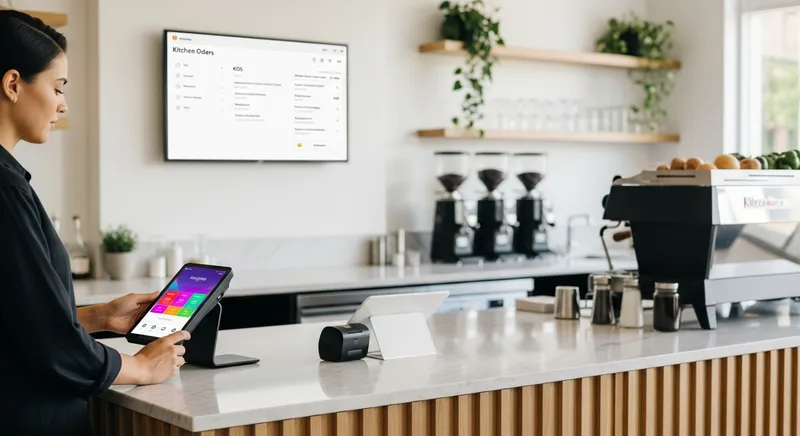
As a New Zealand business owner, you've invested in powerful tools to stay competitive. The Pax A920 Pro is one such tool- a sleek, modern EFTPOS terminal that feels lightyears ahead of old, clunky machines. But here's the billion-dollar question so many owners of cafes, restaurants, and even salons are asking: "How do I get this powerful device to talk to my kitchen?"
You have the Pax A920 Pro for payments and a vision of a streamlined kitchen with a digital display (KDS), but there's a frustrating gap in between. You're facing order errors, delays, and a chaotic workflow, and the solution feels just out of reach. Competitors offer closed systems, but nobody is giving you a clear, simple path for the hardware you already own.
The core pain point is this technical uncertainty. And the solution is simpler than you think. The secret isn't in the hardware itself- it's in the software running on it.
This guide will walk you through everything you need to know to connect your Pax A920 Pro to a Kitchen Display System in New Zealand. We'll demystify the process, show you how it works for different business types, and provide an actionable roadmap to creating a seamless, error-free ordering system.
The Core Misunderstanding: It's Not the Hardware, It's the Software
Let's clear up the biggest point of confusion right away. The Pax A920 Pro is not just a payment terminal. It's a powerful, all-in-one smart device running a modern Android operating system. According to its manufacturer, PAX Technology Inc., the latest models run on operating systems like Android 14, making them more like a specialized smartphone than a traditional EFTPOS machine.
This is the key. The ability to connect to a KDS doesn't come from the Pax hardware itself. It comes from the Point of Sale (POS) application you choose to install on it.
The POS software acts as the central brain of your operation. It takes the order you input on the Pax A920 Pro and instantly sends it to the KDS app running on a tablet in your kitchen or service area. The integration happens within the software ecosystem.
Actionable Tip: Stop searching for "Pax A920 Pro KDS hardware." Instead, start searching for "POS apps for Pax A920 Pro with KDS integration."
Why Integrate Your EFTPOS and KDS in the First Place?
Connecting your front-of-house to your back-of-house is one of the single most impactful changes you can make to your business. The New Zealand government actively encourages this kind of digital adoption for small businesses through its Business.govt.nz portal, recognizing its power to boost efficiency. The benefits are immediate and substantial.
1. Drastically Reduce Order Errors
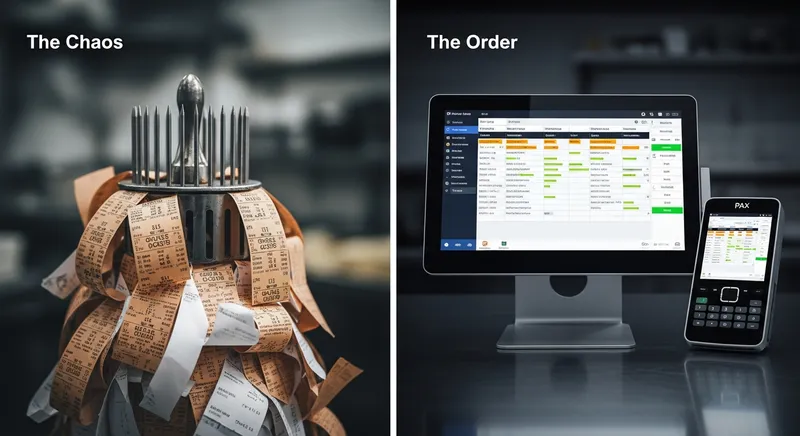
Handwritten dockets are a recipe for disaster. Illegible writing, lost tickets, and verbal miscommunications lead to incorrect orders, wasted food, and unhappy customers. As noted by industry publication Restaurant Business Magazine, a KDS lays out orders in an easy-to-read, chronological fashion, virtually eliminating errors. This directly impacts your bottom line by reducing food waste, a key factor in managing your NZ Cafe Profit Margins.
2. Increase Speed and Efficiency
With an integrated system, the moment an order is confirmed on the Pax A920 Pro, it appears on the KDS. There's no time wasted walking a paper ticket to the kitchen. This shaves precious seconds off every single order, which adds up to minutes during a busy rush. Faster order fulfilment allows you to increase table turnover and serve more customers without overwhelming your staff.
3. Streamline Payments and Reduce Fraud
An integrated system sends the final bill amount directly from your POS software to the Pax terminal. As explained by EFTPOS NZ, this completely eliminates keying errors, where a staff member might accidentally charge $1.50 instead of $15.00. The result is faster, more accurate payment processing and simplified end-of-day reconciliation.
4. Lower Staff Stress and Turnover
A chaotic work environment is a leading cause of staff burnout. A clear, organized, and reliable system empowers your team to perform at their best. Groundbreaking research from the Cornell University School of Hotel Administration highlights that integrated technology is essential for making better operational decisions and can significantly reduce staff fatigue. This aligns with findings from the Restaurant Association of New Zealand, which show Kiwi diners prefer tech that supports staff rather than replaces them, creating a better experience for everyone.
Why a Local NZ Provider Matters for Your POS
When choosing your software, partnering with a New Zealand-based provider offers distinct advantages beyond just features. It's about having a team that understands the unique challenges of the local market.
- Local Support: When your EFTPOS goes down during the Saturday morning rush, you don't want to be dealing with an overseas call centre. A provider like Lazygrid with a Wellington-based support team means you get fast, relevant help from people in your time zone who understand the local landscape.
- EFTPOS NZ Certification: Not all software works with the NZ payment network out of the box. A local provider ensures their system is fully certified and compliant with Eftpos NZ standards.
- Offline Reliability: What happens if your WiFi drops? A robust POS system needs to function even without an internet connection. Lazygrid is designed with a powerful offline mode, allowing you to continue taking orders and processing payments on your Pax terminal. Everything syncs automatically once you're back online, so you never miss a sale.
How Integration Actually Works: A Step-by-Step Guide
Here is a simple, actionable roadmap to get your system up and running.
Step 1: Choose a Compatible POS Application
This is the most important decision. You need a single POS software provider that offers an Android-based POS app for your Pax A920 Pro and a dedicated KDS app that integrates seamlessly.
Lazygrid's All-in-One Solution The Lazygrid Premium Plan ($149/month) is designed for exactly this purpose. It includes our powerful POS app for your Pax terminal and the Lazygrid KDS app for any standard iPad. It also bundles in advanced features like table-side QR code ordering and Reserve with Google integration, all supported by our Wellington-based team.
To see how our plans stack up, here's a quick comparison:
| Feature | Lite Plan ($49/mo) | Standard Plan ($99/mo) | Premium Plan ($149/mo) |
|---|---|---|---|
| POS for Pax A920 Pro | ✅ | ✅ | ✅ |
| KDS Integration | ❌ | ❌ | ✅ |
| Table QR Code Ordering | ❌ | ❌ | ✅ |
| Reserve with Google | ❌ | ❌ | ✅ |
| Online Bookings | ❌ | ✅ | ✅ |
| Staff Commissions | ❌ | ✅ | ✅ |
Step 2: Assemble Your Hardware
You don't need expensive, proprietary equipment. With a provider like Lazygrid, you can use affordable, off-the-shelf hardware.
- The Order-Taking Device: Your Pax A920 Pro.
- The KDS Screen: A standard, affordable tablet. Many businesses find it cost-effective to use their own tablet or iPad as a POS system component, and the same applies for the KDS.
- A Reliable Router: A stable WiFi network is the backbone of your system.
Hardware Packages: If you're starting from scratch, Lazygrid offers complete hardware packages starting from $999 (or $79/month on lease), including an iPad, printer, and cash drawer to get you running immediately.
Step 3: Configure Your Network
This step is simple but crucial. Both your Pax A920 Pro and your KDS tablet must be connected to the exact same WiFi network. This is how they communicate with each other instantly and wirelessly.
Step 4: Install and Pair the Software
Once your POS provider is chosen:
- Install the POS App: Download and install the Lazygrid POS application onto your Pax A920 Pro. This is done through the PAXSTORE, the device's built-in app marketplace.
- Install the KDS App: On your kitchen iPad, download the Lazygrid KDS application from the Apple App Store.
- Pair the Devices: Open the POS app on your Pax terminal and follow the on-screen instructions to connect to the KDS. With Lazygrid, this is a straightforward, one-time setup designed to take minutes.
Placeholder: Screenshot of the Lazygrid POS app interface on a Pax A920 Pro, showing the 'Pair with KDS' screen.
Real-World Scenario: A Ponsonby Cafe's Transformation
Imagine 'The Daily Grind', a bustling cafe in Ponsonby, Auckland. The owner, Tama, was struggling. Handwritten dockets led to constant errors- flat whites made with oat milk instead of soy, missed avocado add-ons, and lost orders during the chaotic weekend rush. Staff were stressed, customers were getting frustrated, and food waste was eating into his profits.
After switching to Lazygrid Premium, the change was immediate. Staff now take orders at the table with a Pax A920 Pro. The moment they hit 'confirm', the order appears on an iPad running the Lazygrid KDS in the kitchen, perfectly legible and time-stamped. Baristas and chefs see a clear, prioritized list. Order accuracy shot up to nearly 100%, and the time from order to delivery dropped by an average of three minutes. The calmer environment reduced staff stress, and faster table turnover led to a 15% increase in weekend revenue.
Beyond Restaurants: KDS for Cafes, Salons, and More
A KDS isn't just for restaurants. Its principles of clarity and workflow management can be adapted for almost any small business.
For Cafes & Food Trucks: In a high-volume, small-space environment like a Wellington food truck, a KDS is a game-changer. It eliminates bulky printers and shouting orders. For mobile businesses, a reliable cloud-based system with offline mode is essential, a key consideration whether you're starting a food truck from scratch or buying a franchise.
For Service Businesses (Salons, Spas): Reframe the KDS as a "Service Display System." Instead of food items, the screen can display client names, the service booked ("90-Min Hot Stone Massage"), the assigned therapist, and the room status. The Pax A920 Pro's mobility allows a therapist to take payment and rebook the client's next appointment chair-side. Meanwhile, the display in the staff room keeps the whole team updated on room availability and their upcoming schedule, creating a smooth, professional client flow. This is a core component of a true all-in-one salon software solution.
Your Path to a Streamlined Operation
The confusion around connecting your Pax A920 Pro to a KDS ends today. The power lies in a modern, all-in-one POS software that's built for the New Zealand market.
This integration isn't a luxury; it's an accessible and essential upgrade for any ambitious Kiwi business looking to improve efficiency, reduce errors, and create a better environment for staff and customers. By choosing the right software partner, you can unlock the full potential of the hardware you already own.
Ready to eliminate order errors and streamline your kitchen? Lazygrid's Premium plan includes our integrated KDS, table QR codes, and more, all with no long-term contracts.
Start Your Free Trial Today or Speak with our Wellington-based Team about a solution for your business.
Frequently Asked Questions
Can the Pax A920 Pro connect directly to any KDS?
No, it cannot. The connection to a KDS is managed by the Point of Sale (POS) software installed on the device. You need a POS application that has both an Android version for the Pax terminal and a compatible KDS module, like the one offered in Lazygrid's Premium plan.
Which Lazygrid plan do I need for KDS integration?
You need the Lazygrid Premium plan ($149/month). This plan includes the POS app for your Pax terminal and the corresponding KDS app for an iPad, which work together seamlessly. It also includes other advanced features like loyalty programs and Reserve with Google.
Do I need a separate server to connect my Pax A920 Pro to a KDS?
No, you don't. Modern cloud-based POS systems like Lazygrid eliminate the need for an expensive on-site server. The Pax terminal and the KDS tablet communicate over your local WiFi, and all your data is securely backed up in the cloud. The system also works in offline mode if your internet connection is unstable.
What's the difference between an integrated EFTPOS and a standalone terminal?
A standalone terminal requires you to manually enter the purchase amount for every transaction. An integrated EFTPOS, like a Pax A920 Pro running Lazygrid, receives the transaction amount directly from the POS system. This eliminates keying errors, speeds up payments, and simplifies reconciliation.
How much does a KDS system cost for a small business in NZ?
The cost is more affordable than you might think. With Lazygrid, the KDS is a software feature included in our Premium plan subscription. The only hardware cost is for the display itself, and you can save significantly by using a standard, off-the-shelf iPad instead of proprietary hardware.