
Self-Ordering Systems for NZ Cafes: Kiosks, QR & Beyond
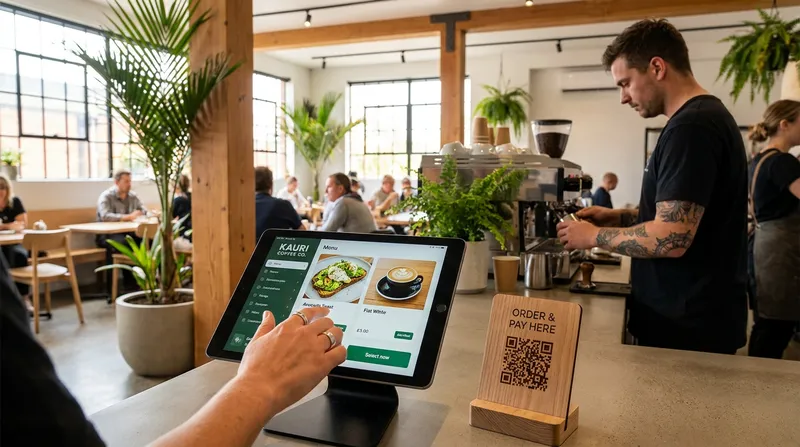
Introduction: Solving the Staffing Crisis with Smart Technology
If you own a hospitality or service business in New Zealand today, you are likely intimately familiar with the chaos of the peak hour rush. The line of customers stretches out the door, your front-of-house staff are overwhelmed, and the phone keeps ringing with takeaway orders. In this environment, long queues do not just cause stress: they directly result in lost revenue as impatient customers walk away.
For years, the standard advice was simply to hire more staff. However, in the current economic climate, finding and retaining reliable team members is one of the hardest parts of running a business. This is where a unified contactless ordering system can make a real difference, reducing pressure on your team while improving the customer experience. By leveraging modern automation technology, you can solve the staffing crisis without sacrificing the personal touch that makes your business special.
This guide will show you exactly how to implement self-ordering technology in your New Zealand restaurant, cafe, food truck, or wellness salon. We will explore the psychology behind digital menus, the real costs involved, and how to build a holistic system that seamlessly connects your customers to your kitchen.
The New Reality of NZ Hospitality: Why Self-Ordering is Essential
Running a cafe or restaurant in New Zealand comes with a unique set of challenges. Minimum wage increases, inflation on ingredient costs, and a severe shortage of front-of-house hospitality workers have squeezed profit margins tighter than ever before. Business owners are being forced to rethink their operational models just to keep their doors open.
According to industry reports by the Restaurant Association of New Zealand, a significant majority of local operators report being consistently understaffed. This highlights a clear shift toward higher efficiency and customer autonomy through digital ordering. When you are short-staffed, having your best employee tied to a cash register punching in orders is a waste of their talent.
Shifting routine order-taking to digital screens frees up your limited staff to focus on what truly matters: food quality, speed of service, and genuine customer hospitality. Instead of acting as human calculators, your team can become brand ambassadors who check on tables, deliver food with a smile, and ensure the dining room is spotless.
Actionable Tip for Business Owners: When introducing a restaurant POS system to your team, frame the technology shift carefully. Explain that the goal is not to replace their jobs, but to make their shifts less stressful. Show them how self-ordering kiosks will eliminate the pressure of a massive line at the till.
The Psychology of Digital Menu Ordering: How to Increase Average Order Value
One of the most powerful arguments for adopting a contactless ordering system is the immediate impact on your bottom line. Across the board, businesses that implement self-service technology see their average order value increase. But why exactly do customers spend more when they order from a screen?
The answer lies in behavioral psychology. When a customer orders face-to-face with a cashier, there is an inherent social pressure. They might feel rushed because there is a line behind them, or they might feel slightly embarrassed to ask for extra cheese, a double shot of syrup, and a side of fries. Digital menu ordering removes this friction entirely.
Research highlighted by Dev.family shows that customers spend 20% more per order through QR code menu upselling because the solution makes them feel more relaxed about customising their orders without staff interaction. Without the perceived judgement of a human server, impulse buys skyrocket.
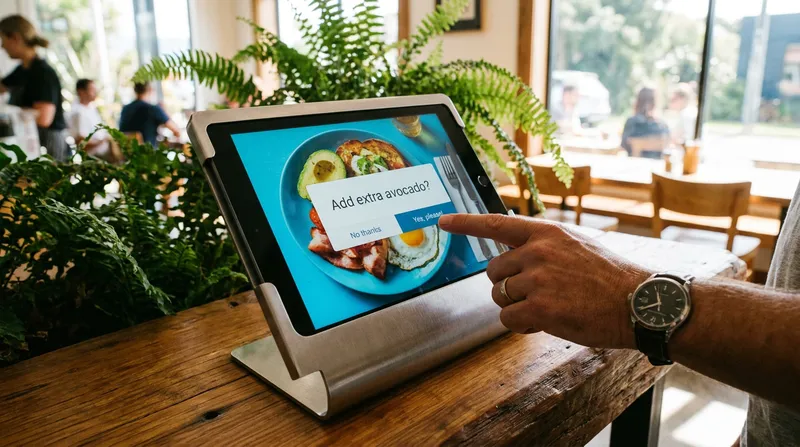
Furthermore, insights from Eflyn explain that self-order kiosks minimize decision fatigue and use visual cues to take advantage of the foot-in-the-door technique. Once a customer has committed to buying a main dish, a beautiful photo prompting them to add a drink for just $3 feels like an easy, logical next step. Pairing this with a digital loyalty programme, like Lazygrid's built-in digital stamp card, further incentivises these higher-value repeat visits.
Actionable Tips for Menu Design:
- Use High-Quality Photos: People eat with their eyes first. Ensure every item on your digital menu has a professional, appetising image.
- Set Strategic Default Add-Ons: If you run a burger joint, prompt the customer to "Make it a Combo" before they can check out.
- Apply This to Services: If you run a beauty shop, use your digital booking system to prompt clients to add a 15-minute scalp massage to their cart.
Building Your Unified Ecosystem: From Kiosks to Kitchen Displays
A major mistake independent operators make is relying on fragmented technology. Having a separate tablet for third-party delivery apps, a clunky old cash register for walk-ins, and a standalone EFTPOS terminal creates a nightmare for end-of-day reconciliation.
To truly reduce restaurant labour costs, you need a holistic ecosystem where every ordering channel feeds directly into one central iPad POS. A unified cloud platform like Lazygrid POS allows you to run your entire operation from standard iPad hardware. If you are evaluating options, we recommend reading our guide on the Best POS System for NZ Cafes: 7 Non-Negotiable Features.
Here is a quick breakdown of how different ordering methods serve your venue:
| Ordering Method | Best Use Case | Key Benefit |
|---|---|---|
| QR Code Menus | Dine-in restaurants, casual eateries | Eliminates wait times for table service |
| Self-Service Kiosks | Quick-service cafes, food trucks | Busts queues during peak morning rushes |
| Staff-Facing POS | Traditional venues, cash payments | Maintains human connection for regulars |
QR Code Menu Ordering for Seamless Table Service
Table-side QR codes turn every customer's smartphone into a personalised point of sale. A customer sits down, scans the code, and browses a highly visual interactive menu. They place their order and pay immediately via Apple Pay, Google Pay, or credit card.
Actionable Tip: Instead of using flat table stickers that wear out, use upright acrylic stands. They catch the customer's eye immediately upon seating and significantly maximise scan rates.
Self Service Kiosks for Cafes and Food Trucks
Floor-standing or counter-top kiosks act as an automated queue-buster. This technology is particularly beneficial for space-constrained businesses. A compact self checkout kiosk for food trucks can literally double your order throughput without requiring you to squeeze another staff member into a tiny mobile kitchen.
Self Booking Kiosks for Salons and Massage Shops
Self-service technology is not just for hospitality. A self booking kiosk for salons allows walk-in clients to view available time slots for the day, select a specific therapist, book their massage, and pay upfront. This happens without interrupting your staff who are mid-service.
Actionable Tip: Ensure your kiosk hardware integrates directly with tools like Reserve with Google and your digital calendar. To explore software options, check out our comparison of Eveve vs ResDiary: Best NZ Booking System 2026.
Kitchen Display System Integration
Sending digital orders to a traditional paper printer often creates chaos. Paper dockets get lost, ruined by spills, or pulled out of order. Kitchen display system integration solves this by organising orders digitally. A KDS routes drinks directly to the barista's screen and food to the chef's screen automatically.
Actionable Tip: Set up colour-coded alerts on your KDS. Programme the screen to turn a ticket yellow if it has been waiting for 10 minutes, and red if it hits 15 minutes.
The Real Self Ordering Kiosk Cost and ROI for NZ Businesses
Historically, self-ordering kiosks were massive, bulky machines that cost tens of thousands of dollars. Today, the self ordering kiosk cost is incredibly accessible for independent NZ businesses. Modern systems utilize standard iPad hardware paired with secure stands and integrated card readers.
When calculating your Return on Investment (ROI), compare the monthly software subscription to the cost of human labour. In New Zealand, hiring just one additional minimum-wage staff member for 20 hours a week costs over $23,000 annually. In contrast, a Lazygrid Premium plan at $149 per month (which includes QR code ordering, loyalty, and commission-free online ordering) costs less than one week of a minimum-wage employee.
A recent survey by the Food Institute reveals that 62% of operators using back-office technology reported reduced labour costs, helping them protect margins without relying solely on menu price increases.
For a detailed breakdown of the numbers, read our guide on Cloud POS ROI for NZ Cafes, Salons & Restaurants.
Will Restaurant Automation Alienate Older Customers?
A common fear among business owners is that older demographics will reject QR codes and digital screens. While some customers prefer a traditional ordering experience, the best approach is a hybrid model. Keep one traditional register open for cash payments and for customers who prefer face-to-face interaction.
Interestingly, research from the EHL Hospitality Business School shows that 74% of operators view technology as augmenting rather than replacing labour. Because the kiosk handles the bulk of your transaction volume, your front-of-house staff now have the time to stop, chat, and provide exceptional service to the regulars who value that human connection.
Step-by-Step: Implementing Your System with an iPad POS
Ready to transform your business? Follow this clear, 4-step action plan to launch your unified ecosystem.
Step 1: Audit and Optimize Your Menu Ensure every item has a clear description and a high-quality photo. Group your add-ons logically so the system can automatically prompt customers to upsell themselves.
Step 2: Choose Flexible Hardware Opt for an iPad-based system like Lazygrid rather than proprietary legacy hardware. iPads are cost-effective and versatile. A single iPad can act as a staff-facing register in the morning and easily flip around to become a customer-facing kiosk during the lunch rush.
Step 3: Connect a Local Payment Gateway Ensure your POS integration includes a reliable, localized payment processor. Look for systems that integrate seamlessly with EFTPOS NZ certified terminals, Windcave, or Stripe.
Step 4: Train Your Staff Run a mock service with your team before going live. Teach them how to troubleshoot the kiosk and how to guide hesitant customers to use the new system.
For a deeper dive into the technical setup, follow our iPad POS Setup Guide for NZ Businesses (2026).
Frequently Asked Questions
How much does a self ordering kiosk cost for a small cafe?
Costs vary, but using an iPad-based system is highly affordable. You typically pay a monthly software subscription fee plus the upfront cost of an iPad and a secure stand, making it a highly cost-effective way to reduce labour costs.
Can I use QR code menu ordering for takeaway orders?
Yes. You can place QR codes in your shop windows specifically for takeaway customers. They can scan, order, and pay from the footpath without ever waiting in line inside your venue. You can also utilize commission-free online ordering links on your website.
Does a self checkout kiosk work for food trucks?
Absolutely. Space-saving iPad kiosks are perfect for food trucks. They allow operators to focus entirely on cooking and assembling food rather than constantly stopping to handle cash.
How does POS integration for self service actually work?
Your cloud-based POS acts as the central brain of your business. When a customer places an order via a kiosk, a QR code, or an online app, the system instantly updates your inventory, processes the payment, and pushes the digital ticket directly to your Kitchen Display System.
Conclusion: Empower Your Team and Boost Revenue
Implementing self-ordering technology is no longer just for global fast-food chains. For independent New Zealand cafes, restaurants, and salons, adopting a unified ecosystem of QR codes, iPad kiosks, and smart POS software is the most effective way to combat staffing shortages and rising operational costs. By removing the friction of traditional ordering, you naturally increase your average order value while giving your staff the freedom to focus on what they do best: delivering exceptional hospitality.
Want to see how Lazygrid's self-ordering and POS tools work together for NZ businesses? Explore our features or book a free demo today to take control of your peak hour rush.