
Smarter NZ Staff Scheduling: A 2026 Guide to Labour Cost Control

As a service business owner in New Zealand, you're constantly performing a difficult balancing act. You need enough staff on the floor to provide excellent service, but every extra hour on the roster eats into your slim profit margins. This challenge is the core pain point for thousands of Kiwi owners: how do you create a staff roster that minimizes wage costs while guaranteeing full compliance with New Zealand's complex labour laws, all without spending your entire weekend buried in spreadsheets?
Many businesses are feeling the pressure. With labour costs cited as a primary challenge by the industry, a recent survey noted that 65% of operators are forced to run below full capacity simply because of rising staff expenses, as reported by Restaurant & Café Magazine. The answer isn't guesswork; it's already sitting in your Point of Sale (POS) system. This guide provides a practical, NZ-specific framework to turn your raw sales data into your most powerful tool for smart, cost-effective, and compliant staff scheduling.
Why Labour Cost Control is Critical for NZ Service Businesses
Labour is almost always the largest controllable expense for any restaurant, cafe, salon, or retail store. In a market where the Restaurant Association of New Zealand's surveys consistently highlight wages as a top concern for operators, mastering labour costs is not just good practice—it's essential for survival and growth. Adding to the pressure, the hospitality sector is expanding rapidly. Data from Stats NZ shows the accommodation and food services industry led all others with an 8.9% annual increase in filled jobs in 2023, tightening the labour market and driving up wages.
Failing to manage these costs effectively directly impacts your bottom line. An overstaffed floor on a quiet Tuesday can wipe out the profits from a busy Friday night. Conversely, understaffing during a rush leads to poor service, stressed employees, and lost customers. By using a data-driven approach, you move from reactive scrambling to proactive strategy, directly boosting your business's profitability. For a deeper dive, explore our guide on NZ Restaurant Profit Margins: The 2026 Guide to Boosting Your Profitability.
Understanding Your Key Labour Metrics
Before you can control your labour costs, you need to measure them accurately. Your POS system's Reporting & Analytics dashboard is the perfect place to start. These two metrics are your foundation.
How to Calculate Your Labour Cost Percentage
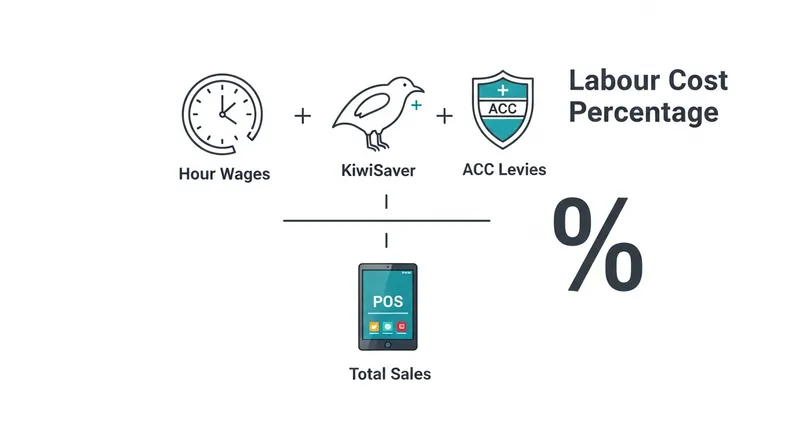
This is the single most important metric for labour management. It tells you what percentage of your revenue is being spent on staff wages.
The formula is:
(Total Labour Cost / Total Sales) x 100 = Labour Cost Percentage
- Total Labour Cost: This is more than just the hourly wage. For an accurate calculation, you must include gross wages, employer KiwiSaver contributions, ACC levies, and accrued holiday pay.
- Total Sales: This is your total revenue before any expenses are deducted.
Actionable Tip: Set up a weekly report in your accounting software or POS to automatically calculate this figure. A modern POS like Lazygrid provides the real-time sales data and can integrate with payroll systems to make this calculation effortless.
What is a Good Labour Cost Percentage in NZ?
While there's no single magic number, a common benchmark for the New Zealand hospitality industry is between 25% and 35% of revenue. However, this varies significantly:
- Quick Service Restaurants (QSR) & Cafes: Often aim for the lower end (25-30%) due to higher volume and less labour-intensive service.
- Full-Service Restaurants: May have a higher percentage (30-38%) due to the need for more front-of-house and kitchen staff.
- Beauty Salons & Spas: Can vary widely based on service pricing and therapist commission structures.
Your ideal percentage depends on your specific business model. The key is to establish your own baseline and track it consistently week after week.
The Foundation: Using POS Data for Accurate Forecasting
Effective scheduling starts with an accurate prediction of demand. Your POS is a goldmine of historical data that can replace gut feelings with concrete facts. This is where the Reporting & Analytics features of your POS become indispensable.
Step 1: Identify Your Peak and Trough Periods
First, you need to understand the natural rhythm of your business. Pull the following reports from your POS for the last 4-8 weeks:
- Sales by Hour of the Day: This reveals your true rush hours. Is it the 8am coffee run, the 1pm lunch break, or the 7pm dinner service? You might be surprised to find a mini-peak at 3pm for school pick-up.
- Sales by Day of the Week: This shows you which days are your busiest. It helps you plan prep and stock for the week ahead.
- Sales by Month/Season: This gives you the big picture, helping you plan for seasonal rushes or quiet periods.
Actionable Tip: While you can export hourly sales data into a spreadsheet and use conditional formatting to create a heatmap, this is time-consuming and prone to error. A modern POS system automates this. Lazygrid's Reporting & Analytics dashboard, for example, visualizes your sales data by the hour automatically, making your peaks and troughs instantly obvious without any manual work.
Real Results: A 45-seat Auckland restaurant used Lazygrid's hourly sales reports to identify a consistent 3-hour lull on Wednesday afternoons. By adjusting their roster to remove one floor staff member during this period, they reduced weekly labour hours by 12 while maintaining service quality—saving over $250 every week.
Step 2: Go Beyond Sales—Build a Total Demand Snapshot
Sales data is your starting point, but for truly smart scheduling, you need to layer on other data points to get a significant competitive edge.
- Online Bookings: For a restaurant or salon, your online Booking/Reservation System is a crucial forecasting tool. An integrated system shows you exactly how many customers to expect for dinner service or how many massage appointments are scheduled, preventing under or overstaffing.
- Weather Forecasts: For a cafe with outdoor seating or a food truck, a sunny Saturday will have a vastly different demand pattern than a rainy one.
- Local Events: Check the calendar for concerts, festivals, or sports games nearby. These events can create unexpected rushes you need to staff for.
By combining these data points, you create a comprehensive 'demand dashboard' that provides a much clearer picture of the week ahead.
Building a Smarter, Compliant Roster: A Step-by-Step Guide
With your demand forecast complete, you can now build a roster that is both cost-effective and legally sound. This process bridges the gap between data analysis and practical operations.
Step 1: Translate Your Forecast into Staffing Needs
Look at your demand forecast, hour by hour, and map out your ideal staffing levels. Before adding more staff, consider how technology can improve efficiency.
Sector-Specific Scenario (Cafe): Your data shows a huge spike from 7:30am to 9:00am, with sales dropping 60% by 10am. Instead of rostering three staff for a full 8-hour shift, you can use a surgical approach. Schedule one opener at 7am, then a second staff member from 7:30am to 9:30am. To handle the peak without a third person, a Self-Service Kiosk can manage orders and payments, freeing up your team for fulfilment. This saves hours of unnecessary wage costs every single day.
Sector-Specific Scenario (Beauty Salon): Your integrated booking system shows five clients scheduled between 10am and 1pm, but only one at 2pm and long gaps in the afternoon. Instead of paying a second therapist to wait for appointments that don't exist, you can schedule their shift to finish after the lunch peak. This directly prevents paying for unproductive 'empty chair' time and aligns costs with revenue.
Step 2: Ensure Full NZ Compliance (The Part Everyone Gets Wrong)
Creating a cost-effective roster is pointless if it breaks the law. Non-compliance can lead to heavy fines from the ERA and a damaged reputation. According to Employment New Zealand, employers have clear legal obligations.
Use this NZ Compliance Checklist when building every roster:
- ✅ Rest and Meal Breaks: The law is specific. You must provide paid 10-minute rest breaks and unpaid 30-minute meal breaks based on shift length. Your roster must show these breaks.
- ✅ Reasonable Hours: Your roster must be predictable, and you must act in good faith when making changes. Ensure you give adequate notice as outlined in your employment agreements.
- ✅ Availability Clauses: If you require staff to be available for shifts, this must be reasonably compensated and included in their employment agreement.
- ✅ Minimum Wage & Holiday Pay: Your roster must ensure all employees are paid at or above the current minimum wage for all hours worked, and holiday pay must be accrued correctly.
Pro Tip: Create roster templates in your scheduling software with break times pre-populated based on shift length. Lazygrid's Staff Management module can then track actual break times taken via the POS clock-in/out feature, giving you a clear record of compliance.
Optimising in Real-Time and Beyond
A great roster is a living document. The final step is to track performance and use technology to continuously improve efficiency.
Tracking Scheduled vs. Actual Hours and Costs
Your roster is a budget. You need to track if you're sticking to it. A POS with an integrated Staff Management module that includes a time clock is crucial for this. Staff clock in and out on the POS, providing you with precise data on actual hours worked.
At the end of each week, compare:
- Scheduled Hours vs. Actual Hours Worked
- Budgeted Labour Cost vs. Actual Labour Cost
This will quickly reveal if staff are starting early, staying late, or taking longer breaks than scheduled, allowing you to address issues before they become habits. This report is a standard feature in modern POS systems like Lazygrid.
Review, Refine, Repeat
Labour optimisation is a continuous cycle. Hold a 15-minute meeting each week to review your labour cost percentage and your 'Scheduled vs. Actual' report. Look for patterns. Is your Friday night team always going over their hours? Perhaps your forecast was too low. Is Wednesday afternoon always dead? Maybe you can reduce a shift. This ongoing refinement is the key to long-term control.
Other technologies can also enhance productivity during staffed hours:
- Table Ordering Systems: In a restaurant, table ordering systems empower customers to order and pay from their table, reducing the steps your servers need to take.
- Kitchen Display Systems (KDS): A KDS eliminates lost dockets and streamlines kitchen communication, getting orders out faster with fewer errors and less stress.
From Guesswork to Growth
Moving from gut-feel scheduling to a data-driven strategy is the single most impactful change you can make to control your labour costs and boost your profitability. Your POS system is the key. By leveraging its reporting, you transform scheduling from a frustrating weekly chore into a strategic tool for growth.
An All-in-One POS that combines powerful Reporting & Analytics with integrated Staff Management and Booking Systems makes this entire process seamless. Ready to turn your POS data into labour savings?
Start a free 14-day trial of Lazygrid to see your actual peak hours, track labour costs in real-time, and build compliant rosters in minutes. No credit card required.
Frequently Asked Questions
What is a good labour cost percentage for a cafe in NZ?
A good target for a New Zealand cafe is generally between 25% and 30% of total revenue. However, this is not a fixed rule. Factors like your menu complexity, pricing strategy, and location can influence this figure. The most important thing is to calculate your current percentage accurately and track it over time to identify opportunities for improvement.
How do I ensure my staff roster is compliant with NZ break laws?
You must follow the rules set by Employment New Zealand. The key requirements depend on shift length:
- 2 to 4 hours: One paid 10-minute rest break.
- 4 to 6 hours: One paid 10-minute rest break and one unpaid 30-minute meal break.
- 6 to 8 hours: Two paid 10-minute rest breaks and one unpaid 30-minute meal break. Best practice is to schedule these breaks directly into your roster and use a POS time-tracking feature to ensure staff are taking them.
Can POS data really predict how many staff I need?
Yes, with remarkable accuracy. By analyzing your POS reports for hourly sales trends over several weeks, you create a reliable demand curve for your business. This allows you to move beyond simply having a 'morning shift' and 'evening shift'. You can pinpoint the exact 90-minute lunch rush where you need an extra person and identify the quiet three-hour period on a Wednesday afternoon where you can operate with a leaner team, directly aligning wage costs with revenue.
What is the minimum rest period between shifts in New Zealand?
While there is no single mandated minimum rest period (like a set number of hours) in NZ legislation, employers have a duty of care under the Health and Safety at Work Act 2015. You must manage fatigue to ensure a safe workplace. Rostering staff for a closing shift followed by an opening shift ('clopening') without a sufficient break (generally considered to be at least 9-10 hours) could be seen as a breach of this duty. It's best practice to ensure a significant rest period between shifts.
How can I reduce staff costs without cutting hours or affecting service?
The answer is to increase the productivity of your existing team. Instead of having staff spend time on repetitive, low-value tasks, use technology to automate them. For example:
- A Self-Service Kiosk can take orders and payments during a peak rush, freeing up a team member to expedite food and drinks.
- An integrated Online Ordering system eliminates the need for a staff member to be tied to the phone taking takeaway orders. This allows you to serve more customers and generate more revenue with the same staff hours, effectively lowering your labour cost percentage.