
POS System Cost NZ: A 2026 Guide to Pricing & Fees for Small Businesses
Introduction: Demystifying POS System Costs for NZ Businesses in 2026
Trying to figure out the true cost of a new Point of Sale (POS) system can feel like navigating a maze. With varying pricing models, hardware options, and a host of different fees, it's easy for New Zealand business owners to feel overwhelmed. The lack of transparency makes it incredibly difficult to create an accurate budget.
This guide is here to change that. We're pulling back the curtain to give you a clear, honest breakdown of POS system costs in NZ for 2026. We'll explore upfront hardware expenses, monthly software subscriptions, complex payment processing rates, and the hidden charges you need to watch out for.
Choosing the right POS is more than just a purchase; it's an investment in your business's efficiency, customer experience, and future growth. Understanding the costs involved is the first step, and knowing the latest 2025 POS trends will ensure your investment is future-proof.
The 4 Pillars of POS System Cost in NZ
To accurately budget for your new system, you need to understand that the total price is made up of four distinct components. Some are one-off costs, while others are recurring fees. Getting a handle on each one is the key to avoiding budget blowouts and finding a solution that truly fits your business.
Here are the four pillars of POS system pricing:
- Upfront Hardware Costs
- Monthly Software Fees
- Payment Processing & Merchant Fees
- Potential Hidden Costs
Pillar 1: Upfront POS Hardware Costs
This is your initial investment to get the physical equipment you need to run your business. The costs can vary significantly depending on whether you buy the hardware outright, rent it, or lease it.
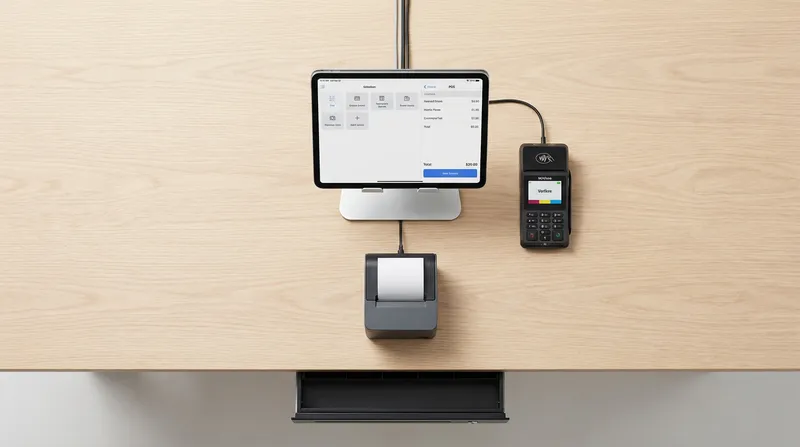
Common hardware components include:
- POS Terminal: The central device for taking orders. Modern systems often use an iPad ($600+) for flexibility, while some providers offer proprietary terminals ($1,000+).
- EFTPOS Machine: To accept debit and credit cards. You can often rent these from a payment provider for $30-$50 per month or purchase them for $400+.
- Receipt Printer: A thermal printer for customer receipts and kitchen dockets ($300 - $500).
- Cash Drawer: A secure drawer for cash transactions, typically triggered by the receipt printer ($150 - $250).
- Barcode Scanner: Essential for retail businesses to quickly scan items ($200+).
Many providers offer POS bundles in NZ, which can be a cost-effective way to get everything you need. A starter bundle with an iPad, printer, and cash drawer often ranges from $1,000 to $2,000. Leasing hardware lowers the upfront cost and can include benefits like support and easy upgrades, though buying outright is usually cheaper over the long term.
Pillar 2: Monthly POS Software Fees
Most modern cloud-based POS systems operate on a Software-as-a-Service (SaaS) model, where you pay a recurring monthly fee. This fee covers access to features, regular updates, and customer support.
Software pricing structures typically fall into these categories:
- Tiered Plans: Most common, with providers offering Basic, Standard, and Premium plans. A standard plan for a small business in NZ usually costs between $50 and $150 per month.
- Per-Terminal Fees: Some providers charge a fee for each additional device you use as a terminal.
- Freemium Model: Providers like Square offer a free basic software plan, which is excellent for new businesses. However, their revenue comes from higher payment processing fees, which can become costly as you grow.
Your software fee typically includes sales reporting and basic inventory management. For many small operators, finding a POS system designed for the unique needs of NZ salons & cafes provides the best value. For example, some all-in-one plans like Lazygrid's Standard tier include commission-free online ordering and booking systems at no extra cost, offering significant savings compared to paying for separate services.
Pillar 3: Payment Processing & Merchant Service Fees
This is the most complex and often most significant ongoing cost. Every time a customer pays with a card, you pay a fee to process that transaction. These fees are a major focus of government regulation.
- EFTPOS Transaction Fees: Traditional EFTPOS (swipe/insert CHQ/SAV) transactions are very cheap for merchants, often covered by a flat monthly terminal rental. According to Retail NZ, these transactions incur no fees for many retailers.
- Merchant Service Fees (MSFs): This is the percentage you pay for processing debit and credit card payments (especially contactless 'tap' payments). This fee includes the bank's margin, the payment network's fee, and the interchange fee.
To combat high costs, the Commerce Commission New Zealand introduced the Retail Payment System Act. This legislation capped interchange fees, which one NZ Herald report notes saved businesses an estimated $105 million in the first year. The average MSF for a small business is now around 1.2% to 1.5%.
When selecting a provider, it's vital to ensure they are EFTPOS NZ certified. This certification, held by trusted providers like Lazygrid, guarantees your payment system is secure, reliable, and compliant with NZ banking network standards.
Furthermore, the government is taking action on surcharging. The Ministry of Business, Innovation & Employment (MBIE) has introduced a bill proposing a ban on in-store surcharges for EFTPOS, Visa, and Mastercard payments. This means businesses will need to factor these processing costs into their product pricing rather than adding a separate fee at checkout.
Pillar 4: Potential Hidden Costs to Watch For
What you see isn't always what you get. When comparing providers, it's crucial to ask about any additional fees that aren't advertised upfront. Being proactive here can save you hundreds, if not thousands, of dollars.
Be sure to ask your potential provider about:
- Setup and Installation Fees
- Premium Support Costs
- Integration Fees (e.g., for Xero or MYOB)
- PCI Compliance Fees
- Early Termination Fees
Real-World Example: Uncovering Hidden Costs
A provider advertises a plan for $49/month. However, after you inquire, you discover:
- Setup Fee: $250
- "Premium" Support: $30/month extra
- Xero Integration: $15/month extra
The real monthly cost is $94, nearly double the advertised price. Always demand a complete fee schedule in writing.
POS System Cost Examples for Your NZ Business
The right POS setup and its associated cost depend entirely on your business type. The needs of a mobile food truck are vastly different from those of a 100-seat restaurant.
Cost for a Cafe, Food Truck, or Small Retail Shop
- Typical Setup: An iPad POS, one payment terminal, and a basic software plan.
- Hardware Cost: $1,000 - $1,500 (outright purchase).
- Monthly Software: $50 - $90.
- Key Features: Simple interface, fast processing, and offline capabilities. An integrated system for boosting sales with online ordering can also provide significant value.
Cost for a Full-Service Restaurant or Bar
- Typical Setup: Multiple POS terminals, a Kitchen Display System (KDS), and a mid-to-high-tier software plan.
- Hardware Cost: $3,000 - $7,000+.
- Monthly Software: $120 - $250+.
- Key Features: Table management, advanced inventory, and staff management. As the Restaurant Association of New Zealand notes, the ability to manage split bills and tips efficiently is also critical. A system with powerful KDS analytics can dramatically improve kitchen efficiency.
Cost for a Beauty Salon or Massage Shop
- Typical Setup: An iPad or desktop POS with a strong, integrated booking system.
- Hardware Cost: $800 - $1,200 (often less hardware is needed).
- Monthly Software: $70 - $150, sometimes priced per staff member.
- Key Features: A seamless appointment calendar, automated reminders, client history, and gift card capabilities.
Lazygrid in Action: A Cafe's Budget
How does this look with a transparent provider?
- Hardware: Lease a complete starter kit (iPad, stand, printer, cash drawer) for $79/month, or purchase for $999.
- Software: The Standard Plan at $59/month includes all core features plus online ordering.
- Processing: Average rate of ~1.3%.
This model provides clear, predictable costs with no hidden fees, making budgeting simple.
Ready to See Your Exact Cost?
The examples above are a great guide, but your business is unique. Get a personalized, no-obligation quote in under two minutes to see exactly what your ideal POS setup would cost.
Conclusion: Budgeting for Value, Not Just Cost
Choosing a POS system is a major decision, and while cost is a huge factor, it shouldn't be the only one. The cheapest option might save you money today but could cost you more in lost efficiency, poor support, or missed growth opportunities tomorrow.
By understanding the four pillars—Hardware, Software, Payment Processing, and Hidden Fees—you can create a realistic budget and calculate the true Total Cost of Ownership (TCO). Focus on the value the system brings, from saving time to providing data that helps you grow.
Ready to find a transparent POS partner that can grow with you? Look for providers designed specifically for NZ businesses, like Lazygrid, who offer clear pricing with no hidden fees. As your business expands, our Ultimate Guide to Multi-Location POS Systems can help you plan for that future.
Frequently Asked Questions
What is the cheapest way to get a POS system in NZ?
The most affordable way is to use a free software plan with your own iPad. You'll still need an EFTPOS terminal and will pay processing fees, which can be higher on free plans. This approach is best for new businesses with very low transaction volumes.
Can I just use my own iPad for my POS system?
Yes. Most modern POS systems are apps that run on iPads, which is a great way to save on initial hardware costs. Just remember you'll be responsible for its support and durability compared to a commercial-grade terminal.
What are the new rules on surcharging for card payments in NZ for 2026?
The government is moving to ban in-store surcharges for EFTPOS, Visa, and Mastercard payments. This means you will need to absorb these costs into your product pricing rather than adding a separate fee at checkout.
What's the real difference between EFTPOS fees and credit card fees?
EFTPOS fees (for 'Cheque'/'Savings' transactions) are typically a low, fixed monthly cost. Credit card and contactless 'tap' fees are a percentage of each sale (e.g., 1.5%) charged by card networks like Visa and Mastercard.
How much should I budget for a POS system for my new cafe?
Budget around $1,000 - $1,500 for initial hardware (or a monthly lease). For ongoing costs, plan for $70 - $150 per month to cover software and payment processing fees, which will vary with your sales.
Do I need to keep my POS sales records for tax?
Yes. New Zealand's Inland Revenue (IRD) requires you to keep all electronic sales records for at least seven years. A good POS system automates this, making tax time simple and ensuring compliance.