
The 7 Best Booking Systems for NZ Cafes & Restaurants (2026 Review)
Introduction
It's Saturday morning. There's a queue out the door, the phone is ringing off the hook with booking requests, and you're trying to manage a list of walk-ins on a crumpled piece of paper. As a cafe or restaurant owner in New Zealand, this kind of controlled chaos is a sign of success, but it's also incredibly stressful and inefficient.
You know you're leaving money on the table. Every unanswered call is a potential lost booking. Every frustrated customer who walks away from the queue is a lost sale. In today's tough market, you can't afford either. The Restaurant Association of New Zealand reports that while the sector is a significant part of the economy, growth is modest. This means every dollar, and every customer, counts.
Choosing a booking system feels like a minefield of high costs, confusing features, and hidden fees. You're worried about getting locked into an expensive contract for a system that doesn't understand the unique rhythm of a busy NZ cafe.
As the creators of Lazygrid, an all-in-one POS and management system built in Wellington, we've spent years working directly with NZ hospitality owners. This guide shares our deep industry knowledge, comparing our own system against the top alternatives to help you make an informed choice. We'll provide a clear review of the best booking systems for NZ cafes and restaurants, focusing on what truly matters: efficiency, cost, and creating a great customer experience.
What to Look For in a Booking System for High-Turnover Cafes
A booking system for a bustling brunch cafe is fundamentally different from one designed for a fine-dining restaurant that only takes reservations. Your needs are centered around speed, flexibility, and managing a constant flow of both bookings and walk-ins. Forget complex, clunky software. You need a tool that helps you turn tables faster and keeps customers happy.
Before we dive into the top systems, here are the non-negotiable features your cafe or high-turnover restaurant needs. For a broader overview of reservation systems, you can also check out our ultimate guide to restaurant reservation systems in NZ.
Essential Feature 1: Smart Waitlist Management
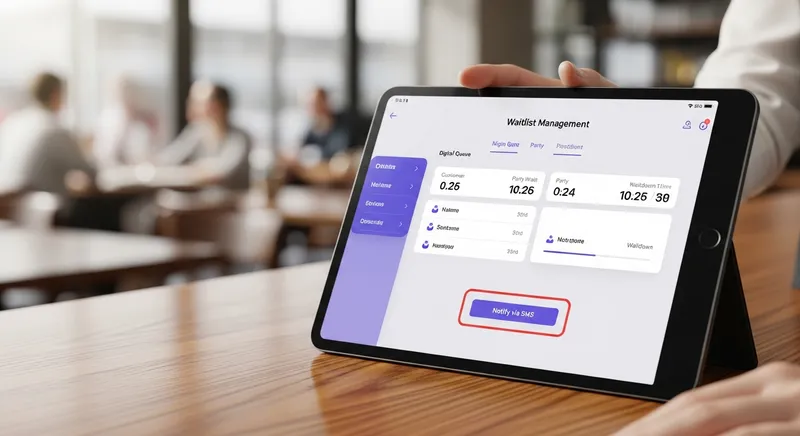
For most cafes, walk-in customers are your lifeblood. Your system must excel at managing this queue. Look for a digital waitlist that allows you to:
- Quickly add customers, party sizes, and quoted wait times.
- Send SMS notifications to customers when their table is ready. This is a game-changer. It allows them to browse nearby shops instead of crowding your entrance, drastically reducing perceived wait times and preventing them from leaving.
Essential Feature 2: Seamless POS Integration
Running a booking system that doesn't talk to your Point of Sale (POS) system is a recipe for headaches and manual double-entry. A true POS integrated booking system streamlines your entire operation, from the front door to the kitchen.
- Benefit: When a booking is seated, it automatically creates an order in the POS and can send dockets to a Kitchen Display System (KDS). You can link sales data to customer profiles, track spending habits, and see your busiest periods with real data. The table status updates automatically, so your front-of-house team is always in sync.
- Actionable Tip: When evaluating a system, ask the provider: "Do you have a direct, real-time integration with my specific POS?" and request a demo of the booking-to-billing workflow.
Essential Feature 3: No-Show & Cancellation Tools
No-shows are a costly problem. An empty table doesn't just mean lost revenue for that booking; it means you likely turned away other paying customers. Your booking system is your first line of defence.
- Tools: Look for automated SMS and email reminders. Industry data shows this simple feature can reduce no-shows by up to 40%. For larger parties or peak times, the ability to require a credit card to hold the booking or take a deposit is crucial.
- Evidence: It's not just about penalties. Academic research shows that combining a clear cancellation policy with positive awareness campaigns encourages better booking behaviour from customers. You can learn more about this in our guide on proven ways to increase table turnover.
The 7 Best Booking Systems for NZ Cafes & Restaurants (2026 Review)
We've reviewed the top players in the New Zealand market, focusing on their suitability for cafes and high-turnover restaurants. We considered features, pricing, and local support to bring you this definitive list.
1. Lazygrid Bookings
- Best For: Cafes and restaurants wanting a fully integrated, commission-free system with local support.
- Key Features: Native integration with Lazygrid POS, smart waitlist with SMS, online ordering sync, QR code ordering, and kitchen display system (KDS) integration. All bookings are commission-free, and you retain full ownership of your customer data.
- Pricing Model: Included in the Standard ($59/month) and Premium ($149/month) plans. No per-booking fees.
- NZ-Specifics: Wellington-based support team, designed specifically for NZ hospitality workflows.
- Pros & Cons:
- Pros: Truly all-in-one system (POS, bookings, online ordering), commission-free model saves money at scale, strong local NZ support.
- Cons: Best features are realized when using the full Lazygrid POS ecosystem.
2. ResDiary
- Best For: Established, larger restaurants needing powerful table management and network exposure.
- Key Features: Advanced yield and table management, detailed reporting, and a large existing network of users. Manages complex floor plans and multiple dining areas well.
- Pricing Model: Monthly subscription fee plus potential per-cover fees for bookings made through their partner network.
- NZ-Specifics: Widely used in NZ, giving it a strong local presence and many integrations with local POS systems.
- Pros & Cons:
- Pros: Powerful and granular control over table management, good for maximising yield, established brand.
- Cons: Can become expensive with network booking fees, interface can feel complex for smaller cafes.
3. OpenTable
- Best For: Restaurants in tourist-heavy locations needing maximum diner exposure.
- Key Features: Unmatched marketing reach through its consumer-facing app and website. The brand recognition can bring in new diners who don't know your restaurant.
- Pricing Model: Can be expensive. Typically involves a monthly subscription plus a significant per-diner fee (often several dollars per person) for each booking.
- NZ-Specifics: Strong presence in major city centres like Auckland and Queenstown, but you lose ownership of customer data.
- Pros & Cons:
- Pros: Huge marketing reach and potential to attract new customers, especially tourists.
- Cons: High per-booking costs can erode margins, you don't own the customer relationship or data.
4. Now Book It
- Best For: Venues wanting a feature-rich, commission-free alternative to the big networks.
- Key Features: Flat-fee pricing, widget for your website, SMS confirmations, waitlist management, and tools for deposits and credit card holds. Also offers gift card functionality.
- Pricing Model: Flat monthly subscription fee, with no commission on bookings.
- NZ-Specifics: A popular choice in both Australia and New Zealand, it's a well-understood and supported platform in the local market.
5. Restaurant Hub
- Best For: Marketing and discovery, especially for filling tables during off-peak times.
- Key Features: Functions primarily as a diner-facing marketplace to promote deals and special offers. It's a marketing tool first, a management tool second.
- Pricing Model: Commission-based, where you pay for the bookings they generate.
- NZ-Specifics: A well-known brand among New Zealand diners, making it effective for promotions.
6. Eveve (by ResDiary)
- Best For: Traditional or fine-dining restaurants that have used the system for years.
- Key Features: Known for its robust and reliable, albeit less modern, interface. It has a long history in the NZ market and is valued for its stability.
- Pricing Model: Traditionally a flat monthly fee.
- NZ-Specifics: One of the original players in the NZ market, now part of the ResDiary group. As technology evolves, it's essential to check for recent updates, a trend covered by industry media like Restaurant & Café Magazine.
7. Eat App
- Best For: Restaurants looking for a modern interface with a focus on CRM and guest data.
- Key Features: Strong table management, guest database with tagging and analytics, and integrations with platforms like TripAdvisor and Google for booking acquisition.
- Pricing Model: Tiered monthly subscription based on features and booking volume. Offers a free basic plan with limited covers.
- NZ-Specifics: A global player with a growing presence in New Zealand, offering a modern alternative to some of the older systems.
Feature Comparison at a Glance
| System | Best For | Pricing Model | Waitlist SMS | Direct POS Integration? |
|---|---|---|---|---|
| Lazygrid | All-in-one POS & bookings | Flat Monthly Fee | Yes | Native with Lazygrid POS |
| ResDiary | Large, established venues | Monthly Fee + Network Fees | Yes | Many POS partners |
| OpenTable | Maximum marketing exposure | Monthly Fee + Per-Diner Fee | Yes | Limited POS partners |
| Now Book It | Commission-free alternative | Flat Monthly Fee | Yes | Some POS partners |
| Restaurant Hub | Marketing & promotions | Commission-based | No | Varies |
| Eveve | Traditional fine dining | Flat Monthly Fee | Yes | Some POS partners |
| Eat App | Modern CRM & guest data | Tiered Monthly Fee | Yes | Some POS partners |
Cost Breakdown: Commission-Free vs. Network Booking Systems
Understanding the pricing model is the most critical part of your decision. It boils down to two main approaches:
Commission-Free Systems (e.g., Lazygrid, Now Book It): You pay a flat monthly fee for the software. You get unlimited bookings with no extra charges. You own the customer data and can market to your diners directly. This model is predictable and often more affordable as you grow.
Network/Per-Booking Systems (e.g., OpenTable, Restaurant Hub): You pay a fee for every single person booked through the platform. This can be great for initial marketing exposure, but costs can quickly spiral. You often lose control of your customer data, making it hard to build direct relationships.
Actionable Tip: Do the Math
Let's compare the costs for a venue doing 500 covers a month through a booking system.
| System Type | Monthly Fee | Per-Cover Fee | Total Monthly Cost (500 Covers) |
|---|---|---|---|
| Network System | $50 | $2.00 | $1,050 |
| Commission-Free | $99 | $0.00 | $99 |
As you can see, a commission-free system can save you a significant amount of money that goes straight to your bottom line. This is especially important when considering what drives customers. As NZBusiness Magazine highlights, convenience reigns supreme for Kiwi consumers, so having your own easy-to-use, commission-free booking widget is a powerful asset.
Conclusion: Making the Right Choice for Your Business
The 'best' booking system is the one that solves your specific problems and fits your budget. For a high-turnover NZ cafe, this usually means a system that excels at waitlist management, offers commission-free online bookings, and integrates seamlessly with your POS and KDS.
Don't think of a booking system as just a cost-center. The right tool is a revenue-driver. It transforms a chaotic front-of-house into a smooth, efficient operation, reduces lost revenue from no-shows, and provides data that helps you make smarter business decisions. By taking control of your bookings, you take control of your customer relationships and your profitability.
Ready to see how a truly integrated system can transform your cafe? Lazygrid offers commission-free bookings, smart waitlist management, and seamless POS integration to help you run a more efficient and profitable operation.
Book a demo with our Wellington-based team today or explore our features to learn more.
Frequently Asked Questions
What is the best free booking system for a small restaurant in NZ?
While the idea of a 'free' system is tempting, they often come with significant hidden costs or limitations. A so-called free booking system might restrict you to a small number of bookings per month, lack essential features like SMS reminders, or charge you unexpected per-booking fees. A better approach for a small restaurant is to find a low-cost, commission-free system. This gives you predictable monthly expenses and all the tools you need to grow without being penalised for your success.
Do I lose my customer data if I use a platform like OpenTable?
Yes, in most cases, you do. When a customer books through a third-party marketplace like OpenTable, they are considered the platform's customer. You get the booking details, but you typically don't receive their email address or consent for your own marketing efforts. Using a direct booking system that integrates with your website ensures that you own this valuable data. This allows you to build a direct relationship with your guests, send them special offers, and encourage repeat visits.
How much should I expect to pay for a restaurant booking system in NZ?
Costs can vary significantly. There are two main types:
- Flat Monthly Fee: This typically ranges from $50 to $200 per month for unlimited bookings. This model is predictable and cost-effective for busy venues.
- Per-Diner Fee: This model, used by network platforms, can range from $1 to $2.50 per person booked. For a group of 4, that could be $10 for a single booking. To compare, calculate your average monthly bookings. If you book 200 people a month at $2 per diner, your cost is $400, making a flat-fee system much more affordable.
Can a booking system actually stop no-shows?
While no system can eliminate no-shows completely, a good one can drastically reduce them. The most effective tools are automated SMS and email reminders, which politely nudge customers before their booking. For an even stronger deterrent, especially for large groups or during peak times, use a system that can securely take a deposit or hold a credit card. This simple step ensures customers have skin in the game and are far more likely to show up or cancel in advance.
Does my booking system need to integrate with my POS?
It is highly recommended. A non-integrated system creates unnecessary work and potential for errors. When your booking system and POS are integrated, your operation becomes much smoother. Seating a booking can automatically open a tab, table statuses update in real-time for all staff, and you can link customer profiles to their spending habits. This provides invaluable data and saves your team time and stress during busy service.