
Stop NZ Brunch Walk-Outs: The No-Bookings POS Strategy
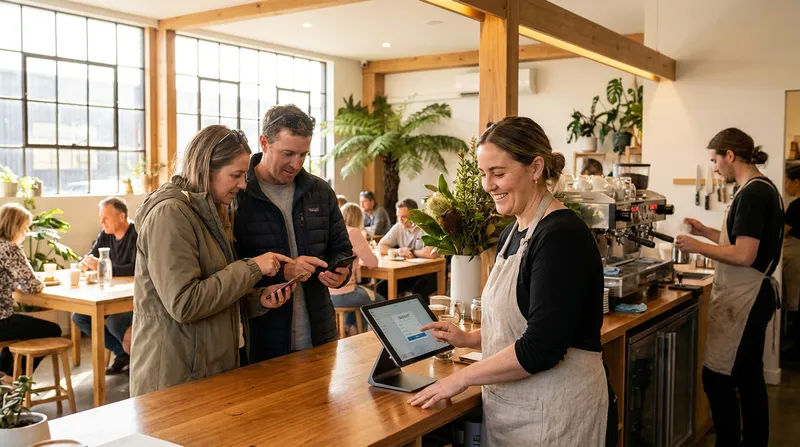
It is 10:30 AM on a Sunday. Your cafe is operating at maximum capacity, the kitchen is firing on all cylinders, and the coffee machine has not stopped for two hours. Then, the inevitable happens. A group of four walks up to your entrance, takes one look at the chaotic crowd of people waiting by the door, turns around, and walks to your competitor down the street. You just lost over $120 in revenue in a matter of seconds.
At the exact same time, you have a reserved table sitting completely empty because a booking is 15 minutes late.
For high-volume cafes and restaurants across New Zealand, the weekend brunch service is a delicate balancing act. Physical queues scare walk-ins away, while traditional reservations destroy table turnover with late arrivals. To make matters worse, standalone booking applications add another monthly subscription, and some add per-cover fees.
There is a better way. This guide will show you how to implement a highly profitable hybrid strategy using an all-in-one POS system. By combining walk-in only weekends with a digital waitlist and offering flat-fee reservations for weekdays, you can stop losing revenue to the doorway crowd and maximise your table turnover.
The weekend brunch dilemma: walk-ins vs. reservations
New Zealand has a world-class weekend brunch culture. From Auckland to Wellington to Christchurch, locals expect high-quality food, exceptional coffee, and a vibrant atmosphere. However, this high demand creates a unique operational challenge where high volume meets strictly limited seating.
The traditional approach to managing this demand is a physical queue. Guests arrive, put their name on a clipboard, and wait by the door. Unfortunately, this creates a visual deterrent. A crowded doorway signals to new arrivals that the wait is too long, triggering immediate walkaways.
US data from Toast, cited by WaitQ, shows that 72 percent of diners say 30 minutes is their limit, and guests on a waitlist stick around for about 20 minutes on average before giving up.
To solve this, some cafes switch to a reservations-only model for weekends. But as any seasoned hospitality owner knows, weekend brunch reservations come with their own set of costly problems, primarily late arrivals and unpredictable dining durations.
Actionable Tip: Track your walkaways this weekend. Do not guess how much money you are losing. This Saturday and Sunday, give your host a clicker or a notepad. Ask them to tally every single group that looks at the line and walks away. Multiply that number by your average spend per head. The final figure will clearly show you the true cost of an unmanaged physical queue.
Why traditional reservations fail the weekend brunch test
During a Tuesday lunch service, reservations are fantastic. They give you predictability and help you schedule staff. But during a peak weekend brunch, a traditional reservation system can actually cost you money.
The mathematics of casual dining relies heavily on rapid table turns. When your business model requires seating a new group every 45 minutes, every single minute counts.
Imagine a party of four has a booking for 10:00 AM. To accommodate them, you must leave a table empty from 9:45 AM. If the party arrives 15 minutes late at 10:15 AM, that table has sat empty for 30 minutes during your busiest period. If they then take 60 minutes to eat, that table has been occupied or held for 90 minutes total, yielding only one table turn instead of two.
This inefficiency cascades through your entire floor plan, causing walk-ins to wait longer and ultimately leave. This is why the 'no-bookings' weekend strategy is popular with many high-volume cafes.
Actionable Tip: Calculate your average revenue per minute. Take your total weekend revenue and divide it by your total weekend operating minutes. Then, divide that by your number of tables. This gives you your Revenue Per Available Table Minute. Once you know this number, you can see exactly how many dollars a 15-minute late reservation is draining from your bottom line.
The cost trap: ResDiary, NowBookIt NZ and standalone apps
Many cafe owners recognise the need to manage their doorway crowds better, so they turn to standalone reservation and waitlist software. Standalone reservation platforms such as ResDiary, NowBookIt and Eveve are powerful tools, but they are separate subscriptions on top of your POS. Pricing models vary: some charge a flat monthly fee, while others add per-cover or network fees, and several only quote on request.
Beyond the financial cost, there is a massive operational drag when you use a booking app that does not talk to your main till. If your waitlist is on one iPad and your POS is on another, your staff are forced into double data entry. They have to manually update table statuses across two systems, leading to errors, missed updates, and frustrated customers.
To run an efficient floor, you need to explore posBoss (Bustle) Alternatives NZ: Add-On vs All-in-One POS. Modern, all-in-one POS systems eliminate the need for separate third-party subscriptions by building waitlist and table management directly into the point of sale.
Actionable Tip: Audit your monthly software subscriptions. Sit down with your bank statements and tally exactly what you pay annually for your standalone reservation system. Compare that to the cost of upgrading to an all-in-one POS system that includes booking and waitlist tools in its Standard plan, with a small flat fee per booking.
The hybrid solution: a virtual queue system built into your POS
Many busy cafes in New Zealand are adopting a hybrid model. They refuse reservations on weekends, but they do not force people to stand in a physical line. Instead, they use a virtual queue system built directly into their POS.
Here is how the workflow operates in three simple steps:
- Check-in at the counter: A group of four arrives at 10:30 AM. Instead of pointing them to a crowded doorway, your host takes their name and phone number on the POS iPad.
- Keep the doorway clear: The host tells them the wait is 30 minutes and encourages them to take a walk or grab a takeaway coffee from your cart outside. This makes your cafe look busy but approachable to new walk-ins.
- Call the party back: When the table is ready, the host contacts the guest to let them know their table is ready.
The impact of this simple workflow is substantial. QueueAway reports one example restaurant that cut walkaways by 35 percent and average waits from about 25 minutes to around 12 after introducing a digital queue.
This strategy works best when paired with efficient kitchen operations. If you want to master peak periods, you should also look into Order Pacing & Scheduled Pickup POS: Crush the NZ Rush to ensure your kitchen can handle the constant flow of seated guests.
Actionable Tip: Train your front-of-house staff on the transition script. Technology only works if your staff know how to sell it. Train your host to confidently say, "We are currently on a 30-minute wait, but there is no need to stand in the cold. Let me grab your number, and I will reach out the moment your table is ready. Feel free to grab a coffee from our takeaway window while you wait!"
How visual floor plans optimise walk-in table management
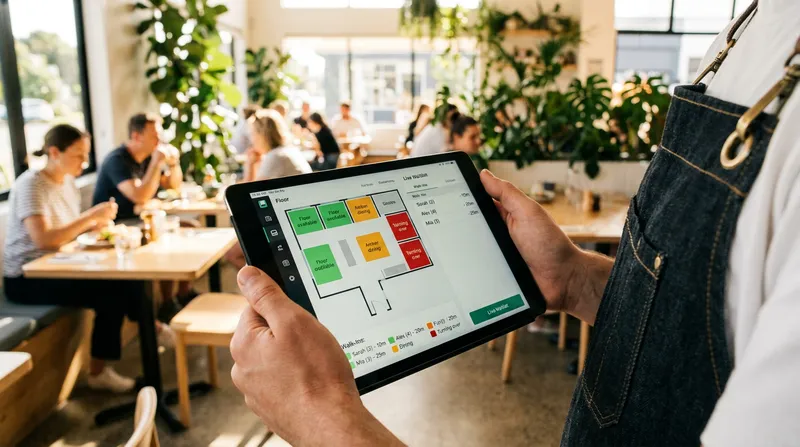
Taking a phone number is only half the battle. The real operational advantage happens when your waitlist is directly connected to a live visual floor plan inside your POS system.
When your floor plan is built into your POS, your host does not have to walk the floor to see which tables are finishing up. The iPad shows them what is happening in real time. They can see at a glance which tables are available, occupied or reserved.
Because the host has this live data, they can contact the next group on the waitlist as soon as a table frees up and is being wiped down. By the time the customer walks back to the cafe, the table is clean, set, and ready. You have just eliminated five minutes of dead time per table turn. Over a busy weekend, those saved minutes equate to dozens of extra customers seated and served.
Actionable Tip: Map your physical cafe layout into your digital system. Take the time to design your digital floor plan to exactly match your physical space. Include barriers, windows, and outdoor seating. When your host staff and servers are looking at a digital map that perfectly reflects reality, communication errors disappear, and seating efficiency skyrockets.
Keeping customer data safe: built-in POS tools vs. third-party apps
While managing the physical flow of customers is critical, you must also consider the psychological and regulatory aspects of digital waitlists.
The psychology of waiting heavily influences customer behavior. A peer-reviewed study in Management Science found that wait times can act as a signal of quality: diners unsure about a venue may see a longer wait as a sign it is worth it, while a very short wait can put them off. A visible, managed digital queue assures guests that their spot in line is secure.
However, collecting phone numbers for a waitlist brings data privacy into play. Since 1 May 2026, the Privacy Act's new IPP 3A has added notice duties when businesses collect personal information indirectly, so it pays to know where customer data is stored and who can access it.
Using one POS system for your waitlist, bookings and customer records means fewer separate providers hold your guests' details. To understand more about these compliance requirements, read our guide on the NZ Privacy Act IPP 3A (2026): Ditch 3rd-Party Data for POS.
Actionable Tip: Consolidate your guest data into a single platform. Stop using paper clipboards and random third-party tablet apps to collect phone numbers. By moving your waitlist into your main POS system, you keep guest details in one place. If you plan to use them for loyalty or marketing later, tell guests that when you collect their number.
Weekday bookings: flat-fee restaurant booking systems win
The 'no-bookings' strategy is ideal for the weekend rush, but what about a rainy Tuesday morning? To run a truly optimised hospitality business, you need a hybrid approach. You want walk-ins only on the weekends, but you want to encourage structured reservations during your quiet weekday periods or for large corporate groups.
This is where high-cost standalone subscriptions can hurt your margins, charging steep monthly fees regardless of whether it is a busy Saturday or a quiet Tuesday. Conversely, modern all-in-one POS systems offer a much fairer pricing model.
With solutions like Lazygrid, you can accept weekday bookings using a low, flat-fee structure (typically NZ$0.50 to $1.00 per booking, depending on your industry). You are never paying per-cover fees. If a group of ten books a table for a Wednesday team lunch, you pay a tiny flat fee for the entire booking, keeping your profit margins intact.
Furthermore, modern POS systems integrate directly with search engines. You can learn how to capture high-intent diners directly from Google Search and Maps by exploring Reserve with Google in NZ: Direct Bookings (Low Flat Fees). This allows a customer searching for "cafes near me" on a Thursday to book a table instantly, straight into your booking system.
Actionable Tip: Claim your business profile and activate direct bookings. Ensure your Google Business Profile is fully updated with your current hours and menu. If you're on Lazygrid Premium, connect Reserve with Google (each booking carries the same small flat per-booking fee). Open your booking availability for weekdays and large groups only, keeping your weekends blocked out exclusively for your waitlist walk-ins.
Conclusion: stop losing revenue to the doorway crowd
Managing a high-volume weekend brunch service does not have to mean turning away potential customers. By ditching the chaotic physical queue and adopting a digital waitlist, you can keep your doorway clear and capture revenue that would otherwise walk down the street to your competitors.
Traditional reservations ruin table turnover during peak hours, and standalone booking applications add another monthly subscription, and some add per-cover fees. The smart, modern approach is to use an all-in-one POS system that combines a live visual floor plan, waitlist management, and low flat-fee weekday bookings into one seamless platform.
Stop letting the doorway crowd dictate your weekend revenue. Upgrade your table management strategy with Lazygrid today, empower your front-of-house staff with built-in waitlist tools, and watch your weekend table turnover and profitability soar.
Frequently asked questions
What is the best waitlist app for cafes in NZ?
The best waitlist tool is one built directly into your main point of sale. This eliminates double data entry, reduces your monthly software subscription costs, and allows your front-of-house staff to manage the floor seamlessly from a single iPad.
How do I reduce walkaways during a busy weekend brunch?
The most effective strategy is using a virtual queue system. By taking a customer's phone number and contacting them when their table is ready, you remove the intimidating, crowded line at the door. Customers are free to grab a coffee nearby, keeping them engaged and preventing them from leaving for a competitor.
Are there affordable Eveve or ResDiary alternatives in New Zealand?
Yes. Instead of paying separate monthly fees or per-cover charges for standalone software, modern NZ cafes are switching to all-in-one POS systems. These systems include flat-fee booking tools and built-in waitlist management.
Can I use Reserve with Google for my NZ cafe?
Absolutely. By integrating Reserve with Google on Lazygrid Premium, you can capture direct bookings straight from Google Search and Maps. This is ideal for driving weekday traffic, and it operates on a low flat-fee basis (NZ$0.50 to $1.00 per booking) rather than taking a percentage of the cover.
Why is a built-in POS floor plan better than a separate app?
A built-in floor plan shows table status (available, occupied or reserved) alongside the orders assigned to each table. This allows hosts to contact the next group on the waitlist as soon as a table frees up, shaving crucial minutes off every table turn.