
Allergy-Proof Your NZ Kitchen: POS & KDS Integration Guide
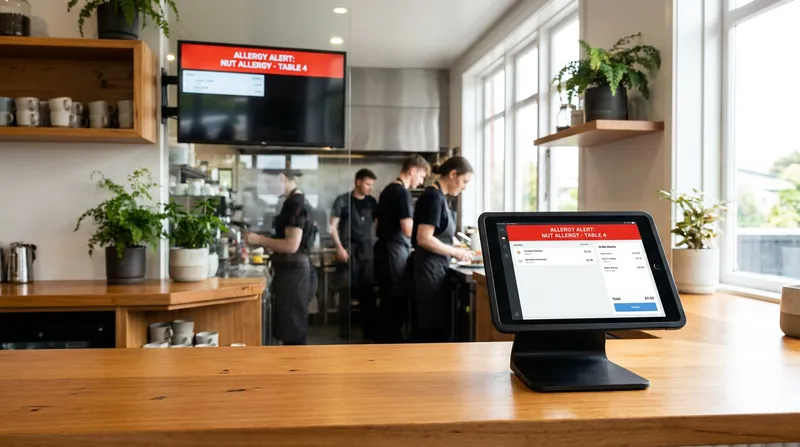
Are you relying on handwritten notes or verbal shout-outs to manage food allergies in your venue? If so, you are taking a significant operational risk. Managing food allergies during a frantic Friday night rush is one of the most stressful challenges a hospitality owner faces. Under New Zealand law, business owners carry the ultimate liability. Relying on human memory during a busy service is a recipe for mistakes. You need a foolproof, automated system that connects front-of-house orders directly to kitchen execution without dropping the ball.
This is where implementing robust restaurant allergen management software becomes your ultimate safety net. By integrating a modern Point of Sale (POS) system with a Kitchen Display System (KDS), you remove human error from the equation. This guide will show you exactly how to transform your operations into an allergy-proof environment, mitigating your legal risks while delivering exceptional, safe service.
Understanding Food Allergies and Cross-Contamination in NZ
Before diving into the technology, it is critical to understand the regulatory landscape governing New Zealand food safety compliance. The rules are strict, and ignorance is not a valid legal defense when a customer suffers a severe reaction.
According to the Ministry for Primary Industries (MPI), food businesses must clearly state if food contains common allergens. These include peanuts, specific tree nuts, crustaceans, molluscs, fish, milk, eggs, wheat, soy, sesame, and lupin. If a customer asks about the ingredients in your dishes, your staff must provide accurate, immediate information. There is a massive difference between a mild food intolerance and a life-threatening anaphylactic allergy. Your staff must treat every dietary request with the highest level of severity.
Furthermore, Food Standards Australia New Zealand (FSANZ) has updated the Food Standards Code with the Plain English Allergen Labelling (PEAL) requirements. While these rules primarily target packaged goods with a hard transition deadline of February 2026, the mandate for transparency extends directly to restaurants, cafes, and takeaway venues. You can no longer use vague terms like "tree nuts" on your menus. You must specify the exact nut, such as almonds or cashews.
Cross-contamination occurs when a safe food comes into contact with an allergen, transferring the dangerous protein. This can happen through shared fryers, unwashed cutting boards, or a chef accidentally using the same tongs for two different dishes. Modern technology designed to prevent cross-contamination stops this exact scenario by creating hard stops and visual alerts in your digital order flow.
The Legal Shield: How POS Audit Trails Protect NZ Owners
Food allergy liability in NZ restaurants is a subject that keeps many owners awake at night. The New Zealand Food Act 2014 requires all food businesses to operate under a registered Food Control Plan or National Programme. A key component of these plans is strict allergen management.
If a customer suffers an allergic reaction and health inspectors investigate your venue, they will demand to see your processes. A verbal explanation of "we usually tell the chef" will not hold up in court or during an official audit. Auditors look for documented training, evidence of ingredient tracking, and proof of reliable communication. This is exactly where compliance software saves your business.
An automated POS creates a permanent digital audit trail. Imagine a busy Auckland cafe during a Saturday brunch rush. When a server inputs an order with a severe peanut allergy, the system logs the exact time the order was placed, the specific modifiers selected, and the exact station the ticket was routed to in the kitchen.
If an incident occurs, you can pull a cloud-based report instantly to prove that your front-of-house staff followed the correct protocol. This digital safety record acts as a legal shield. It proves you have a systematic, technology-backed process for handling dietary requirements. If you are currently expanding your business, standardizing this digital trail across all venues is essential. Learn more in our NZ Multi-Site POS Playbook: Scale From 1 to 3 Locations - Lazygrid Blog.
How to Set Up Allergen Alerts in Your POS
Setting up your system correctly is the first step in risk management. You cannot expect your system to protect you if the data input is flawed. Here is how to configure your POS dietary modifiers for maximum safety.
First, utilize forced modifiers for high-risk dishes. If someone orders a Pad Thai, your POS should automatically prompt the server with a mandatory question: "Any nut allergies?" The server cannot send the ticket to the kitchen until they select "Yes" or "No".
Second, use custom allergen tags in your product catalog. Modern iPad POS systems allow you to attach specific allergen tags to every ingredient. When a server selects a dish, the POS will instantly display any hidden allergens, such as soy sauce containing wheat.
Third, ensure you have a custom allergy note feature enabled. Customers can be allergic to almost anything, including garlic, onion, or specific spices. Your staff must have a clear, highly visible text box to type in unique requests. If you are still using clunky, outdated registers, it might be time to read The POS Trap: Why NZ Venues Are Switching to iPad POS - Lazygrid Blog.
Fourth, conduct regular menu audits. Seasonal menu changes introduce new risks. When your chef swaps a summer salad for a winter soup, the allergen profile changes. Use your POS bulk-update features to quickly align the new menu items with the correct allergy tags before the first service begins.
Quick POS Setup Checklist:
- Enable forced modifiers on high-risk items.
- Tag all hidden allergens in the ingredient catalog.
- Add a mandatory text field for custom allergy notes.
- Audit allergy profiles during every seasonal menu change.
Integrating KDS for Kitchen Safety
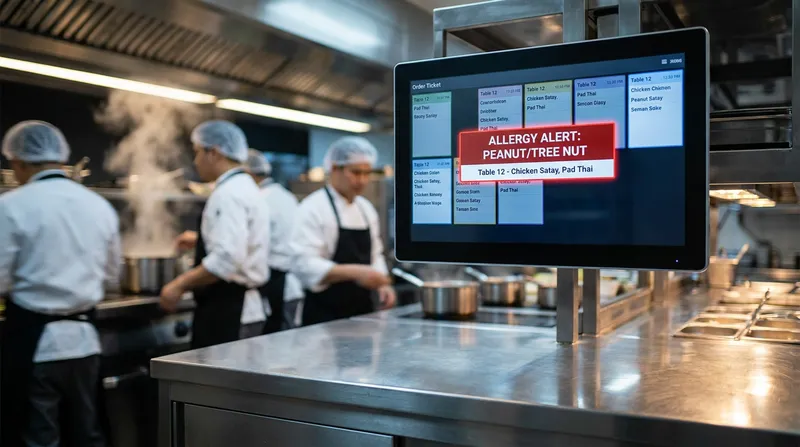
Sending an allergy alert from the POS is only half the battle. The kitchen must receive, understand, and execute that order flawlessly. This is why KDS setup is the most critical component of an allergy-proof kitchen.
Paper tickets are a liability. They get lost, covered in grease, or misread in the heat of service. A digital kitchen display completely transforms how your back-of-house operates. With Lazygrid's Standard plan (from $59/month), an allergen order fired from the POS can trigger several automated safety protocols on the KDS.
First, the system uses color-coded tickets. While standard orders appear white or green, an allergy order flashes bright red on the screen. This visual disruption forces the kitchen staff to stop and pay attention immediately.
Second, the KDS can route the ticket to a designated safe prep station. Instead of sending a gluten-free order to the main line where flour is airborne, the system automatically routes the ticket to an isolated station. You can explore these features on the Lazygrid KDS product page.
Third, the KDS requires the chef to manually bump or acknowledge the allergy warning before they can clear the ticket. This creates a secondary layer of accountability, ensuring the chef has physically registered the dietary requirement before the plate leaves the pass.
The Food Truck Dilemma: Managing Allergens in a Tiny Footprint
Food trucks face a unique set of challenges. When operating in a confined space, the risk of cross-contamination skyrockets. You do not have the luxury of separate prep stations or dedicated allergy fryers. Therefore, food truck allergen management relies heavily on strict digital workflows and pre-service preparation.
For mobile vendors, managing dietary requirements during a massive festival rush is incredibly stressful. The solution is moving the allergy conversation to the pre-ordering phase. By utilizing an integrated online ordering system, customers can flag their dietary requirements before they even walk up to the window.
When a customer places a digital order, they can select their specific allergens from a drop-down menu. This gives the operator advanced warning to clean a specific section of the grill or change their gloves. Check out our guide on Commission-Free Pre-Ordering for NZ Food Trucks - Lazygrid Blog to see this in practice.
Beyond the Kitchen: Tracking Allergens in Wellness Clinics
While restaurants are the primary focus of food safety laws, allergen management is also a massive liability for service businesses. Massage therapists and beauty salons use products loaded with potential allergens, including sweet almond oil, latex, and soy-based waxes.
Fortunately, the same POS Customer Relationship Management (CRM) technology used in hospitality can be adapted for wellness businesses. During an initial consultation, staff can log skin sensitivities directly into a client's digital profile. The system then automatically flags these warnings during future bookings. For more insights on upgrading your wellness business tech, read our Timely & Fresha Alternatives: NZ Salon POS Guide 2026 - Lazygrid Blog.
Staff Training for Dietary Requirements
Technology is only as effective as the people operating it. Your restaurant allergy protocol must be paired with rigorous, ongoing staff training.
According to Allergy New Zealand, implementing a robust allergen management policy requires staff to be trained on exactly how to communicate with customers and handle ingredient inquiries safely. Your staff must feel confident discussing ingredients and using the POS system to verify information.
To build this confidence, run mock allergy drills during your pre-service meetings. Use the POS training mode to simulate an anaphylactic emergency order, ensuring staff know exactly which buttons to press.
Use your POS system's staff management features to enforce training standards. Assign role-based permissions, ensuring that new trainees cannot bypass allergy prompts without a manager's approval. Learn more about using data to build your team in our post on how to Reduce Staff Turnover in NZ: Use POS Data to Retain Teams - Lazygrid Blog.
Managing Menu Modifiers and Ingredients
A truly allergy-proof kitchen requires total visibility into your supply chain. If your supplier substitutes a brand of mayonnaise that contains soy for one that does not, your entire allergen matrix is compromised. According to guidance published by the Allergen Bureau, food businesses must stay entirely up to date with their ingredient labeling to ensure consumers receive accurate information.
Your POS inventory management system is your best defense against supply chain surprises. By tracking stock at the ingredient level, you can maintain a digital food bible that lists every component of every dish. When you update a recipe in the back office, those changes instantly sync to the front-of-house iPads.
This level of detailed tracking also provides massive financial benefits. By measuring exactly what goes into each dish, you can pinpoint your true Cost of Goods Sold (COGS) and identify areas where food waste is eating into your margins. Discover how to balance these elements in our guide to Menu Engineering NZ: Calculate Food Cost & Boost Profits - Lazygrid Blog.
Conclusion
Mitigating legal risk in the New Zealand hospitality industry requires more than just good intentions. The Food Act 2014 and FSANZ regulations demand precision, transparency, and accountability. Relying on handwritten dockets and verbal warnings is a liability you can no longer afford to carry.
By investing in modern restaurant software, you are building a resilient, automated safety net. From forced modifiers on the iPad POS to bright red visual alerts on the KDS, every piece of technology works together to prevent cross-contamination. More importantly, this digital order flow creates the audit trail you need to protect your business.
Taking control of your allergen protocols is the smartest business decision you can make this year. Take the guesswork out of your operations, empower your staff with the right data, and give your customers the peace of mind they deserve.
Lazygrid's Standard plan includes online ordering, advanced printing, and kitchen routing from just $59/month, making professional allergen management accessible for venues of any size. Ready to build an allergy-proof business? See how Lazygrid's features work together by visiting our POS product page and start your free trial today.
Frequently Asked Questions
What are the FSANZ requirements for allergen labelling in NZ restaurants?
Under the updated Food Standards Code, New Zealand hospitality businesses must clearly declare common allergens when asked by a customer. The new Plain English Allergen Labelling (PEAL) rules mandate that specific ingredients (like individual tree nuts instead of generic "nuts") are explicitly identified. A modern POS system helps track these specific ingredients across your menu.
How does a Kitchen Display System (KDS) prevent cross-contamination?
A KDS prevents cross-contamination by completely removing easily lost paper tickets. When a server inputs an allergy warning into the POS, the KDS flashes the ticket in bright red and can automatically route the order to an isolated, safe prep station. This ensures the allergen-free dish is prepared away from dangerous ingredients.
Can a POS system help beauty and massage shops track allergens?
Yes. While typically used for food, a robust POS with CRM capabilities allows wellness businesses to log client skin sensitivities (like latex or nut oil allergies) in their digital profiles. The system will automatically flag these warnings during future bookings, protecting clients from severe allergic reactions.
How do food trucks comply with the NZ Food Act 2014 for dietary requirements?
Due to confined spaces and high cross-contamination risks, food trucks can comply by utilizing integrated online ordering systems. This allows customers to select their dietary requirements before arriving, giving the operator time to clean specific grill areas or change gloves before the busy service period hits.
What happens if a NZ hospitality business violates food safety compliance rules?
Violating the NZ Food Act 2014 can result in serious legal and financial consequences, including massive fines, mandatory closure, and personal liability for the business owner. Implementing an automated POS creates a digital audit trail to prove you followed strict safety protocols if an incident is ever investigated.