
Automate the 15% Public Holiday Surcharge for NZ Cafes
Introduction: The Hidden Cost of Public Holidays for NZ Venues
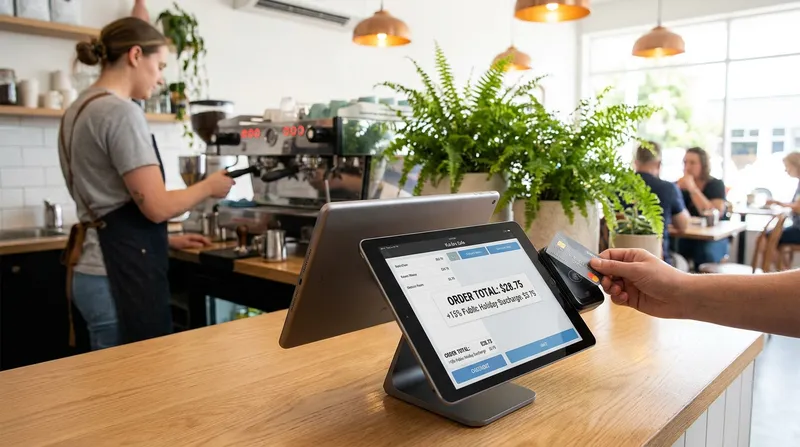
Preparing your venue for a busy public holiday weekend is stressful enough without the added headache of manual software updates. For many New Zealand hospitality owners, the morning of a public holiday begins with a frantic 6:00 AM scramble to manually adjust prices on the till.
This manual admin is a massive pain point. If a manager forgets to turn the surcharge on, you lose crucial revenue needed to cover inflated wage costs. If they forget to turn it off the next day, you risk overcharging customers, dealing with angry reviews, and potentially breaching consumer laws. You are likely exhausted by this constant balancing act and anxious about making a costly mistake during complex holidays like Easter Sunday.
Fortunately, modern hospitality menu pricing software has evolved. You no longer have to rely on sticky notes and memory to stay compliant. This guide will explain how to navigate the complex landscape of a cafe surcharge in New Zealand and show you exactly how to automate your calendar so you can focus on serving your customers.
The Financial Reality: Why Surcharges Are Essential in NZ Hospitality
Running a hospitality business in New Zealand operates on notoriously tight margins. When a public holiday rolls around, those margins are squeezed even further. Applying a surcharge is not a greedy profit grab, but rather a basic survival mechanism for your business.
Under the Holidays Act 2003, your employer obligations are strict. According to guidelines from Employment New Zealand, employees working on a public holiday must be paid at least time-and-a-half for the hours they work. Furthermore, if the holiday falls on a day they would normally work, they are also entitled to an alternative paid day off (a day in lieu).
These time-and-a-half hospitality NZ requirements drastically increase your daily operating costs. The Restaurant Association of New Zealand frequently highlights that hospitality venues operate on incredibly slim profit margins. Without a mechanism to offset these genuine extra costs, many cafes and restaurants would simply be forced to close their doors on public holidays.
Implementing a 15% surcharge ensures you can afford your public holiday pay NZ hospitality obligations while keeping your venue open for the community to enjoy.
The Legal Minefield: NZ Public Holiday Surcharge Rules Explained
While surcharges are entirely legal and necessary, applying them incorrectly can land your business in hot water. The NZ public holiday surcharge rules demand transparency above all else.
The core rule is that you must clearly disclose the surcharge to the customer before they make a purchasing decision. It is not enough to simply add the fee at the EFTPOS terminal. You must have clear signage on your front door, at the counter, and on your menus.
If you fail to manage restaurant surcharges in NZ correctly, you risk misleading consumers, which brings us to the most common legal trap hospitality owners face every single year.
The Easter Sunday Trap (and How to Avoid Breaches)
Easter weekend is the most confusing time of the year for hospitality pricing. Many business owners assume the entire four-day weekend consists of statutory holidays. This is a dangerous assumption.
Under the Holidays Act, Easter Sunday is not a statutory public holiday. Because it is not a public holiday, you are not legally required to pay your staff time-and-a-half on this day.
If you apply an Easter Sunday surcharge in NZ claiming it is for public holiday staff costs, you are likely breaking the law. According to the Commerce Commission New Zealand, charging a public holiday surcharge on days when additional costs are not genuinely incurred is a breach of the Fair Trading Act 1986. Consumer advocacy group Consumer NZ regularly warns the public to watch out for businesses making this exact mistake.
Actionable Tip: To ensure Fair Trading Act NZ surcharge compliance, audit your POS calendar today. Manually verify that Easter Sunday is explicitly excluded from your automated holiday pricing rules.
Navigating Mondayisation Rules for Waitangi Day and Anzac Day
Another layer of complexity is Mondayisation. When statutory holidays like Waitangi Day or Anzac Day fall on a Saturday or Sunday, special Mondayisation rules for hospitality in NZ apply.
If an employee normally works on the weekend, their public holiday is observed on that exact weekend day. If they do not normally work on the weekend, their holiday is transferred to the following Monday.
This means your venue might incur time-and-a-half costs on both the weekend and the Monday, depending on your roster. If you are applying a Waitangi day restaurant surcharge, you need a system that can accurately reflect your specific operating costs without requiring you to manually toggle prices on and off multiple times over a long weekend.
Quick Reference: NZ Public Holiday Surcharge Guide
To help you plan, here is a quick breakdown of common holidays and how they impact your pricing rules:
| Holiday | Statutory Status | Justifies Surcharge? | Mondayisation Applies? |
|---|---|---|---|
| New Year's Day | Yes | Yes | Yes |
| Waitangi Day | Yes | Yes | Yes |
| Good Friday | Yes | Yes | No (Always a Friday) |
| Easter Sunday | No | Only as a clearly disclosed surcharge, never labelled a public holiday fee | No |
| Anzac Day | Yes | Yes | Yes |
| Matariki | Yes | Yes | No (Always a Friday) |
The Problem with Manual POS Updates
If you are still using legacy till systems, you know the chaotic reality of manual updates. A manager has to arrive early, dig through the settings menu, and manually increase the prices of every item or toggle a blanket surcharge button.
The risks of this manual process are high. You face lost revenue if the manager forgets to turn the surcharge on during the morning rush, and severe customer backlash if they forget to turn it off on Tuesday morning. Furthermore, manual updates often miss integrated online ordering menus, creating a discrepancy between in-store and online prices.
Legacy systems simply fail at this task. As we cover in our guide on The POS Trap: Why NZ Venues Are Switching to iPad POS, modern cloud-based systems eliminate these manual bottlenecks. Upgrading to a reliable restaurant POS system in New Zealand gives you access to automated menu management in NZ, removing human error entirely.
How to Automate Holiday Surcharges with Lazygrid POS
To eliminate the stress of manual updates, you need centralised menu management. Modern software allows you to configure your pricing rules once and let the system handle the rest of the year automatically.
The scheduling and promotions tools described below are available on Lazygrid Standard ($59/month) and Premium ($149/month) plans. With POS surcharge automation in NZ, your business runs smoothly, your staff are paid correctly, and your customers receive transparent, accurate receipts.
Step 1: Set Up Your Annual Holiday Calendar
The first step to true automation is inputting your dates into the system well in advance. Do not wait until the day before a holiday to configure your settings.
- Log into your Lazygrid dashboard.
- Navigate to the scheduling or promotions tab.
- Input the exact dates for all upcoming statutory holidays.
- Pay special attention to unique local dates, such as a Matariki public holiday surcharge or your specific regional anniversary day (like Wellington Anniversary or Auckland Anniversary).
Actionable Tip: In January of each year, download the official government public holiday list. Take 15 minutes to schedule holiday pricing in your POS for the entire 12-month period. Once it is done, you can completely forget about it.
Step 2: Configure the 15% Surcharge Rule
Once your dates are locked in, you need to tell the system exactly what to do on those days.
- Create a new pricing rule specifically named "Public Holiday Surcharge".
- Set the value to a flat 15% increase.
- Apply this rule to your entire menu (excluding items like gift cards if necessary).
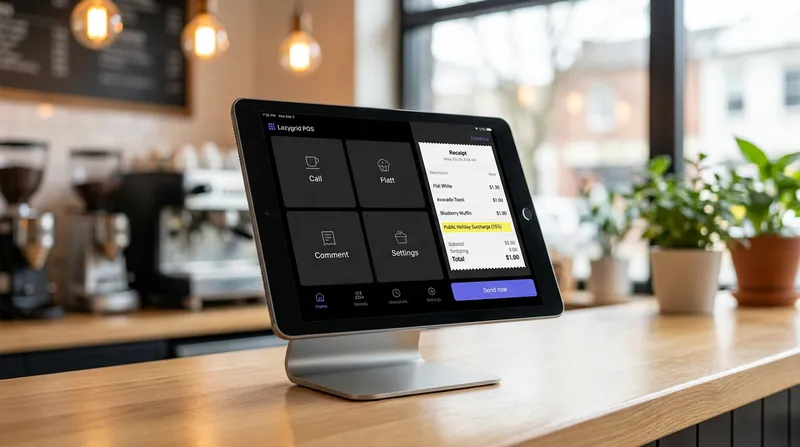
When you learn how to add a public holiday surcharge in your POS correctly, the system will automatically calculate the 15% fee at checkout. Most importantly, it displays this fee as a separate, clearly labeled line item on the customer's receipt. This level of transparency prevents your staff from having to manually calculate the math or argue with customers about hidden fees.
For more insights on setting up robust pricing rules, check out our comparison on All-in-One vs Modular POS: Why NZ Venues Are Switching.
Step 3: Sync Across Multiple Locations Automatically
If you operate a franchise, a chain of cafes, or a fleet of food trucks, manual updates are a nightmare. You cannot rely on five different managers at five different locations to remember to toggle the surcharge at the exact same time.
Centralised cloud-based scheduling solves this. When you configure your holiday calendar in the Lazygrid main dashboard, you can push that update live to all terminals and locations simultaneously.
You can also use centralised reporting to compare surcharge revenue performance across sites, while staff management sub-accounts ensure only authorised managers can adjust pricing rules. This ensures absolute brand consistency. A customer visiting your Auckland cafe will experience the exact same pricing structure as a customer visiting your Hamilton location. If you are looking to grow your footprint, read our NZ Multi-Site POS Playbook: Scale From 1 to 3 Locations for more operational tips.
Conclusion: Reclaim Your Time and Protect Your Margins
Public holidays should be a time of high revenue and bustling energy for your venue, not a source of administrative anxiety. By automating your 15% surcharge, you guarantee legal compliance, protect your hard-earned profit margins, and eliminate the risk of human error.
Stop relying on manual toggles, sticky notes, and the memory of your opening manager. Upgrading to an automatic surcharge POS system allows you to set your calendar once a year and focus entirely on delivering a great customer experience.
If you are ready to modernise your operations with a reliable restaurant POS system in New Zealand, start your free 14-day trial of Lazygrid POS or book a free demo with our Wellington-based team to make your next public holiday your most profitable one yet.
Frequently Asked Questions
Can I charge a public holiday surcharge on Easter Sunday in NZ?
You can apply a surcharge on Easter Sunday, but you must not label or present it as a public holiday surcharge. Easter Sunday is not a statutory public holiday under the Holidays Act, so you are not required to pay staff time-and-a-half and you cannot justify the fee as covering public holiday wage costs. Businesses may charge what they like as long as the surcharge is clearly disclosed in advance, but under the Fair Trading Act the reason must not be misrepresented. Claiming a surcharge is due to public holiday obligations on a day that is not a public holiday would be misleading.
Is a 15% public holiday surcharge legal in New Zealand?
Yes, it is entirely legal. However, the law requires that you clearly disclose the surcharge to your customers before they make a purchase. You must have clear, visible signage on your doors, menus, and at the counter explaining the 15% fee so consumers are fully aware before ordering.
Do I have to pay staff time-and-a-half on Matariki?
Yes. Matariki is a standard statutory public holiday in New Zealand. Any employees working on this day must be paid at least time-and-a-half for their hours worked, and they may also be entitled to an alternative paid day off (a day in lieu) if it is a day they would normally work.
How do I manage surcharges if I have multiple cafe locations?
The most efficient method is to use a cloud-based POS system with centralised menu management. This allows you to schedule the surcharge rules once in your main dashboard and automatically push the update to every terminal across all your locations simultaneously, ensuring brand consistency.
What happens if a public holiday falls on a weekend?
This triggers Mondayisation rules. If an eligible holiday (like Waitangi Day) falls on a weekend, it is observed on that weekend for staff who normally work those days. For staff who do not normally work weekends, their holiday entitlement is moved to the following Monday.