
Best POS System for NZ Bar-Restaurant Hybrids
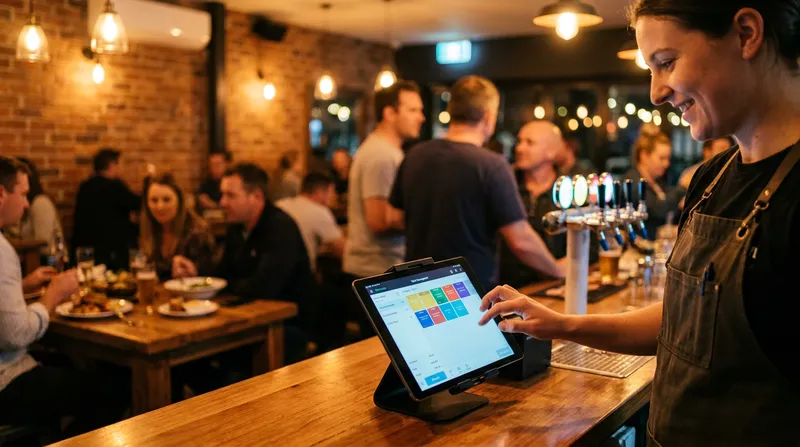
Picture this scenario. It is 7:00 PM on a busy Friday night. A group of ten walks into your venue, grabs a round of drinks at the bar, and opens a tab. Thirty minutes later, their reserved table is ready, and they want to move to the dining room. In a legacy POS system, this simple customer request creates absolute chaos for your staff.
Your bartender has to manually close the tab, yell the order details across the room to a waiter, or re-enter every single drink on a different terminal. During this frantic process, mistakes happen. Drinks are left off the final bill, items are assigned to the wrong table, and your profit margin takes a direct hit.
Hospitality owners in New Zealand lose revenue and burn out their staff when large groups move between different service areas. You need the speed of a fast-paced bar and the structured coursing of a formal restaurant, all happening flawlessly under one roof.
In this guide, we will show you how to manage dual workflows, split massive group bills without the headache, and maintain lightning-fast service across different zones using a unified cloud POS system.
The Anatomy of Multi-Zone POS Software
Multi-zone POS software is designed specifically for hybrid venues. It means having a single, unified system that adapts its interface depending on where the staff member is working within the building.
Cloud technology allows data to sync instantly between a terminal at the front bar and an iPad in the dining room. Modern systems like Lazygrid act as an engine for business operations, utilising cloud software accessed via the internet to allow for easier updates, lower upfront investments, and real-time visibility into customer history, as explained by NetSuite.
When a customer orders a cocktail at the bar, that data is immediately available to the waitstaff in the dining area. Furthermore, built-in reporting and analytics allow you to track customer behaviour and revenue across your distinct bar and dining zones. This flexibility is perfect for dynamic venues. If you run a seasonal operation that changes layouts frequently, you can learn more in our guide on iPad POS for NZ Seasonal Businesses: No Lock-In Contracts.
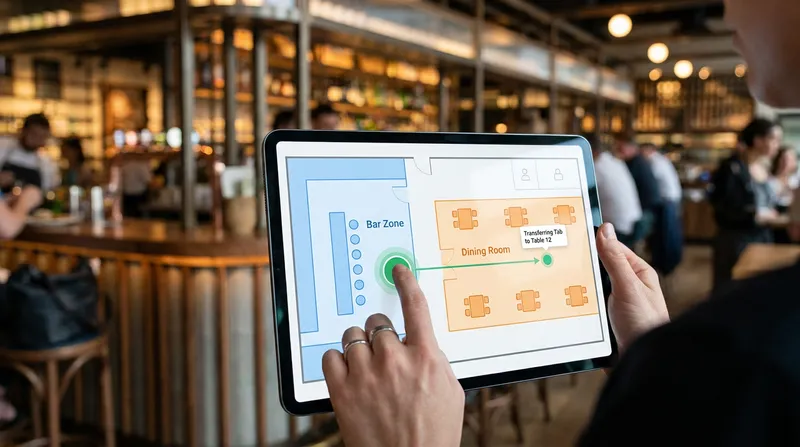
Actionable Tip: Set up your digital floor plans to reflect your actual venue layout accurately. Create a distinct "Bar" zone and a "Dining Room" zone in your software. This allows staff to visually track where customers are sitting and prevents orders from getting lost in the system.
Step-by-Step: Mastering Bar Tab Management on Your POS
Tab management is where your venue either makes money or loses it. A clunky system leads to unclosed tabs and lost revenue. A modern POS system makes transferring a tab from the bar to a table completely seamless.
Here is the exact workflow your staff should follow to ensure no drinks are missed:
- Open the tab securely: The bartender starts a tab under the customer's name or by securely holding a payment card on file.
- Select the transfer option: When the group is ready to move to their reserved table, the bartender simply taps "Transfer to Table" on the bar terminal.
- Assign the table number: The bartender selects the specific table number located in the dining room zone of the digital floor plan.
- Confirm the sync: The waitstaff immediately sees the open tab, complete with all previous drink orders, on their dining room iPad. The kitchen and bar are automatically updated.
This workflow requires a user interface that can switch between a fast bar service screen (focused on speed and popular drinks) and a paced dining service screen (focused on courses and table numbers).
Proper training is just as important as the software itself. When you optimise your shifts, which you can learn about in our guide to Stop Guessing Your Roster: Optimise Staff Schedules, make sure you pair experienced staff with new hires to practice these transfers during quiet hours.
Actionable Tip: Always train your bar staff to take a clear name and phone number before opening a fast-service tab. If a customer wanders off or forgets to pay, you have a record attached to their digital order history.
Split Bill POS System Features That Save Your Friday Night
The meal is over, and the group of ten wants to pay separately. Without a dedicated split bill POS system, your staff will spend ten stressful minutes doing math on a napkin while a massive queue forms at the register.
Tableside payments are changing the hospitality game. Tourist inflows and a shift to mobile ordering lifted hospitality card spending to massive numbers in NZ, with tableside payments actively increasing table turnover, according to data from Mordor Intelligence.
A modern iPad POS system allows your staff to handle complex payments directly at the table. You can utilise several different splitting methods:
- Split by item: Guest A pays for the steak and a beer, while Guest B pays for the fish and a wine.
- Split evenly: Divide the total bill by ten with a single tap of a button.
- Custom amounts: Enter specific dollar amounts if one guest wants to chip in exactly fifty dollars toward the total.
Actionable Tip: Equip your waitstaff with mobile POS devices (like an iPhone or an iPad Mini) so they can process split payments directly at the table. This keeps the front counter clear for new arrivals and significantly speeds up your table turnover rate.
Why an EFTPOS Integrated POS is Non-Negotiable in NZ
A standalone EFTPOS terminal requires your staff to manually type the bill total into the machine. If a staff member accidentally types $15.00 instead of $150.00 during a chaotic Friday night rush, you just lost $135.00 in a matter of seconds. One typo can cost you more than your entire monthly POS software subscription.
Integrated EFTPOS terminals sync directly with the POS, making reporting and reconciliation simpler while ensuring faster checkout experiences and shorter queues, as noted by EFTPOS NZ.
Furthermore, New Zealand merchants rely heavily on local payment networks to keep transaction fees manageable. StopPress highlights that local networks like Worldline process billions of dollars in core retail and hospitality transactions. You need a system with native local integration, rather than relying on generic international payment gateways that may not support NZ-specific requirements.
If you want to understand more about how payment processing fees impact your bottom line, read our detailed breakdown on EFTPOS vs Flat-Rate Processing in NZ: How to Stop Overpaying on Debit Transactions.
Actionable Tip: Before signing a contract with any POS provider, verify that they are officially certified with EFTPOS NZ. This guarantees your hardware will talk seamlessly to local payment networks without lag or connection drops.
Taking It Outside: Food Truck POS Systems and Offline Mode
Many NZ bar-restaurant hybrids also run seasonal outdoor bars or market stalls to boost brand awareness. Maybe you set up a pop-up bar in the beer garden, or perhaps you run a secondary food truck at a local weekend market.
The challenge with outdoor operations is that Wi-Fi is notoriously unreliable. You need a system that keeps working when the internet drops out unexpectedly.
An iPad POS system is ideal for these mobile setups. When the software features a robust offline mode, the system stores all transaction data locally on the device. Your staff can continue taking orders, printing kitchen tickets, and serving customers without interruption. Once the iPad reconnects to the internet, all the data syncs automatically back to your main restaurant dashboard in the cloud.
For a deep dive into how this technology protects your revenue during internet outages, read Offline POS System NZ: The Truth About Offline Mode.
Actionable Tip: When setting up a mobile terminal for an outdoor beer garden or market stall, always test your offline mode before service begins. Turn off the Wi-Fi on your iPad, process a test transaction, and ensure the receipt prints correctly to your local Bluetooth or Ethernet printer.
Choosing the Best POS System for Small Business NZ
Running a hybrid hospitality venue is incredibly demanding. You are essentially running two different businesses at once: a high-volume bar and a detail-oriented restaurant. You should not have to fight your software to make it work.
The best POS system for small business NZ operators acts as an invisible partner. It should offer instant cloud syncing, native local EFTPOS integration, and multi-zone capabilities that allow staff to transfer tabs effortlessly.
Remember that software is only half the equation. You also need reliable, rugged equipment that can survive a commercial hospitality environment. Take a look at our hardware options, including the POS Hardware NZ for iPads, Printers, and Card Readers, to build the perfect setup for your venue.
Conclusion
If you are tired of lost tabs, manual EFTPOS errors, and stressed staff, it is time to evaluate your current setup. Upgrading to a modern, cloud-based POS system will pay for itself by eliminating costly mistakes, turning tables faster, and keeping your customers coming back for a flawless dining experience.
See how Lazygrid handles tab transfers, split bills, and EFTPOS in one unified system. Explore our Standard and Premium POS plans starting from $59/month, or build your perfect setup with our POS Hardware NZ options.
Frequently Asked Questions
What is the best POS system for a bar and restaurant hybrid in NZ?
The best system is a cloud-based, multi-zone POS that allows seamless tab transfers between the bar and dining areas. It must feature native local EFTPOS integration and robust split-billing features to handle complex group orders efficiently.
Does Lazygrid support tab transfers between bar and dining zones?
Yes, Lazygrid supports seamless tab transfers. Staff can instantly move an open tab from a fast-paced bar terminal directly to a specific table in the dining room, keeping all order history intact across the entire venue.
How does a split bill POS system work for large groups?
A modern split bill POS allows your waitstaff to easily divide a total bill evenly, split it by specific items ordered, or enter custom dollar amounts for each guest. This is all done directly from a mobile tablet at the table, keeping the front counter clear.
Why is an EFTPOS integrated POS important in New Zealand?
Integration eliminates the need for staff to manually type dollar amounts into a standalone terminal. This speeds up the checkout process, completely removes costly human typing errors, and ensures accurate end-of-day reconciliation with local NZ payment networks.
How do staff transfer bar tabs to dining tables?
Using a unified cloud POS, staff simply select the open customer tab on the bar terminal and tap a button to assign it to a specific table number in the dining room. The order history syncs instantly to the iPads used by the restaurant waitstaff.
Can I use an iPad POS system for a food truck or outdoor bar?
Yes, an iPad POS is ideal for mobile and outdoor setups. As long as the software features a reliable offline mode, you can continue taking orders and processing cash payments during internet drops, syncing the data automatically once you are back online.