
Coffee Shop POS: Beat the Morning Rush & Boost Sales
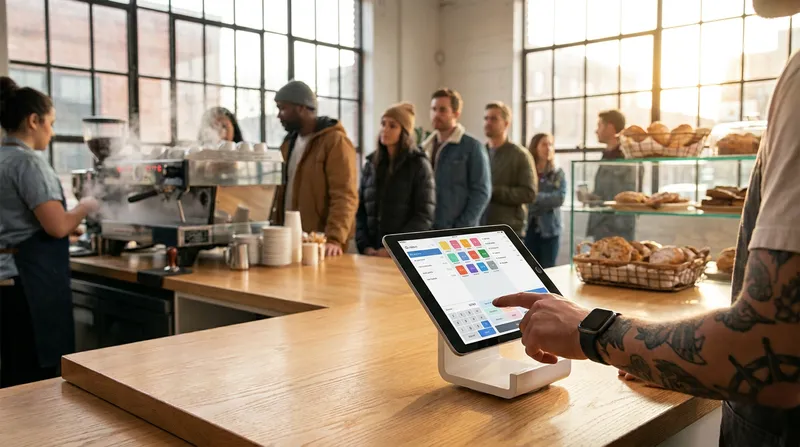
It is 7:30 AM on a Tuesday in New Zealand. Your cafe is packed, the espresso machine is roaring, and a queue of uncaffeinated customers is stretching out the door. Then, the worst happens. A customer at the back of the line checks their watch, sighs, and walks out.
Watching potential customers leave because the morning queue is moving too slowly is a painful reality for many cafe owners. Often, this bottleneck is caused by clunky software, manual EFTPOS entry, and staff struggling with a confusing till interface. With research from the National Coffee Association showing that specialty coffee consumption is at a record high and 36 percent of drinkers specifically have their coffee prepared away from home, high volume is guaranteed.
Every single second counts when a queue is out the door. Your cafe till system is either your biggest bottleneck or your best tool for speed. In this guide, we will explore exactly how modern POS software can shave seconds off every transaction and turn your morning rush into a smooth, highly profitable operation.
The Hidden Cost of a Slow Cafe Till System
Let us break down the "Morning Rush Math" for your business. Saving just 10 seconds per order might not sound like much at first glance. However, over the course of a two-hour morning peak, those saved seconds add up to serving 15 to 20 extra customers. If your average transaction value is $12, that is up to $240 in extra daily revenue. Over a year, that efficiency translates to tens of thousands of dollars in captured sales that would have otherwise walked out the door.
Beyond the direct financial impact, there is a massive psychological cost to slow service. According to research from the Cornell Center for Hospitality Research, exceeding a 5-minute wait time threshold can result in a 47 percent decrease in overall customer satisfaction. When customers perceive your line as too slow, they will simply choose a competitor tomorrow.
Upgrading to the fastest POS for busy cafes is not just a technology upgrade; it is a direct investment in customer retention. For a deeper dive into the financial benefits of upgrading your technology, check out our guide on Cloud POS ROI for NZ Cafes, Salons & Restaurants.
Essential Coffee Shop POS Features for Speed
Not all point-of-sale software is created equal. A generic retail system will slow down a barista, while a purpose-built suite of coffee shop POS features will shave crucial seconds off every transaction. The key is intuitive design that requires minimal staff training, allowing your team to focus on the customer rather than fighting with the screen.
Here is a quick overview of the features that make the biggest impact:
| Feature | Benefit for Cafes |
|---|---|
| Quick Keys | Reduces screen taps for popular items like flat whites |
| Integrated EFTPOS | Eliminates manual entry errors and speeds up payment |
| Self-Service Kiosks | Diverts standard orders to reduce queue length |
| Offline Mode | Keeps orders flowing during internet outages |
| Digital Loyalty | Speeds up checkout with automated points tracking |
Fast Interface and Customizable Quick Keys
The fastest way to speed up a transaction is to reduce the number of screen taps required to complete it. A modern iPad POS for coffee shop use allows you to completely customize your layout to match your menu workflow.
- Actionable Tip: Group your best-selling items, such as flat whites and trim lattes, on the main screen using large, color-coded quick keys. You should never have to dig through three sub-menus to ring up your most popular drink.
- Smart Modifiers: Make sure your modifiers (like extra shot, oat milk, or decaf) are easily accessible on the same screen as the main product. This micro-optimization means your staff can enter a complex custom order in two taps instead of five.
Seamless EFTPOS Integration
Manual EFTPOS entry is a massive time-waster and a common source of costly keying errors. When a staff member has to look at the till and manually type "$12.50" into the terminal, they risk typing "$1.25" during the rush. This double-handling slows down the line and frustrates customers.
An integrated EFTPOS for your cafe pushes the total directly to the terminal automatically. This is especially critical in New Zealand, where tap-and-go is the standard. According to a 2024 survey by Payments NZ, 88 percent of respondents used contactless payments in the past year, and digital wallets are now the go-to option for 15 percent of people. Integrated payments allow your customers to tap their phone and leave in seconds, keeping the queue moving rapidly.
Self-Service Kiosks for Line-Busting
One of the most effective ways to beat the morning rush is to let customers order themselves. Self-service kiosks are a major differentiator for modern setups like Lazygrid POS. Kiosks can handle standard orders while your baristas focus on crafting complex custom drinks. Data shows that kiosks can generate 20 to 30 percent higher average order values, and up to 65 percent of customers prefer them for quick service.
Cafe Customer Display Screens
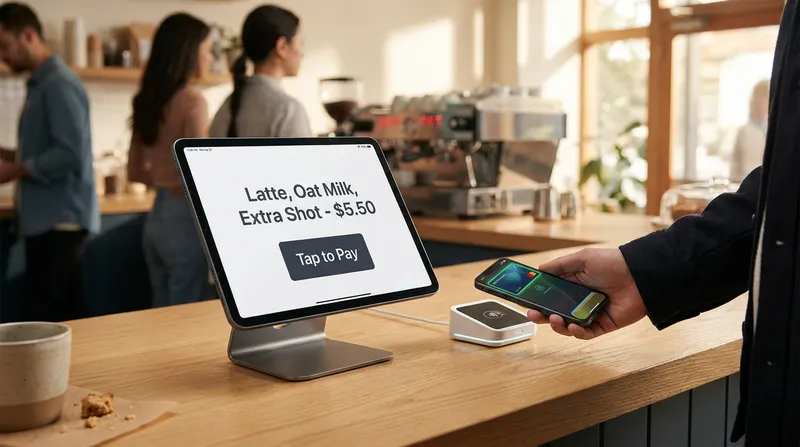
Order errors slow down the entire cafe. When a barista makes a regular latte instead of an oat milk latte, you lose time, waste ingredients, and damage customer goodwill. A cafe customer display screen solves this by letting customers verify their modifiers before they pay.
There is also a powerful psychological benefit to these screens. A study published in the Journal of Consumer Research highlights that perceived wait time accounts for 72 percent of the variance in queue satisfaction, while actual wait time accounts for only 28 percent. Giving the customer a digital screen to look at distracts them, confirms their order is correct, and actively reduces their perceived wait time.
- Actionable Tip: Use your customer display screen to prompt loyalty sign-ups or display a QR code for your menu while the customer is waiting for their payment to process.
Offline Mode POS Reliability
Every cafe owner's nightmare scenario is the internet going down right at 8:00 AM on a busy Friday. If your system cannot handle offline operations, your business grinds to a halt. A true cloud POS for cafe environments, such as Lazygrid, will continue to take orders, print to the kitchen via your local network, and open the cash drawer even without an active internet connection. Once the connection is restored, the system will automatically sync all data to the cloud.
- Actionable Tip: Always test your POS system's offline capabilities before a busy holiday weekend. Unplug your internet router and run a test transaction to ensure your staff knows exactly what to expect and what to do during an outage.
Mobile POS for Line-Busting
When the queue stretches out the door, you do not have to wait for customers to reach the counter. Line-busting is a highly effective technique where a staff member walks into the queue with a tablet to take orders and payments on the spot.
An iPad is the perfect lightweight hardware for this mobile POS strategy, and it works equally well as a POS system for food trucks in NZ operating in tight spaces. By the time the customer reaches the front of the line, their coffee is already waiting for them on the pickup counter.
- Actionable Tip: Equip your line-buster with a portable, integrated card reader for instant transactions in the queue. For help setting up this hardware, read our iPad POS Setup Guide for NZ Businesses.
Streamline Back-of-House Operations
Speed at the front counter is only half the battle. A truly efficient restaurant POS system in NZ must be supported by streamlined back-of-house operations. If your inventory and customer management systems are slowing you down behind the scenes, that inefficiency will eventually bleed into your customer service.
Digital Cafe Loyalty Programme Software
Paper stamp cards are slow, easily lost, and provide zero data about your customers. They also slow down the checkout process while customers dig through their wallets. Modern cafe loyalty programme software integrates directly into your POS.
Instead of fumbling for a stamp, the system automatically accumulates points based on the customer's profile or payment card. Digital progress bars motivate customers to return, and this digital approach speeds up the checkout process while providing you with valuable data on purchase patterns.
- Actionable Tip: Offer a sign-up bonus, like a free coffee or pastry, to encourage quick digital adoption among your regulars. Train staff to ask for a phone number or scan a digital wallet pass quickly at the end of the transaction.
Coffee Shop Inventory Management
There is nothing worse than a customer getting to the front of the queue only to be told the cafe is out of their favorite almond croissant. Proper coffee shop inventory management features automatic stock deduction, preventing these awkward conversations at the till.
You can set low-stock alerts for critical items (like alternative milks, takeaway cups, or coffee beans) to ensure you never run out during the morning rush. The system updates in real-time, meaning the front-of-house staff always knows exactly what is available in the kitchen.
- Actionable Tip: Do a weekly audit of high-wastage items using your POS reporting dashboard. Adjust your ordering based on hard data rather than guesswork to improve your profit margins.
Choosing the Best POS System for a Cafe in NZ
Finding the best POS system for a cafe in New Zealand requires looking beyond basic transaction processing. You need a system built specifically for speed, hardware flexibility, and local support.
Bulky legacy hardware is rapidly being replaced by sleek, iPad-based cloud systems that take up less counter space and offer automatic software updates. When evaluating new software, look for clear pricing, EFTPOS NZ certification, and a highly customizable interface that fits your specific workflow. For example, Lazygrid provides transparent pricing starting from $24/month for the Lite plan, $59/month for Standard, and $149/month for Premium, making it easy to scale as your cafe grows.
For a complete checklist on what to look for when upgrading, review our detailed article on the Best POS System for NZ Cafes: 7 Non-Negotiable Features.
Conclusion
The morning rush should be the most profitable part of your day, not a stressful ordeal that leaves your staff exhausted and your customers frustrated. Investing in the right technology saves seconds per order, which translates directly to increased daily revenue, higher staff morale, and happier customers.
By utilizing quick keys, integrated payments, customer display screens, kiosks, and line-busting mobility, you can transform your cafe till system into a powerful engine for growth. Do not let clunky software hold your business back.
Ready to explore more ways to speed up your service and modernize your cafe? Check out our insights on Self-Ordering Systems for NZ Cafes: Kiosks, QR & Beyond, or see how Lazygrid POS handles your morning rush and Start a free trial today.
Frequently Asked Questions
What is the best POS system for a cafe in NZ?
The best POS system for a cafe in New Zealand is cloud-based, operates on flexible hardware like iPads, and includes local EFTPOS integration, offline mode, and customizable quick keys to handle high-volume periods efficiently.
How much does a cafe POS system cost in New Zealand?
Pricing varies depending on your needs, but modern cloud-based systems are highly affordable. For instance, Lazygrid POS offers a Lite plan starting at $24/month, a Standard plan for $59/month, and a Premium plan for $149/month, allowing cafes of all sizes to access top-tier features.
Why is EFTPOS integration important for coffee shops?
EFTPOS integration eliminates manual amount entry on the terminal. This speeds up the checkout process by several seconds per transaction and completely removes the risk of staff accidentally keying in the wrong amount during a rush.
Do I really need an iPad POS for my coffee shop?
While not strictly mandatory, an iPad POS offers unmatched flexibility. It takes up less counter space, is incredibly easy for staff to learn, and allows for mobile line-busting during busy periods where staff can take orders directly in the queue.
What happens to my cafe POS if the internet goes down?
A high-quality cloud POS will have a robust offline mode. This allows you to continue taking cash orders, printing tickets to the kitchen via your local network, and syncing all the data to the cloud once the connection is restored.
How does a customer display screen speed up service?
It allows customers to verify their order details (like specific milk types or syrups) in real time before paying. This drastically reduces the number of incorrectly made coffees that need to be remade, saving time and ingredients.