
KDS vs Paper Tickets: Is a KDS Worth the ROI in NZ?
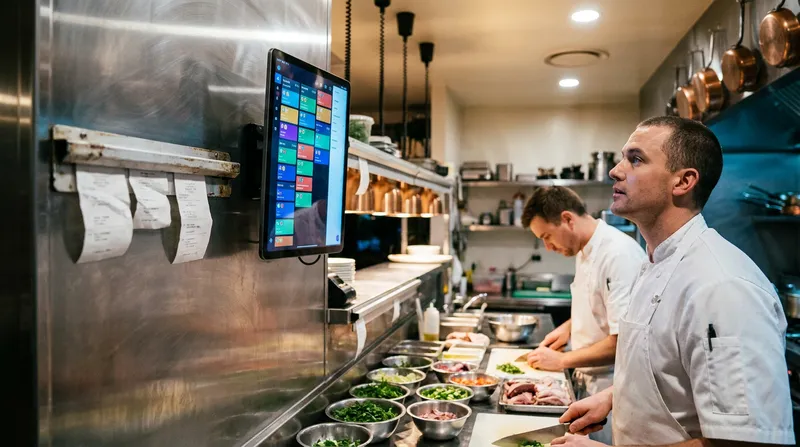
A paper ticket falls behind the grill. A handwritten order is misread. A customer waits 40 minutes for a meal that should have taken 20. Sound familiar?
For small restaurant, cafe, and food truck owners across New Zealand, kitchen chaos is one of the most expensive problems you never see on your profit and loss statement. You feel it in customer complaints, staff stress, and the slow creep of negative reviews online.
A Kitchen Display System (KDS) promises to fix all of this by replacing paper tickets with a digital screen that shows orders in real time, tracks preparation times, and keeps your kitchen running in sequence. But does the investment actually pay off for a small Kiwi venue? And how long before you break even?
This guide breaks down the real costs, the measurable benefits, and gives you a simple ROI framework so you can make a confident decision for your business.
What Is a Kitchen Display System and How Does It Work?
A Kitchen Display System is a screen (or multiple screens) mounted in your kitchen that receives orders directly from your point-of-sale system the moment a customer places them. Instead of printing a paper ticket and physically running it to the kitchen, orders appear instantly on the KDS screen.
Here is what a KDS typically does:
- Displays orders in real time as soon as they are entered at the POS
- Colour-codes tickets by urgency so your team knows what needs to go out first
- Tracks preparation times so you can monitor how long each order takes
- Highlights allergen warnings to reduce the risk of serious errors
- Allows kitchen staff to bump (complete) orders with a tap, keeping the queue clean
- Supports multiple stations so the grill, fryer, and salad sections each see only what is relevant to them
For a small restaurant or cafe in New Zealand, a KDS typically runs on a tablet or a dedicated commercial screen connected to your POS via Wi-Fi. If you are already running a cloud-based POS system, adding a KDS is often a straightforward integration rather than a full system overhaul.
If you are evaluating your broader kitchen tech stack, our guide on the best QSR POS system in NZ for speed, KDS and flow covers how KDS fits into a complete quick-service setup.
The Real Cost of Paper Tickets in Your Kitchen
Before you can calculate the ROI of a KDS, you need to understand what paper tickets are actually costing you right now. Most owners underestimate this number significantly.
Direct costs you can measure
- Thermal paper rolls: A busy cafe or restaurant can go through 2 to 4 rolls per day. At roughly NZ$1.50 to $3.00 per roll, that is $1,000 to $4,000 per year just in paper
- Printer maintenance and replacement: Kitchen printers operate in hot, greasy environments. Expect to replace or service them every 2 to 3 years at a cost of $300 to $600 per unit
- Ink ribbons or print heads: Depending on your printer model, these consumables add another $200 to $500 annually
Hidden costs that hit your bottom line harder
According to research published by Cornell University's Center for Hospitality Research, order errors in restaurants cost an average of $1.50 to $8.00 per incident when you factor in food waste, remakes, and customer goodwill. For a venue doing 100 covers a day with even a 3% error rate, that is 3 errors per service, or roughly $10 to $24 per day, adding up to $3,650 to $8,760 per year.
Other hidden costs include:
- Slow ticket times during peak service: When a runner has to physically carry tickets, there is a 30 to 60 second delay on every order. Over a busy lunch service with 80 orders, that delay compounds into real wait time
- Lost or damaged tickets: A ticket that falls behind equipment or gets splashed with oil means a remade dish, an angry customer, and wasted food
- Staff time spent on coordination: Your front-of-house team checking on order status, your kitchen team calling back updates, your manager resolving disputes about ticket order
- Training new staff: Teaching someone to read handwritten tickets from multiple servers is a surprisingly slow process
The Restaurant Association of New Zealand consistently highlights operational efficiency as one of the top challenges for small hospitality venues, particularly as labour costs rise under New Zealand's minimum wage increases.
KDS Hardware and Software Costs in NZ: What to Budget
One of the biggest barriers to adopting a KDS is the perception that it is expensive technology reserved for large chain restaurants. The reality in 2026 is quite different.
Hardware options for small NZ venues
Option 1: Repurpose an existing iPad or tablet If your POS software supports KDS functionality on a standard iPad, you can start for as little as $400 to $600 for a used or refurbished iPad, plus a wall mount ($50 to $150). This is the most accessible entry point for a small cafe or food truck.
Option 2: Dedicated commercial KDS screen A purpose-built commercial KDS screen (waterproof, grease-resistant, with higher brightness for kitchen environments) typically costs $800 to $1,500 in New Zealand. These are more durable and better suited to high-volume kitchens.
Option 3: Hardware package from your POS provider Some POS providers bundle KDS hardware with their software plans. Lazygrid's Standard hardware package, for example, includes two iPads and two printers for NZ$1,999 (GST exclusive), with leasing options available to reduce upfront cost.
Software costs
KDS functionality is often included within POS software plans rather than charged separately. With Lazygrid POS, the KDS feature is available from the Standard plan at NZ$59 per month. That same plan also gives you commission-free online ordering, a built-in booking system, and loyalty programmes, so the KDS is effectively part of a complete operations upgrade at no extra cost.
Total cost of entry for a small NZ venue
| Setup Type | Hardware Cost | Monthly Software | Year 1 Total |
|---|---|---|---|
| iPad repurposed + existing POS plan | $500 | $59 | $1,208 |
| New iPad + mount + Standard plan | $900 | $59 | $1,608 |
| Commercial KDS screen + Standard plan | $1,400 | $59 | $2,108 |
| Hardware package (leased) | $79/month | $59 | $1,656 |
These numbers are considerably lower than most owners expect, and they need to be weighed against what you are currently spending on paper, printers, and error costs.
Building Your KDS ROI Calculator: A Simple NZ Framework
Here is a practical framework you can use to calculate your own break-even point. We have included a worked example for a 40-seat Auckland cafe doing 120 covers per day, six days per week, using the 2026 NZ minimum wage of $23.95 per hour.
| ROI Calculation | Example (Auckland Cafe) | Your Venue |
|---|---|---|
| Step 1: Current Paper Costs | ||
| Monthly paper rolls | $80 | $___ |
| Monthly printer maintenance | $25 | $___ |
| Order errors (3/day x $5 x 26 days) | $390 | $___ |
| Staff coordination time (1 hr/day at $23.95) | $622.70 | $___ |
| Total Monthly Paper Cost | $1,117.70 | $___ |
| Step 2: KDS Costs | ||
| Hardware amortised (36 months)* | $19.44 | $___ |
| Monthly software cost | $59.00 | $___ |
| Total Monthly KDS Cost | $78.44 | $___ |
| Step 3: Payback Period | ||
| Monthly Savings (Paper minus KDS) | $1,039.26 | $___ |
| Break-even Point ($700 hardware / savings) | Under 1 month | ___ months |
Note: This example assumes a $700 new hardware investment ($600 iPad plus $100 mount). If you already have a compatible POS plan, your new monthly KDS software cost is zero, making the break-even period even shorter.
Even with conservative estimates, most small NZ venues reach break-even within 1 to 4 months. The ongoing annual savings typically land between $10,000 and $15,000 for a venue doing moderate volume.
Operational Benefits Beyond the Numbers
The ROI calculation above captures measurable costs, but some of the biggest benefits of a KDS are harder to put a dollar figure on. They are real, though, and they matter enormously to your team and your customers.
Faster ticket times
Industry data from Hospitality New Zealand and global hospitality research consistently shows that digital kitchen systems reduce average ticket times by 15% to 30%. For a cafe during the morning rush, shaving 3 minutes off each order means you can serve significantly more customers in your peak 90-minute window.
Fewer errors and remakes
When orders go directly from the POS screen to the kitchen display, the game of telephone between front-of-house and kitchen is eliminated. Modifications, allergen notes, and special requests appear clearly on screen rather than being scrawled in shorthand that only one cook can decipher.
Calmer, more organised kitchen culture
Kitchen stress is a major driver of staff turnover in New Zealand hospitality. A KDS creates a single source of truth for the whole kitchen team. Everyone sees the same queue, in the same order, with the same information. The shouting, the confusion, and the blame game reduce significantly.
Real-time performance data
A KDS tracks preparation times for every order. With Lazygrid, those prep time metrics feed directly into your reporting dashboard, so you can review kitchen performance weekly without any manual data entry. This data tells you which dishes consistently blow out ticket times, which stations are bottlenecks, and how your kitchen performs at different times of day. This is intelligence you simply cannot get from paper tickets.
For food truck operators, a KDS on an iPad is particularly powerful because it eliminates the need for a kitchen printer entirely in a space where every centimetre counts. Our breakdown of Square POS vs EFTPOS for NZ food trucks touches on how lean tech setups benefit mobile operators.
KDS for Cafes, Food Trucks, and Small Restaurants: Which Setup Suits You?
Not every venue needs the same KDS configuration. Here is a quick guide based on business type.
Small cafe (under 60 seats)
A single iPad KDS mounted near the coffee machine or food prep area is usually sufficient. You want orders from the POS to appear instantly so your barista and kitchen staff are working from the same queue. Look for a POS plan that includes KDS as part of the package rather than charging extra.
Recommended setup: One iPad KDS, wall-mounted, connected to your existing POS. Budget NZ$500 to $900 for hardware.
Food truck
Space is your biggest constraint. A small 7-inch or 10-inch tablet mounted on an adjustable arm near the prep area gives you the KDS benefit without taking up counter space. Offline mode is critical here as you will not always have reliable Wi-Fi at markets and events.
Recommended setup: One compact tablet KDS with offline capability. Budget NZ$400 to $700.
Small restaurant (60 to 120 seats)
You may benefit from two KDS screens: one for hot kitchen (grill, fryer) and one for cold prep (salads, desserts). This keeps each station focused on their own queue without information overload.
Recommended setup: Two iPad or commercial screens, one per station. Budget NZ$1,000 to $2,500 for hardware.
If you are also considering self-service ordering to reduce front-of-house pressure, our guide on setting up a self-service kiosk in your NZ cafe for under $1,500 pairs well with a KDS implementation.
What to Look for in a KDS-Compatible POS System for NZ
Not all POS systems handle KDS integration equally. When evaluating your options, ask these specific questions:
- Is KDS functionality built into the POS plan or charged as a separate add-on? Extra fees add up quickly and can erode your ROI.
- Does the system work offline? In New Zealand, internet reliability varies, especially in regional areas and at outdoor events. Your kitchen cannot stop because the Wi-Fi dropped.
- Can you customise which orders go to which screen? A grill station should not see dessert orders. Good KDS routing keeps each station focused.
- Does it highlight allergens and modifications clearly? This is a food safety issue, not just a convenience feature.
- Is there local support in New Zealand? When something goes wrong during a Friday dinner service, you need someone who can help in your time zone.
- Does the POS integrate with Xero or your accounting software? This matters for your overall tech stack efficiency. Our guide on POS to Xero integration for NZ hospitality venues explains why this integration saves significant time at month end.
For a broader comparison of local cloud POS options, our post on the best Toast POS alternative in NZ covers what local systems offer that international platforms cannot.
Is a KDS Worth It? The Honest Verdict for Small NZ Venues
For the vast majority of small restaurants, cafes, and food trucks in New Zealand, a kitchen display system delivers a positive ROI within the first one to three months of operation. The ongoing savings in paper costs, error reduction, and staff time easily outweigh the modest hardware investment.
The question is not really whether a KDS pays for itself. The data shows clearly that it does. The real question is whether you are ready to commit to the small process changes that come with it: training your kitchen team on the new workflow, adjusting how your front-of-house enters orders, and trusting the screen rather than the ticket rail.
If you are ready to run the numbers for your own venue, the framework above gives you a great starting point. If you are running a POS system that already supports KDS, the barrier to entry is lower than you think. If you are still on a legacy system that requires a separate KDS subscription and expensive proprietary hardware, now is a good time to evaluate whether your current POS is holding your kitchen back.
Lazygrid POS includes KDS functionality from the Standard plan at NZ$59 per month, with hardware packages available to get you set up quickly. If you want to see how it fits your specific venue, explore our pricing and plans or get in touch with our New Zealand-based team.
Your kitchen deserves better than a soggy paper ticket. And your bottom line will thank you for making the switch.
Frequently Asked Questions
How much does a kitchen display system cost in New Zealand?
The total cost of a KDS in New Zealand depends on your hardware choice and POS software plan. Hardware ranges from NZ$400 to $700 for a repurposed tablet setup, up to NZ$1,200 to $1,500 for a dedicated commercial KDS screen. Software costs are often bundled into your POS plan rather than charged separately. With Lazygrid POS, KDS functionality is included in the Standard plan at NZ$59 per month, so there is no additional KDS subscription fee. For most small venues, the total year-one investment lands between NZ$1,200 and $2,500.
How long does it take to see ROI from a kitchen display system?
For most small NZ restaurants and cafes, the break-even point is between one and four months. The savings come from three main areas: eliminating paper and printer costs, reducing order errors and food remakes, and recovering staff time currently spent on kitchen coordination. Venues with higher order volumes and more frequent errors tend to break even fastest, sometimes within the first few weeks of operation.
Can a KDS work for a food truck or small cafe?
Absolutely. A KDS is arguably more valuable in a small, space-constrained operation like a food truck or compact cafe because it eliminates the need for a kitchen printer entirely. A single iPad or small tablet mounted near the prep area gives your team real-time order visibility without taking up counter space. The key requirement is that your POS system supports offline mode, since food trucks often operate without reliable Wi-Fi at markets and events.
What happens if a KDS screen fails during service?
Hardware failure is a valid concern for any digital system. We recommend keeping one backup printer connected or having a spare tablet on standby. If you are using a cloud-based POS like Lazygrid, you can simply log into the KDS on another device and pick up exactly where you left off. Plus, with local New Zealand-based support, you can get help quickly in your time zone if an issue arises.
What is the difference between a kitchen display system and a kitchen printer?
A kitchen printer produces a physical paper ticket for each order, which must then be physically handled, pinned to a rail, and manually removed when the order is complete. A kitchen display system shows all orders on a digital screen in real time, colour-coded by urgency and elapsed time. Orders can be bumped (marked complete) with a tap. The KDS eliminates paper costs, reduces the risk of lost or damaged tickets, tracks preparation times automatically, and makes it easier to manage order priority during busy service.
Do I need special hardware for a KDS, or can I use an existing iPad?
In most cases, you can use an existing iPad or tablet as a KDS, provided it runs a compatible operating system (iPadOS 15 or later for Lazygrid). This makes the entry cost very low if you already have a spare device. For higher-volume kitchens or environments with significant heat and grease, a purpose-built commercial KDS screen offers better durability and brightness. However, for the majority of small NZ cafes and restaurants, a standard iPad in a protective mount works well.
Will my kitchen staff find a KDS difficult to use?
Most kitchen teams adapt to a KDS within one to two shifts. The interface is intentionally simple: orders appear, staff prepare them, staff tap to mark them complete. There are no complicated menus or settings for kitchen staff to navigate. The bigger adjustment is usually psychological, moving from a familiar paper system to a digital one. Giving your team a brief walkthrough before the first live service and running a quiet shift as a trial period helps smooth the transition significantly.
Does a KDS work if the internet goes down?
This depends on your POS system. Cloud-based POS systems that include offline mode will continue to send orders to the KDS even without an internet connection, syncing data once connectivity is restored. This is an important feature to confirm before purchasing, particularly for food trucks and venues in areas with unreliable connectivity. Lazygrid POS includes offline mode, so your kitchen keeps running even during an outage.