
Receipt Marketing for NZ Small Business: A Customisation Guide
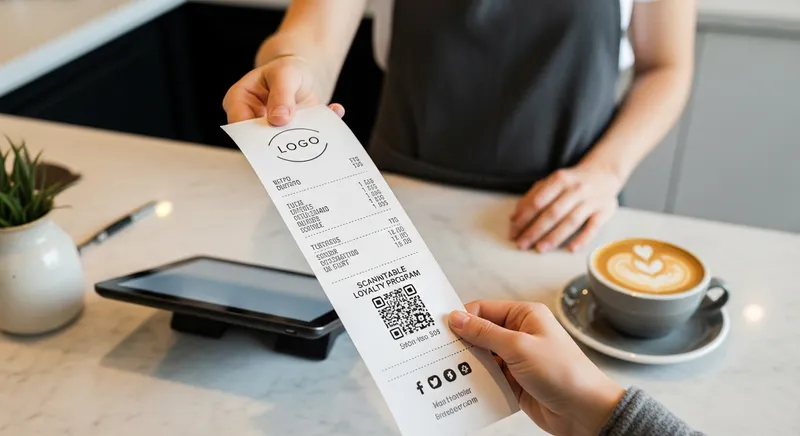
Receipt Marketing for NZ Small Business: A Customisation Guide
Introduction: Turn Your Biggest Grudge Purchase into Your Smartest Marketing Tool
As a Kiwi business owner, you know the feeling. You re-order another box of EFTPOS paper rolls, wincing at the cost. It feels like a mandatory expense for something that customers glance at for five seconds before it's crumpled in a pocket or tossed in the bin. What if that grudge purchase could become one of your most effective, low-cost marketing channels?
Every single receipt you print is a guaranteed physical touchpoint with a paying customer. It bypasses spam filters and ad blockers, landing directly in their hand. This guide provides a practical, step-by-step plan for New Zealand cafes, restaurants, salons, and retailers to transform that humble slip of paper into a powerful tool for boosting loyalty, gathering feedback, and driving repeat sales.
Why Bother? The Untapped Power of Your Humble Receipt
The humble receipt has a 100% open rate. Unlike an email that can be ignored or a social media post that gets lost in the algorithm, every customer who makes a purchase receives and handles their receipt. This simple fact makes it an incredibly powerful, yet often overlooked, marketing asset.
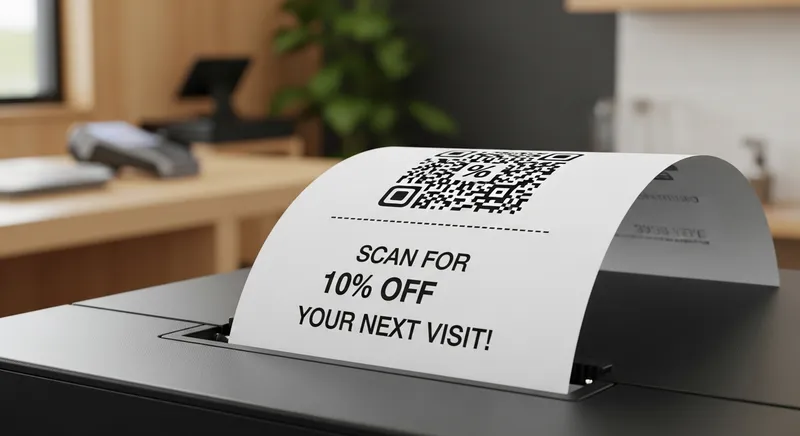
By customising this touchpoint, you can:
- Increase Customer Loyalty: A simple offer or a link to a digital loyalty card encourages customers to return.
- Drive Repeat Business: Promotions and discounts printed directly on the receipt give customers a tangible reason to come back sooner.
- Gather Valuable Feedback: A QR code linked to a quick survey can provide insights you'd otherwise miss.
- Promote Your Online Presence: Drive traffic to your website, social media pages, or online booking system.
This strategy also taps into the powerful 'shop local' sentiment. Kiwi consumers are actively looking to support local businesses. A personalised receipt strengthens that community connection.
Getting Started: How to Customise Your Eftpos Receipt in NZ
Turning your receipt into a marketing tool is more straightforward than you might think. It doesn't require a massive budget or advanced technical skills. The entire process can be broken down into three manageable steps.
Step 1: Check Your POS System's Customisation Features
Your ability to customise your receipt starts with your Point of Sale (POS) software. This is the brain of the operation. Before you do anything else, explore your POS settings. Not all systems are created equal.
| POS Type | Customisation Level | Example |
|---|---|---|
| Bank EFTPOS Terminal | None | Standard bank-issued receipt with transaction data only. |
| Legacy On-Premise POS | Limited | May allow adding basic text to the header or footer. |
| Modern Cloud POS (like Lazygrid) | Full | Add your logo, custom text, dynamic promotions, and QR codes. |
Look for sections named 'Receipt Setup', 'Branding', or 'Business Details'. Modern, cloud-based systems usually offer the most flexibility. If you're using an all-in-one POS system in NZ, you likely have these features built-in. For example, a key benefit of a cloud-based system is the ability to make remote receipt updates- you can change a promotion from home without having to be on-site.
Step 2: Designing Your Branded Receipt (Even Without a Designer)
Once you know what your POS can do, it's time for the fun part. Remember that thermal printers only print in black and white, so high contrast is key. Simplicity is more effective than a cluttered design.
Actionable Tip: Open a simple text editor and draft your receipt layout. Include these key elements:
- Top: Your logo (use a simple, bold version).
- Middle: Standard transaction details (items, price, GST).
- Bottom (Footer): This is your marketing space! Add a clear call-to-action.
- Your website and phone number.
- Social media handles (e.g., "Find us on Instagram @YourCafeNZ").
- A warm, personal thank you message.
Step 3: Sourcing Custom Printed Eftpos Paper Rolls in NZ
For next-level branding, you can get the back of your receipt paper pre-printed, often in full colour. This is perfect for a large, impactful logo or a permanent promotional message. Several NZ-based suppliers, such as Streamline Solutions, offer this service.
Actionable Tip: When contacting a supplier for custom-printed rolls, ask these questions:
- What is your minimum order quantity?
- What are the setup fees for a new design?
- Can you confirm the roll size is compatible with my printer model?
This is a separate consideration from your EFTPOS NZ fees, so be sure to budget for it as a marketing expense.
Your Quick-Start Receipt Marketing Checklist
Ready to get started in the next 10 minutes? Here are three things you can do today:
- Log into your POS and add your logo. This is the simplest way to add a professional touch to every transaction.
- Add your website and a 'Thank You' message to the footer. It's a small detail that reinforces your brand and shows appreciation.
- Create a QR code that links to your Google Business Profile. Use a free online generator and add the QR code to your receipt footer with the text: "Enjoyed your visit? Leave us a review!"
7 More Actionable Receipt Marketing Ideas
Once you've mastered the basics, try these practical ideas you can implement on your receipts.
- QR Code to a Digital Loyalty Stamp: Ditch the easily lost paper cards. Use a QR code to link to a digital loyalty program where customers can earn stamps on their phone.
- A Simple Bounce-Back Offer: Add text that says, "Show this receipt on your next visit within 7 days for a free coffee upgrade!"
- Gather Instant Feedback: Print a QR code linked to a simple Google Form asking, "How did we do today? Let us know in 30 seconds."
- Grow Your Social Following: Use a clear call-to-action like, "Follow us on Instagram for daily specials! @YourBrandNZ".
- Announce an Upcoming Event: Print a message like, "Join us for our Live Music Night next Friday!"
- Run a Simple Contest: Add a line: "Is your receipt number a winner? Check our Facebook page every Monday to see!"
- Promote Online Bookings: For service businesses, a QR code that links directly to your booking page is invaluable. Make it easy for clients to get bookings on Google and other platforms.
The Restaurant Association of New Zealand consistently highlights the importance of effective marketing campaigns, and your receipt is a perfect, low-cost channel to support these efforts.
Deep Dive: Using QR Codes to Bridge Physical and Digital
Of all the customisation options, the QR code is the most powerful. It acts as a direct bridge between the physical world of your business and your digital ecosystem. With smartphone cameras now able to scan them instantly, QR codes have become a mainstream tool. Data from link management service Bitly shows that marketers are widely adopting them for everything from packaging to emails, confirming their effectiveness.
When a customer scans a QR code on their receipt, you can instantly transport them to:
- Your online ordering page
- Your loyalty program sign-up
- Your Google review page
- A 'how-to' video for a product they just bought
- Your Instagram profile
This turns a static piece of paper into an interactive experience. It's a foundational tactic for building a robust digital loyalty programme for your NZ cafe or restaurant.
How a Modern POS Powers Your QR Code Strategy
Moving from paper punch cards to a digital system is a game-changer. It eliminates the "I lost my card" problem and provides you with valuable data on customer visit frequency. A modern POS like Lazygrid makes this seamless.
Imagine a customer at 'Welly Brew Cafe'. They scan the QR code on their receipt, which opens their web browser. They can quickly sign up for the loyalty program, and their first purchase is automatically registered. The next time they visit, they are just a few coffees away from a free pastry. The cafe now has data on this customer's visit frequency and can see the direct impact of its loyalty program.
This isn't just a gimmick; academic studies have shown that customized promotions have a significant positive effect on store loyalty.
Ultimately, your success with receipt marketing hinges on having the right tools. As the NZ government's business.govt.nz portal advises, adopting the right digital tools is key to effective marketing. A system that integrates seamlessly with NZ EFTPOS, like a local EFTPOS-integrated system, often provides a smoother experience than international alternatives.
Conclusion: Your Receipt is Now Your Secret Marketing Weapon
That flimsy slip of paper you've been handing out for years is a low-cost, high-impact marketing channel waiting to be unlocked. By viewing it as an opportunity rather than just an expense, you can strengthen customer relationships, drive sales, and build a more resilient business.
Remember the three key takeaways:
- Check your POS software first - it defines what's possible.
- Design for clarity - a simple logo and a clear call-to-action are all you need.
- Start small - implement one idea, like adding a QR code to your website, and build from there.
Ready to transform your receipts? A modern, all-in-one system like Lazygrid is designed to make this process seamless. Start Your Free Trial Today to access built-in receipt customisation, loyalty QR codes, and booking system integration.
Frequently Asked Questions
How much does it cost to print custom receipts in NZ? There are two potential costs. First is software customisation, which is often a free, built-in feature of modern POS systems like Lazygrid. The second is sourcing custom-printed paper rolls from an NZ supplier, which involves a per-roll cost and potential setup fee. This should be viewed as a marketing investment, as the return from a good offer can far outweigh the printing cost.
Can I add a logo to my standard EFTPOS machine receipt? This depends on your setup. If you are using a simple, bank-provided standalone EFTPOS terminal, you typically cannot customise the receipt. However, if your EFTPOS terminal is integrated with a POS system, all customisation (including logos and text) is controlled by the POS software, giving you much more flexibility.
Do I need a special thermal printer to print logos and QR codes? Not usually. Most modern thermal receipt printers sold in the last 5-7 years are fully capable of printing graphics like logos and QR codes. The key is the POS software that sends the correct commands to the printer. If your software supports it, your printer likely will too.
What file format should my logo be for a thermal printer? For best results, use a simple, high-contrast, black-and-white logo. Most POS systems prefer a PNG or JPEG file. Avoid complex gradients or colours, as they will not print well on a thermal printer.
Are digital receipts a better option for marketing in NZ? Digital receipts are excellent for capturing customer emails but require an extra step and customer consent. Physical receipts are a guaranteed touchpoint with every single paying customer. The most effective strategy often combines both: use the physical receipt to deliver an incentive (via a QR code) that encourages customers to engage with your digital channels or sign up for digital receipts.
What's the easiest receipt marketing idea to start with? The simplest and fastest way to start is to log into your POS system and add your logo, website URL, and a friendly thank you message to the receipt footer. The next easiest step with a high return is to add a QR code that links directly to your business's Google Maps profile, making it effortless for happy customers to leave a positive review.