
Reserve with Google: Zero-Commission Bookings for NZ Venues
Reserve with Google: Zero-Commission Bookings for NZ Venues
New Zealand venue owners face a frustrating reality. You work tirelessly to build your brand, optimise your menu, and provide excellent service. Yet, when a customer searches for your business online and books a table or appointment, a massive chunk of your profit margin often goes to a third-party booking aggregator. These platforms charge per-cover fees or high monthly percentages, eating into your hard-earned revenue.
If you are tired of losing margins to these platforms, there is a better way. The solution lies in implementing a commission-free restaurant booking system that connects directly to the search engine your customers already use. By leveraging a direct Google Business Profile booking button, you can capture high-intent local search traffic without paying a premium for every single customer.
In this comprehensive guide, we will explore how restaurants, cafes, massage shops, beauty salons, and food trucks across New Zealand can implement a zero-commission reservation software setup, reduce operational costs, and take back control of their customer data.
What is Reserve with Google?
Before diving into the financial benefits, it is important to understand exactly what this technology is. Reserve with Google is an integrated feature that allows consumers to book appointments, reserve tables, or buy tickets directly through Google Search and Google Maps.
As detailed by Google, this functionality removes the friction of navigating away from the search results. Instead of clicking a link, waiting for a third-party website to load, and navigating a complex booking widget, the customer simply clicks a "Book Online" or "Reserve a Table" button right on your Google Business Profile.
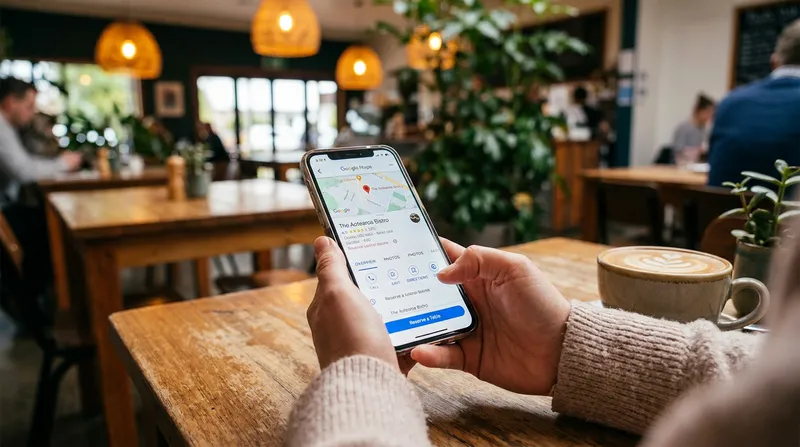
For the consumer, it is fast and seamless. For the business owner, it is a game changer. When paired with the right flat-fee booking system NZ venues trust, this integration means you capture the booking instantly without paying a middleman.
The True Cost of Third-Party Booking Aggregator Fees
Many New Zealand business owners treat third-party booking fees as an unavoidable cost of doing business. However, when you break down the math, the financial drain is staggering. Consider a popular local restaurant using a traditional aggregator platform that charges $3 per cover. If that restaurant accepts just 100 bookings through the platform each week, with an average party size of two, that equates to 200 covers.
Let us look at the annual cost:
- 200 covers per week at $3 per cover = $600 per week.
- $600 per week multiplied by 52 weeks = $31,200 per year in booking fees alone.
That is over $30,000 leaving your business every single year just for the privilege of letting customers book a table. According to the Ministry of Business, Innovation and Employment (MBIE), the hospitality sector operates on incredibly tight margins, making the reduction of per-booking fees critical for long-term survival.
To put this into perspective, here is how a traditional model compares to a modern, flat-fee solution:
| Feature | Per-Cover Model ($3/cover) | Lazygrid Flat-Fee Premium |
|---|---|---|
| Weekly Cost (200 covers) | $600 | $34.38 ($149/month) |
| Annual Cost | $31,200 | $1,788 |
| Data Ownership | Aggregator Owns Data | You Own 100% of Data |
| Scalability | Costs increase with bookings | Unlimited bookings included |
At just $149 per month ($1,788 per year), switching from a $3 per cover aggregator to Lazygrid's Premium plan saves a typical venue over $29,000 annually.
Furthermore, recent data highlighted by Restaurant & Cafe Magazine New Zealand shows that while the industry generates billions in sales, rising operational costs are forcing operators to seek new technological efficiencies. Finding a viable OpenTable alternative NZ operators can use is no longer just a nice idea: it is a financial necessity.
Why Cross-Industry Venues Need Zero-Commission Software
While restaurants often dominate the conversation around booking fees, this issue impacts multiple sectors across the New Zealand service industry. Direct bookings from Google Search offer unique advantages depending on your specific business model.
Restaurants and Cafes
For dine-in venues, table management is everything. A direct Reserve with Google POS integration allows diners to see real-time availability, flowing directly into your floor plan to eliminate double-booking errors. For further optimisation, see our guide on Split Bills & Integrated EFTPOS: Speed Up NZ Payments - Lazygrid Blog.
Salons, Beauty Shops, and Massage Therapists
Service-based businesses rely entirely on their appointment calendar. When clients search for local services, your Google Business Profile should display a direct booking button to secure that revenue instantly. Learn more in our Timely & Fresha Alternatives: NZ Salon POS Guide 2026 - Lazygrid Blog.
Food Trucks and Pop-Up Venues
Food trucks benefit immensely from pre-ordering and event bookings. Allowing customers to reserve a pickup time via Google Maps helps manage the kitchen queue and secure revenue early. Read more about Commission-Free Pre-Ordering for NZ Food Trucks - Lazygrid Blog.
The Data Ownership Advantage
Beyond immediate financial savings, there is a hidden cost to using third-party aggregators: you are giving away your customer data. When a customer books through a major third-party app, the aggregator captures their contact information and uses it to market competing local venues to your customer.
Utilising a direct Google booking button linked to Lazygrid's built-in Customer Management module captures this data automatically with every booking. You retain 100% ownership of your customer data.
You can then use this data to:
- Send automated SMS reminders to reduce no-shows.
- Track visit frequency and identify your most loyal regulars.
- Launch targeted marketing campaigns for slow periods.
- Enroll customers in Digital Loyalty Cards NZ: Ditch Paper Stamps in 2026 - Lazygrid Blog.
Research from EHL Hospitality Business School confirms that digital transformation and owning the guest journey from the very first click is essential for modern guest satisfaction and long-term operational efficiency.
How to Set Up a Booking Button on Google
Implementing a Google Maps restaurant reservations system is easier than most business owners realise, provided you have the right technology partner. Here is the step-by-step Google reserve button setup process for New Zealand venues.
Step 1: Claim and Verify Your Google Business Profile You cannot add a booking button if you do not own your listing. Search for your business on Google. If you see a prompt asking "Own this business?", click it and follow the verification steps.
Step 2: Choose an Integrated POS Partner Google does not handle the actual calendar management; it acts as the storefront. You need a POS provider that is an official Reserve with Google partner. Lazygrid POS, which is EFTPOS NZ certified and trusted by thousands of local businesses, offers this integration natively within its Premium plan.
Step 3: Enable the Integration in Your POS Dashboard Once you are set up with a compatible system, navigate to your POS dashboard settings. In Lazygrid, you simply toggle the Google integration feature on and authorise the connection.
Step 4: Configure Your Booking Rules Before going live, set your parameters. Define your maximum party sizes, block out specific tables for walk-ins, and set your lead time requirements.
Step 5: Test the Customer Experience Once the button appears on your Google listing (which can take 24 to 48 hours), test it yourself to ensure the reservation flows correctly into your POS system.
The Hijack Warning: Removing Unwanted Third-Party Links
Here is a critical issue that many New Zealand business owners are completely unaware of: third-party booking aggregators often hijack your Google Business Profile.
Quick audit: Search your own business name right now and check which booking button appears first. If it is not yours, you are losing money today.
Because these platforms want to capture the booking fee, they use their massive SEO power to inject their own booking links onto your Google listing. You end up paying a per-cover fee for a customer who was already looking for you directly.
How to remove unwanted booking links:
- Log into the Google account associated with your Google Business Profile.
- Search for your business name on Google to bring up the merchant dashboard.
- Click on "Bookings" or "Edit Profile" and navigate to the booking section.
- Look for the list of integrated providers.
- Remove any third-party aggregators you do not want. In some cases, you must contact the third-party provider directly to request removal.
- Replace the removed link with your direct, commission-free booking system.
Beyond Bookings: Building a Complete Tech Stack
Securing direct bookings from Google Search is just the first step in modernising your venue. To truly maximise profitability, your reservation system must communicate flawlessly with the rest of your operations.
Lazygrid's Premium plan includes everything you need to scale. When a customer books via Google and arrives at your venue, your staff can seat them using an iPad POS system. Their order flows instantly to an included Kitchen Display System (KDS), ensuring no paper tickets are lost and prep times are tracked accurately.
This level of integration prevents food waste and improves service speed. For more insights on optimising kitchen operations, read our guide on Zero-Waste Kitchens: How NZ Venues Cut Food Waste & COGS - Lazygrid Blog. Furthermore, if you operate more than one venue, you can discover how to manage growth effectively in our NZ Multi-Site POS Playbook: Scale From 1 to 3 Locations - Lazygrid Blog.
Conclusion: Take Back Your Profit Margins
In today's competitive New Zealand hospitality and service market, giving away a percentage of your revenue for a simple table reservation or appointment booking is an outdated business model. Your customers are already searching for you on Google. By implementing a Reserve with Google POS integration, you meet them exactly where they are, providing a seamless booking experience while protecting your profit margins.
Stop funding the marketing budgets of your competitors. Lazygrid's Premium plan gives you everything you need to own your bookings, your data, and your margins for one predictable monthly fee of $149. Explore how you can transform your business today.
Frequently Asked Questions
Is Reserve with Google completely commission-free?
Yes, Google does not charge any fees for adding the booking button to your Google Business Profile. However, the software connecting to it might. To achieve a truly commission-free restaurant booking system, you must partner with a flat-fee POS or scheduling provider like Lazygrid that does not charge per-cover or percentage-based fees.
How do I add a booking button to my Google Business Profile in New Zealand?
You cannot add the button manually. You must sign up with an official Reserve with Google integration partner. Once you activate the integration within your provider's dashboard, they will automatically sync your availability with Google, and the "Book Online" button will appear on your listing within 24 to 48 hours.
Can salons, massage therapists, and beauty shops use Reserve with Google?
Absolutely. The feature is highly effective for service-based businesses. By using appointment scheduling software NZ professionals rely on, you can display your available time slots directly on Google Search and Maps. Clients can book haircuts, massages, or beauty treatments instantly without navigating away from the search results.
How do I stop third-party aggregators from hijacking my Google bookings?
Third-party apps often inject their own booking links into your profile to collect per-cover fees. To stop this, log into your Google Business Profile dashboard, navigate to the bookings section, and manually remove the unauthorised provider. Replace their link with your direct, zero-commission reservation software.
Does Reserve with Google integrate directly with my POS system?
It depends on your POS provider. Modern, all-in-one systems offer direct Reserve with Google POS integration. This means when a customer books via Google, the reservation automatically appears on your digital floor plan, blocking out the table or time slot in real-time to prevent double bookings.