
Streamline Your NZ Restaurant: Carbon 8 & KDS Guide
Streamline Your NZ Restaurant: Carbon 8 & KDS Guide
Introduction: Solving the Kitchen Chaos
It is 6:00 PM on a Friday. Your restaurant is packed, the noise level is rising, and the dinner rush is in full swing. Suddenly, a paper docket flutters off the pass and falls to the floor, completely unnoticed by the kitchen staff. Twenty minutes later, an angry customer is asking your front-of-house team where their meal is.
If you own a hospitality business in New Zealand, this scenario is likely all too familiar. You are losing revenue and burning out your staff due to lost paper dockets, constant miscommunications between the counter and the kitchen, and the high costs of being locked into rigid, proprietary POS hardware. You need a flexible, reliable way to connect modern payments with digital kitchen screens.
Integrating agile hardware like the Verifone Carbon 8 with a modern digital kitchen screen is the solution to this chaos. This setup not only automates your order flow but also frees you from expensive vendor lock-in. In this guide, we will walk you through exactly how to connect these systems using Lazygrid POS to create a seamless, stress-free environment for your staff and your customers.
Why Upgrading to a Kitchen Display System NZ Makes Financial Sense
The hidden costs of running a traditional paper-based kitchen are staggering. Every misread handwritten note, lost ticket, and delayed order results in wasted food and frustrated customers who may never return. When you are managing a busy cafe or restaurant, relying on paper is a financial leak you cannot afford.
In New Zealand, macroeconomic factors are putting unprecedented pressure on hospitality owners. Rising wage costs, inflation, and persistent staff shortages mean that operational efficiency is no longer just a nice goal to have. It is a baseline requirement for survival. According to a recent industry report from Deloitte, eighty-one percent of hoteliers and hospitality operators are prioritizing increasing employee productivity through technology to combat record-high payroll costs.
A Kitchen Display System (KDS) directly addresses these productivity issues. By routing orders directly from the point of sale to a digital screen in the prep area, a KDS eliminates the physical movement of paper. Research from WebstaurantStore notes that a KDS eliminates the need for paper tickets, minimizing the risk of miscommunication and ensuring each order is prepared to exact specifications.
Actionable Tip: Start by auditing your current food waste. Track how many meals are remade each week due to lost or misread dockets. Multiply that by your average food cost to see exactly how much a KDS could save you in a single month.
Verifone Carbon 8 Features: The Ultimate Smart POS Terminal
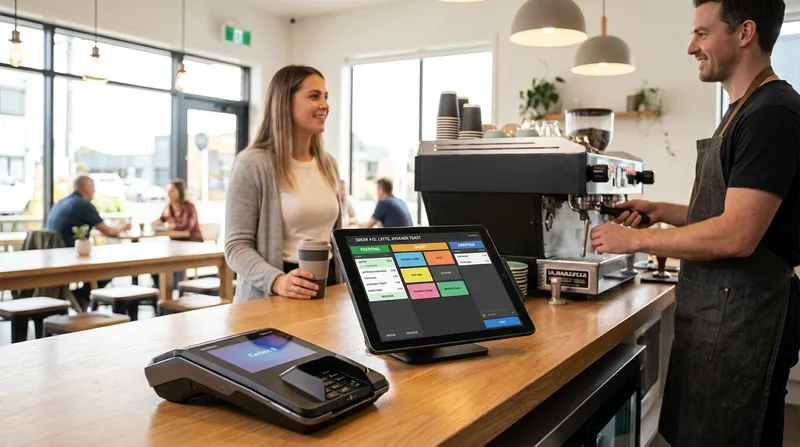
To build a reliable digital workflow, you need hardware that can keep up with the pace of hospitality. The Verifone Carbon 8 is rapidly becoming the terminal of choice for smart POS setups in New Zealand. Unlike basic payment terminals that only process cards, the Carbon 8 functions as a comprehensive smart hub for your counter.
According to official specifications from Verifone, the Carbon 8 is a compact mobile POS device featuring an 8-inch merchant-facing tablet and a 5-inch customer display. It supports WiFi, Bluetooth, and full EMV/NFC payment acceptance. This dual-screen setup is incredibly valuable. Your staff can easily navigate complex menus on the large screen, while the customer sees their exact order total and can tap their card or phone on the integrated payment reader.
The most significant advantage of the Carbon 8 is its agnostic nature. Many proprietary POS providers force you to buy their specific, locked-down hardware. If you ever want to change your software provider, you have to throw away thousands of dollars worth of equipment. The Carbon 8, however, integrates flawlessly with flexible cloud-based systems like Lazygrid POS. This gives you the power to choose the best software for your business without being held hostage by hardware limitations.
If you are currently evaluating your options, we highly recommend reading our Best Cloud POS Systems for NZ Restaurants: A 2027 Buyer's Guide to see which software pairs best with agnostic terminals.
Actionable Tip: When setting up your Carbon 8 with Lazygrid POS, utilize the customer-facing screen to display a QR code linking to your loyalty programme. This simple step can drastically increase your sign-up rate during the checkout process.
The Power of POS Integration Hospitality NZ: Connecting Front and Back of House
The true magic happens when your Verifone Carbon 8 is seamlessly integrated with your Kitchen Display System. Let us break down the exact workflow of a fully integrated order flow automation system:
- A customer orders a complex item (e.g., a flat white with oat milk and a gluten-free muffin).
- The staff member enters the order on the Lazygrid POS software running on the Carbon 8.
- The customer taps their phone to pay via Apple Pay.
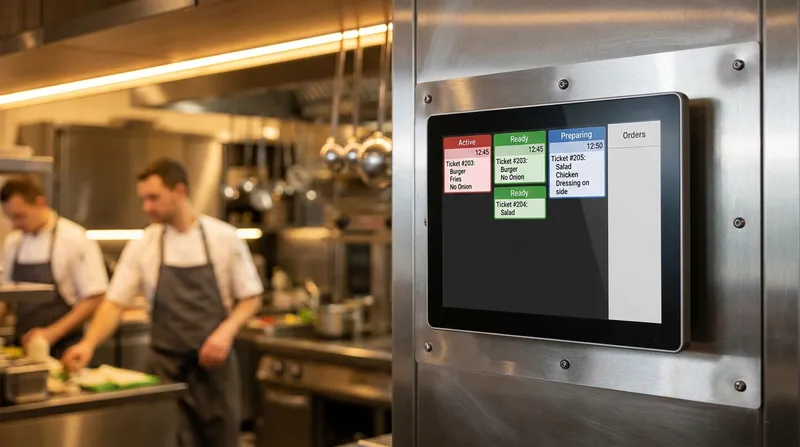
- The exact moment the payment is approved, the order instantly appears on the kitchen docket screen.
- The barista sees the coffee order on their specific screen, while the kitchen staff sees the food order on theirs.
This instantaneous communication eliminates the physical walking of tickets and prevents the kitchen from starting to cook an order before the payment has cleared.
The hospitality industry is experiencing a massive shift toward digital ordering, making this level of integration mandatory rather than optional. Academic research from Boston University highlights that since the massive 237 percent jump in full-service restaurant digital orders in 2021, digital ordering has only continued to accelerate. As more customers expect to order via QR codes, online platforms, and self-service kiosks, your kitchen must have a centralized digital hub to organize the influx of tickets.
Take a real-world example of an Auckland cafe that implemented this exact integration. By routing coffee orders directly to a tablet mounted on the espresso machine and food orders to the kitchen, they reduced their average wait times by 30 percent during the morning rush. For a deeper dive into organizing this workflow, check out our KDS Setup Guide NZ: Your 7-Step Plan for a Smarter Kitchen.
Perfect for Tight Spaces: Food Truck POS System NZ Setups
For mobile hospitality businesses like food trucks, space is the ultimate premium. You do not have room for bulky cash registers, massive receipt printers, and a row of paper ticket spikes.
The compact nature of the Carbon 8 combined with a tablet-based KDS is a game changer for food trucks. Furthermore, modern cloud POS setups like Lazygrid offer robust offline capabilities. If you are serving at a remote festival in Wellington with spotty internet, your Carbon 8 and KDS can continue communicating over a local mobile hotspot, ensuring your service never misses a beat.
Step-by-Step Verifone KDS Setup for Your Restaurant
Transitioning from paper to digital might seem intimidating, but the physical setup is straightforward when you follow a structured plan. Here is your actionable checklist for connecting your Verifone terminal to a cloud-based KDS:
- Establish a Secure Local Network: Your POS terminal and your KDS screens must be on the same local network to communicate quickly. Invest in a high-quality commercial router.
- Configure Your Hardware: Mount your KDS tablets at eye level in the kitchen using splash-proof, heat-resistant commercial cases. Connect your Verifone Carbon 8 at the front counter to a steady power source.
- Map Your Menu Items: Open your Lazygrid POS back office and assign specific routing rules to your menu items. For example, assign all beverages to the Barista Station screen, and all hot food to the Fryer Station.
- Set Up Color-Coded Timers: Configure your KDS software to change ticket colors based on wait times. Set tickets to turn yellow after 10 minutes and red after 15 minutes.
- Establish a Hybrid Fallback: Technology is fantastic, but internet outages happen. Set up a hybrid system using a backup thermal printer. Read our guide on KDS Printers NZ: Your Guide to a Bulletproof Hybrid Kitchen Setup (2027) to learn how to build this safety net.
Actionable Tip: Before going live on a busy Friday night, run a soft launch on a quiet Tuesday afternoon. Send test orders through the Verifone terminal to ensure they appear on the correct kitchen screens with the proper modifiers.
Navigating EFTPOS NZ POS Integration and Compliance
Operating a payment system in New Zealand requires adherence to specific local standards. When setting up your order flow automation, you must ensure that your hardware is certified for the EFTPOS NZ network.
The integration between Lazygrid POS and the Verifone terminal happens via a secure API (Application Programming Interface). The POS sends the exact dollar amount to the terminal, and the terminal sends a success or failure message back to the POS. The software never stores the customer's actual credit card data, keeping your business fully PCI-DSS compliant.
Cost Comparison: Agnostic Terminals vs Proprietary POS Ecosystems
One of the most critical decisions a New Zealand hospitality owner will make is choosing between agnostic hardware and a proprietary POS ecosystem. Companies offering sleek all-in-one systems often come with a significant catch: vendor lock-in.
When you purchase proprietary hardware, you are forced to use that company's payment processing rates and their specific monthly fees. In contrast, using an agnostic smart terminal like the Verifone Carbon 8 paired with flexible software like Lazygrid POS gives you leverage.
- Upfront Hardware Costs: Agnostic setups often utilize standard iPads for the POS and KDS screens. This is generally much cheaper upfront than buying specialized, branded restaurant hardware.
- Monthly Fees: Cloud-based software typically charges a flat, transparent monthly fee. For example, Lazygrid offers scalable pricing from Lite at $24 per month, up to Standard at $59 per month (which fully supports advanced printing and KDS routing capabilities), and Premium at $149 per month.
- Payment Processing: Because you own agnostic hardware, you have the freedom to shop around and negotiate better merchant rates with different New Zealand banks and payment gateways.
Over a three-year period, the savings of owning your hardware and negotiating your processing rates can amount to thousands of dollars. To see a full breakdown of what you should expect to pay, review our Restaurant POS Systems NZ: A 2027 Cost & Pricing Guide.
Actionable Tip: Ask your current payment provider for a detailed breakdown of your effective processing rate (total fees divided by total card sales). Use this number to negotiate better rates when upgrading your hardware.
Frequently Asked Questions
Can I use the Verifone Carbon 8 as a standalone POS system?
Yes, the Carbon 8 can function as a basic standalone device for taking payments. However, integrating it with a dedicated cloud POS and a Kitchen Display System unlocks its full potential, allowing you to manage complex menus, modifiers, and high-volume hospitality operations with ease.
How does a kitchen display system connect to my EFTPOS terminal?
They do not connect directly to each other. Instead, they connect via your cloud-based POS software over a secure local WiFi network. When the payment terminal confirms a successful transaction, the POS software instantly triggers the digital ticket to appear on the KDS.
Is a cloud POS better for New Zealand food trucks?
Absolutely. Cloud POS systems paired with compact terminals like the Carbon 8 save crucial counter space. Lazygrid POS features an offline mode that can process payments during internet outages and provide real-time sales data to your phone from anywhere in the country.
What happens to my KDS if the internet goes down?
Most modern cloud POS systems, including Lazygrid, offer a local offline mode. This allows devices connected to the same local WiFi router to continue communicating with each other even if the external internet connection drops.
Conclusion: Take Control of Your Restaurant Operations
Transitioning from a chaotic, paper-based kitchen to a streamlined digital workflow is one of the most profitable decisions a hospitality owner can make. By integrating a smart terminal like the Verifone Carbon 8 with a modern Kitchen Display System, you eliminate lost dockets, speed up your service, and drastically reduce miscommunications.
Remember, technology should work for you, not the other way around. Choosing flexible, agnostic hardware allows you to negotiate better payment rates and adapt to the changing landscape of New Zealand hospitality without being locked into expensive contracts.
If you are ready to modernize your order flow and take control of your restaurant operations, it is time to explore solutions built for flexibility. Start a free trial of Lazygrid POS today and connect your Carbon 8 to your kitchen screens in under an hour.