
The Ultimate Pop-Up POS Tech Stack for NZ Festivals
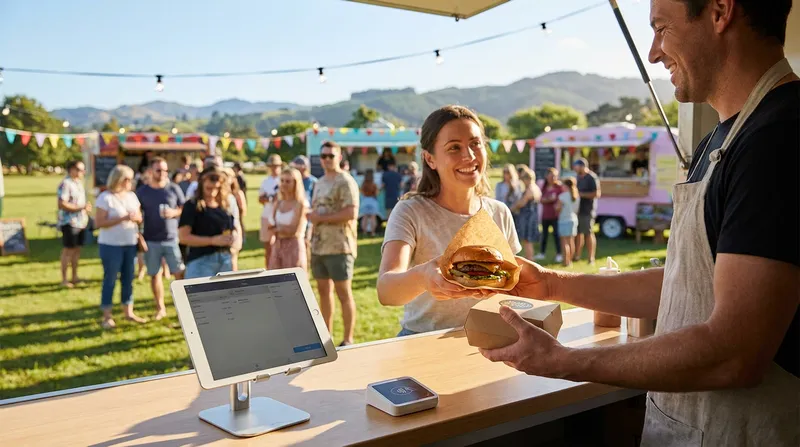
You know the feeling all too well. The queue is twenty people deep at your weekend food festival stall, and suddenly, your payment terminal displays a dreaded network error. You lose hundreds of dollars in potential sales within a matter of minutes as frustrated customers walk away. Then, after an exhausting weekend of cooking and serving, you face the administrative nightmare of manually reconciling messy pop-up revenue with your main restaurant's accounting dashboard.
Taking your brick-and-mortar restaurant on the road for weekend events, local night markets, or food festivals is an incredible way to boost revenue and brand awareness. However, unplugging a bulky cafe till and moving it into a tent almost always leads to hardware failures and connectivity issues.
It does not have to be this way. By building a lightweight, event-ready tech stack, you can spin up temporary sub-accounts, use staff smartphones as secure mobile tills, and leverage true offline mode to keep the queue moving. In this guide, we will show you exactly how to build the ultimate mobile POS for events NZ operators need to succeed.
Why Traditional Systems Fail at NZ Festivals
Weekend events are exciting and highly profitable for brick-and-mortar restaurants. They offer a chance to reach new customers, test new menu items, and generate a massive cash injection in just two or three days. However, the technology that works perfectly in your permanent cafe is rarely suited for the chaotic environment of an outdoor festival.
Traditional point of sale systems are designed to sit on a stable counter with a hardwired internet connection and a constant power supply. When you move these bulky systems into a temporary marquee or a cramped food truck, they become a massive liability. Cables get tangled, and the heavy hardware takes up too much valuable prep space. Furthermore, the reliance on a constant Wi-Fi connection leaves you vulnerable to network dropouts.
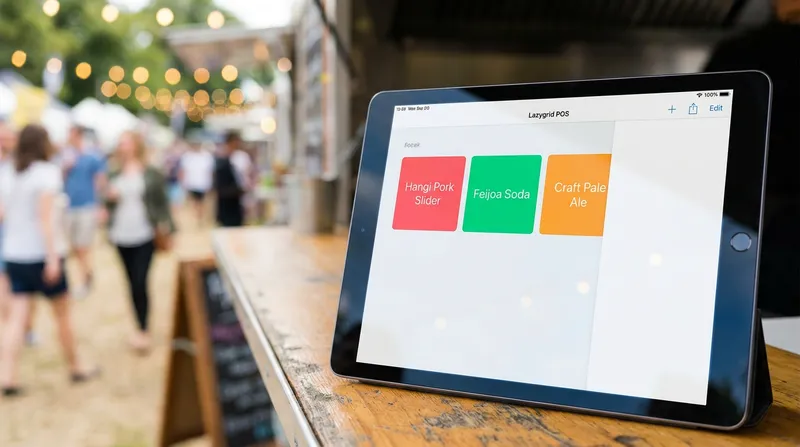
This is why operators are turning to a lightweight, cloud-based mobile POS for events NZ setup. A modern pop-up restaurant tech stack allows you to ditch the heavy hardware. Instead, you can rely on sleek, battery-powered devices that communicate wirelessly and keep your business running smoothly, no matter where you set up shop.
Building Your Pop-Up Restaurant Tech Stack
Creating an event-ready tech stack means prioritizing portability, offline capabilities, and fast data syncing. You need equipment that can handle high volumes of rapid-fire transactions without taking up more space than a chopping board.
It is highly recommended that operators separate their event hardware from their permanent restaurant hardware. Taking your main cafe iPad to a muddy festival field is a recipe for disaster. Instead, build a dedicated toolkit specifically for your off-site ventures. To simplify this process, operators can explore streamlined options like the Lazygrid Starter or Standard hardware packages, which bundle everything needed for a seamless, mobile-first deployment.
Here is a practical checklist of essential components for your event point of sale setup:
- A smart device: An iPad, Android tablet, or smartphone to act as your primary register.
- A portable card reader: A Bluetooth-enabled EFTPOS terminal with a long battery life.
- A reliable cloud POS: Software that supports offline mode and easy menu customization.
- High-capacity power banks: To keep your devices charged during 12-hour festival shifts.
- A mobile hotspot: A dedicated 4G or 5G device to provide an internet backup.
Using Staff Smartphones and iPad POS for Market Stalls
You do not need to spend thousands of dollars buying brand new hardware for a weekend event. One of the biggest advantages of a modern cloud POS is the ability to turn existing devices into secure mobile tills. Using an iPad POS for market stalls, or even allowing staff to use their personal iPhones and Android devices, can save you a significant amount of money.
To do this securely, you must set up strict user permissions. A robust system like Lazygrid allows you to create specific staff logins that restrict access. Your team will only be able to see the order screen and process payments, completely protecting your sensitive business data and backend settings. This level of accountability also helps when you want to Reduce Staff Turnover in NZ: Use POS Data to Retain Teams - Lazygrid Blog by rewarding your fastest servers after a busy weekend.
Actionable Tip: Always pair every mobile device with a high-capacity power bank. Keep the power bank taped securely under the counter and run a short charging cable to the smartphone or tablet. This ensures your mobile POS for events NZ setup survives from the morning prep all the way to the evening pack-down.
Choosing a Portable EFTPOS Machine NZ
In a high-volume festival environment, speed is your ultimate currency. You simply cannot afford to manually type in purchase amounts or deal with slow card processing. Fast, contactless payments are an absolute necessity.
Recent market data highlights just how crucial this is. According to research from Mordor Intelligence, the permanent retention of the tap limit has entrenched near-universal contactless behavior, with 72 percent of residents tapping at least weekly. Your customers expect a seamless tap-and-go experience.
A portable EFTPOS machine NZ operators trust should connect seamlessly via Bluetooth to your smart device. This mobile EFTPOS integration NZ setup prevents manual entry errors during a chaotic lunch rush. When the POS talks directly to the terminal, the exact amount is pushed through automatically, eliminating the risk of a staff member accidentally charging $4.00 instead of $40.00.
For more advice on streamlining your checkout process, check out our guide on how to Split Bills & Integrated EFTPOS: Speed Up NZ Payments - Lazygrid Blog.
Hospitality POS Offline Mode: Surviving Bad Event Wi-Fi
Picture this scenario. You are at a massive local wine and food festival. Thousands of people are crowded into a small park, and every single person is trying to upload photos to social media. The local cellular network crashes under the strain, and suddenly, your food truck has zero internet connection.
This is where a true offline mode POS restaurant setup saves your business. There is a massive difference between a system that merely caches orders and one that offers true offline processing. A basic system might let you tap buttons on the screen, but it will not print dockets to the kitchen or save the transaction securely until the internet returns.
A robust hospitality POS offline mode allows your device to continue functioning as a fully operational till. You can take orders, print physical dockets to your battery-powered Bluetooth printer, and save all transaction data locally on the device.
Actionable Tip: Always test your offline mode before launch day. Turn on airplane mode on your smart device, process a test transaction, and ensure the docket still prints to your kitchen station. This simple test provides massive peace of mind before the crowds arrive.
Event Point of Sale Setup: Creating a Temporary Sub-Account
One of the biggest mistakes restaurant owners make is using their main, everyday menu at a weekend festival. Your permanent menu likely has dozens of items, modifiers, and complex inventory tracking attached to it. Trying to navigate this massive menu on a small screen during a rush will slow your staff down and cause inventory chaos back at the main restaurant.
Technology is recognized as essential for running efficient businesses and streamlining back-of-house operations, according to the 2025 Dining Trends Report highlighted by The Shout. The smartest way to manage a pop-up is to spin up a temporary sub-account specifically for the weekend event.
Here is how to optimize your event point of sale setup:
- Create a new location: In your cloud POS dashboard, set up a temporary location named after the festival.
- Build a simplified menu: Create a custom menu featuring only your 3 to 5 highest-margin, fastest-to-prepare items.
- Use large buttons: Configure the layout with massive, color-coded buttons so staff can punch in orders without looking closely at the screen.
- Disable unnecessary prompts: Turn off table selection or complex modifier prompts to keep the transaction time under 15 seconds.
By using a cloud POS for temporary events, you keep your festival operations lean and fast without messing up the data of your permanent brick-and-mortar location.
Syncing Cloud POS for Temporary Events to Your Main Dashboard
After an exhausting three-day weekend slinging burgers or pouring coffees at a market stall, the last thing you want to do is sit in an office with a calculator. Manual tax reconciliation is a massive pain point for hospitality owners who do off-site events.
If you use an isolated, cheap cash register for your pop-up, you have to manually enter all those sales into your main accounting software later. This leads to data entry errors and a massive headache for your accountant.
A modern cloud POS eliminates this problem entirely. Because you set up the festival as a sub-account or a separate location within your main system, all the data syncs automatically to your reporting dashboard. As soon as your smart device reconnects to a stable Wi-Fi network at the end of the day, every single transaction, discount, and inventory deduction is pushed to your main business dashboard.
Actionable Tip: Create a specific tag for your event revenue (for example, "NightMarket_Nov2026"). This allows you to pull isolated reports later directly from your analytics dashboard to accurately calculate the return on investment of the festival. You can easily compare the stall fee, labor costs, and prep time against the exact revenue generated. For more insights on tracking profitability, read our guide on Menu Engineering NZ: Calculate Food Cost & Boost Profits - Lazygrid Blog.
Maximizing Speed at Wellington on a Plate and Night Markets
High-foot-traffic events in New Zealand, such as Wellington on a Plate or the Auckland Night Markets, require a relentless focus on speed. When customers are hungry and surrounded by dozens of competing food stalls, a slow queue will cost you sales.
Frictionless checkouts are mandatory. Official consumer payment behavior data from Payments NZ proves this point, showing that 88 percent of respondents used contactless payments in the past year, and digital wallets are the preferred option for 15 percent of New Zealanders. Your Wellington on a Plate POS setup must accept Apple Pay, Google Pay, and standard contactless cards instantly.
To take your speed to the next level, consider implementing queue-busting technology alongside your food truck POS system NZ setup. Print large QR codes and place them on A-frame signs down the length of your queue. Customers can scan the code, view your simplified event menu, and place their order and pay via their smartphones while they wait in line. For larger footprints, adding a self-service kiosk serves as a brilliant secondary ordering point. The order prints directly to your kitchen, meaning by the time the customer reaches the front of the tent, their food is already being plated.
Additionally, capturing event-day sign-ups through an integrated loyalty programme can convert first-time festival customers into repeat visitors at your permanent venue. Learn more about setting up these workflows in our article on Commission-Free Pre-Ordering for NZ Food Trucks - Lazygrid Blog.
Short Term POS Rental NZ vs. Flexible Cloud Systems
Many operators believe that renting hardware is the only option for temporary events. However, short term POS rental NZ services often come with high setup fees, hefty deposits, and outdated hardware that requires hours of training for your staff.
Renting a system also means you are introducing a completely foreign piece of software into your business for just two days. This guarantees operational hiccups and ensures you will have to do manual data entry on Monday morning to get those sales into your main accounting system.
The smarter, more cost-effective route is utilizing a flexible cloud system. With platforms like Lazygrid, you can simply activate an additional terminal license on your existing account from as little as $24 per month on the Lite plan for the duration of the event. You use your own iPads or staff smartphones, meaning there is zero learning curve for your team. Once the festival is over, you simply pause or cancel that extra license.
This approach provides enterprise-level technology without the enterprise price tag. It is the perfect solution for seasonal pop-ups and food trucks looking to maximize their margins. Discover more ways to optimize your tech spend in our post about Hospitality POS NZ: Cut Costs with an All-in-One Platform - Lazygrid Blog.
Conclusion
Taking your hospitality business to off-site events is a fantastic way to grow your brand and generate significant revenue. However, you cannot afford to let bad technology ruin your busiest weekends. By investing in a mobile POS for events NZ setup, leveraging staff devices, and ensuring you have true offline capabilities, you can eliminate the stress of dropped connections and messy manual accounting.
Build a lightweight pop-up restaurant tech stack, create a dedicated sub-account for your simplified menu, and watch your queue move faster than ever before. Start your free Lazygrid trial today and have your event setup ready in under 30 minutes, providing the perfect balance of portability, power, and affordability for New Zealand operators.
Frequently Asked Questions
Can I use my smartphone as a POS system for a market stall?
Yes, modern cloud POS systems allow you to download an app directly onto your iPhone or Android device. You can connect a portable EFTPOS reader via Bluetooth and securely process orders without needing any bulky, traditional hardware.
How does offline mode work on a restaurant POS?
Offline mode allows your smart device to continue taking orders, printing dockets to local Bluetooth printers, and saving transaction data locally when the internet connection drops. Once your connection is restored, the system automatically syncs all that saved data securely to the cloud.
Is it better to rent a POS for a weekend event or use a cloud subscription?
Using a flexible cloud subscription is usually much cheaper and significantly easier. Instead of paying high short-term rental fees for unfamiliar hardware, you can activate a sub-account on your existing POS (like a $24 per month Lite plan), use your own devices, and pause the license when the event comes to an end.
How do I keep my festival inventory separate from my main restaurant?
The best method is to create a temporary sub-account or a specific location within your cloud POS dashboard. This allows you to build a custom, simplified event menu and track stock separately without affecting your main business data or confusing your staff.
What is the best POS setup for a food truck in New Zealand?
A food truck requires a space-saving, mobile-first setup. An iPad or Android POS paired with a portable, integrated EFTPOS machine and strong offline capabilities is the most reliable tech stack for NZ food trucks, ensuring you can serve customers fast regardless of your location.