
Best Restaurant POS in NZ: Core Features vs. Upsells
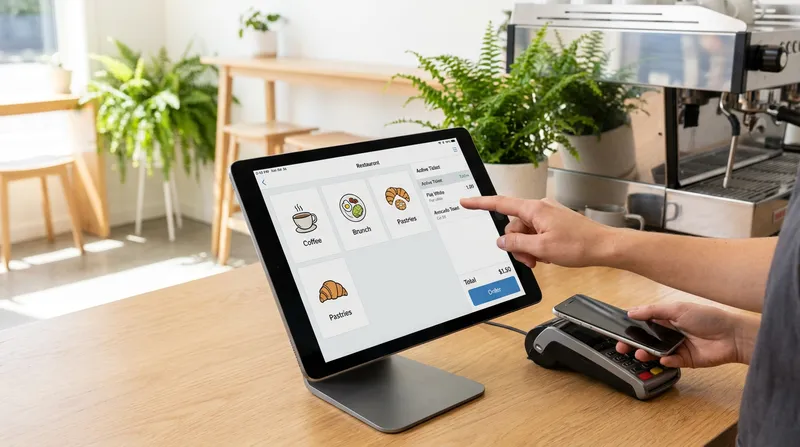
If you own a hospitality business in New Zealand, you already know the feeling. You sit down for a software demonstration, hoping to find a simple tool to manage your orders. Instead, you are hit with a wall of jargon, aggressive sales tactics, and promises of revolutionary features you never asked for. By the end of the pitch, you are looking at a bloated, expensive contract filled with hidden transaction fees and proprietary hardware requirements.
New Zealand hospitality owners are exhausted by this cycle. You do not need a complicated, overpriced system that requires a degree in IT to operate. You need a reliable tool that protects your profit margins, speeds up your service, and keeps your customers coming back.
This guide is your antidote to industry upselling. We will break down exactly how to evaluate restaurant POS software in New Zealand, helping you separate the core features that actually drive revenue from the flashy vanity features designed only to inflate your monthly bill.
Why Modern Venues Need Cloud-Based POS Software
Before diving into specific features, it is important to understand what cloud-based POS software actually means for a busy venue owner. In simple terms, a cloud-based system stores your data securely on the internet rather than on a clunky back-office computer. This allows you to check your daily sales from your phone while picking up supplies, update your menu instantly across all devices, and automatically back up your data.
Legacy systems that rely on localized servers often trap businesses in a web of disconnected technology. You might end up using one system for taking orders, a separate iPad for delivery apps, another program for staff scheduling, and a physical notebook for reservations.
According to research from SevenRooms, 40 percent of operators are running four to five separate operational systems, yet 83 percent report that better-connected systems would significantly improve their profitability.
An all-in-one POS system eliminates this software fatigue. By consolidating your operations into a single platform, you reduce your monthly subscription bloat and simplify staff training. However, you must be careful. Some providers use the term "all-in-one" as an excuse to charge premium prices for features you will never use. To protect your business, you need to understand the 7 Hidden POS Fees NZ Restaurant Owners Must Avoid.
Core Revenue Drivers vs. Vanity Features
When evaluating a new POS system, you need a strict framework to audit the features being presented to you. For every tool a sales representative pitches, ask yourself one simple question: "Will this feature save me time, or will it make me money?"
If the answer is neither, it is a vanity feature. Vanity features look impressive during a demonstration but add unnecessary complexity to your daily operations. Core revenue drivers, on the other hand, directly impact your bottom line.
Here is a simple breakdown to keep in mind:
| Core Revenue Drivers | Vanity Features |
|---|---|
| Commission-free online ordering | Expensive reservation modules for quick-service cafes |
| Kitchen Display Systems (KDS) | Complex 3D floor plan builders |
| Automated CRM and gift cards | Bloated employee social networks |
| Real-time inventory and reporting | Proprietary hardware requirements |
Let us examine the specific features that are non-negotiable for modern New Zealand venues.
Integrated Online Ordering Protects Your Margins
Relying solely on third-party delivery apps is a dangerous game for your profit margins. While these platforms offer visibility, they often charge commission fees ranging from 15 to 30 percent per order. For a local takeaway or cafe operating on tight margins, this is completely unsustainable.
Direct online ordering integration is a core revenue driver. When your POS system includes a commission-free online ordering platform, you keep 100 percent of your profits. Furthermore, you retain ownership of your customer data, allowing you to market directly to your regulars.
Industry experts at ChowNow note that direct online ordering protects margins by reducing commission fees while giving operators access to crucial customer data. This is not just a preference for venue owners; it is what your customers want. According to NCR Voyix's 2025 Customer Experience Report, 58 percent of customers prefer to order delivery through a restaurant's own app or website rather than a third-party platform.
If you want to understand the financial impact of making this switch, read our guide on Why NZ Takeaways Are Ditching Uber Eats for Direct Ordering.
Reporting and Analytics to Protect Margins
Protecting your profit margins requires visibility. Robust reporting and inventory management features directly impact your bottom line. By tracking weekly sales reports, you can easily identify underperforming menu items, optimize your staffing schedules based on peak hours, and reduce food waste. This is not just data collection; it is actionable intelligence that keeps your business profitable.
Kitchen Display Systems (KDS) for Speed and Accuracy
If you have ever worked through a busy Friday night service, you know the chaos of lost paper dockets. Handwriting is illegible, tickets fall off the rail, and front-of-house staff constantly run to the kitchen to ask about order wait times.
A Kitchen Display System (KDS) replaces this chaos with streamlined digital efficiency. Orders are sent instantly from the POS to a screen in the kitchen. They are color-coded based on wait times, ensuring no order is forgotten.
This is a true core feature because it directly improves table turnover times and customer satisfaction. Faster ticket processing means you can serve more customers during your peak hours without hiring additional staff. Discover more about this technology in our article on Kitchen Display Systems: Why NZ Venues Ditch Paper Tickets.
Automated CRM to Win Back Customers
The term Customer Relationship Management (CRM) often sounds like corporate jargon meant for large retail chains. For hospitality businesses, a CRM simply means having an automated way to remember your customers and encourage them to return.
A POS system with built-in customer management tracks order history and visit frequency. This allows you to set up automated digital loyalty programs (like a digital "Buy 9 coffees, get the 10th free" stamp card), issue digital gift cards, or send targeted offers to customers who have not visited in a while. Digital vouchers and gift cards act as complementary retention tools that drive repeat visits. Retaining an existing customer is significantly cheaper than acquiring a new one, making this a powerful revenue driver. Learn exactly how to implement this strategy by reading The 60-Day Rule: Automate Your POS CRM to Win Back Customers.
The Hardware Trap: iPad POS Systems vs. Proprietary Terminals
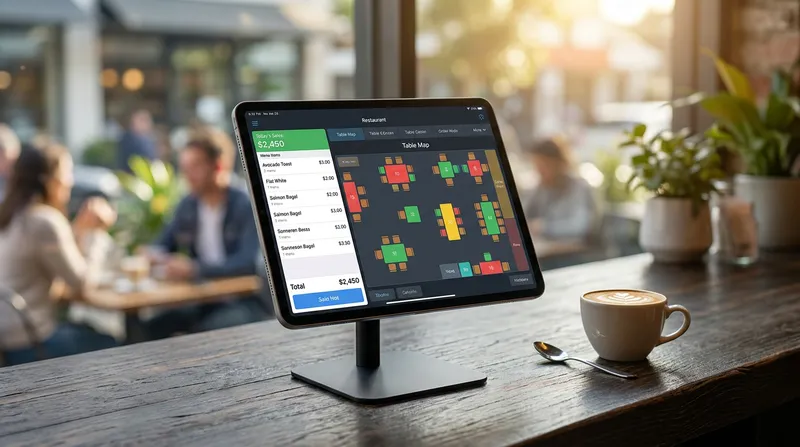
One of the most common ways POS companies upsell venue owners is through the hardware trap. They offer software at a seemingly reasonable monthly rate, but require you to purchase thousands of dollars worth of bulky, brand-specific hardware terminals.
If that hardware breaks, you must buy a replacement directly from them at a premium price. If you decide to switch software providers in the future, those expensive terminals become useless electronic waste because they cannot run any other software.
The modern alternative is an iPad POS system setup. Using standard Apple iPads provides incredible flexibility and affordability. The hardware is sleek, takes up less counter space, and is instantly familiar to your staff, which drastically reduces training time. If an iPad is accidentally dropped and broken, you can simply walk into any local electronics store, buy a new one, download the app, and be back up and running in minutes.
Furthermore, your POS must connect seamlessly with your payment terminals. In New Zealand, ensuring your setup is certified with local payment networks is critical. As highlighted by the Commonwealth Bank of Australia, integrated EFTPOS terminals sync directly with POS systems, making reporting simpler while speeding up the checkout experience. A reliable integration eliminates manual keying errors (where a staff member accidentally types $4.00 instead of $40.00) and ensures accurate end-of-day reconciliation.
For a complete breakdown of affordable, non-proprietary setups, check out our guide to POS Hardware NZ.
Choosing the Best POS System for Your Specific Venue
Not all hospitality businesses operate the same way, which is why a one-size-fits-all approach rarely works. You need to evaluate software based on the specific operational demands of your venue type.
For Cafes: Speed is your primary metric. During the morning coffee rush, your POS must allow staff to process orders in seconds. Look for features like quick-service workflows, integrated digital loyalty programs to retain daily commuters, and self-service kiosk capabilities. Self-service kiosks act as a peak-hour solution that reduces queue times and increases average order value without requiring you to hire additional staff. You do not need complex multi-course table management.
For Food Trucks: Mobility and reliability are paramount. You need a mobile POS system that runs on an iPad or iPhone, takes up minimal space, and connects to a compact Bluetooth printer. Most importantly, your system must have a robust offline mode. Food trucks often operate at festivals or markets with poor internet connectivity. Your software must allow you to continue taking cash orders and printing tickets even when the Wi-Fi drops out.
For Restaurants and Bar Hybrids: Full-service venues require robust table management. You need visual floor plans, the ability to split bills effortlessly, and seamless communication with your Kitchen Display System. If your venue transitions from a dining room to a busy bar later in the evening, your software must be able to handle both environments. We cover this specific scenario in detail in our post on the Best POS System for NZ Bar-Restaurant Hybrids.
For Multi-Location Venues: If you are expanding your footprint, you need multi-location management capabilities. Your POS should allow you to update menus, track inventory, and pull consolidated sales reports for all your sites from a single dashboard, saving you hours of administrative work.
By identifying your specific needs, you can easily say "no" when a sales representative tries to sell a food truck owner an expensive reservation management module.
Your Checklist to Survive a POS Sales Pitch
To ensure you do not get overwhelmed or upsold during your next software demonstration, bring this exact checklist with you. Demand clear, straightforward answers to these questions:
- Are your prices listed in New Zealand Dollars (NZD), and are they inclusive or exclusive of GST? (Many overseas providers advertise low rates that turn out to be in USD).
- Do you charge a percentage fee on every transaction processed through the POS? (This is the biggest hidden cost in the industry. Look for flat monthly subscription fees instead).
- Am I locked into a long-term contract, or can I cancel month-to-month?
- Does your system require me to buy your specific hardware, or can I use my own iPads?
- Is your system certified with EFTPOS NZ for seamless payment integration?
- Is online ordering included in the monthly fee, or do you take a commission on my takeaway orders?
- What happens if my internet goes down during a busy Friday night service? (Demand a demonstration of their offline mode).
If a sales representative dodges these questions or gives vague answers, walk away. Your business is too important to be tied to a provider that lacks transparency.
Conclusion
Choosing the best restaurant POS software in New Zealand does not have to be an exhausting process. By focusing on core revenue drivers like integrated online ordering, digital kitchen displays, and automated customer retention, you can easily filter out the vanity features designed to inflate your bill.
Remember that the software should serve your business, not the other way around. Reject proprietary hardware traps, demand transparent NZD pricing, and refuse to pay hidden transaction fees on your hard-earned sales.
At Lazygrid, we are a New Zealand-based POS provider trusted by local hospitality businesses. We believe in providing powerful, all-in-one technology without aggressive upselling. Our transparent plans start from just $24 per month with absolutely no hidden transaction fees.
If you are ready for a transparent POS solution that actually protects your profit margins, start your free trial or book a 15-minute demo today.
Frequently Asked Questions
What is the average cost of a restaurant POS system in NZ?
Costs vary widely, but it is vital to separate upfront hardware costs from ongoing software subscriptions. A modern iPad-based system might cost around $1,000 upfront for the tablet, printer, and cash drawer, with software subscriptions ranging from $50 to $150 per month. Beware of providers offering "free" hardware, as they typically recoup the cost by charging hidden percentage fees on every transaction you make.
Can I use an iPad as a POS system for my cafe?
Absolutely. iPads are the industry standard for modern cafes. They are affordable, highly responsive, take up minimal counter space, and are incredibly easy for staff to learn. If an iPad breaks, it can be replaced at any local electronics retailer on the same day, unlike bulky legacy terminals.
Do I need internet access to run a cloud-based POS?
While cloud-based systems require the internet to sync data and process credit cards, a high-quality POS will feature a robust offline mode. This allows your venue to continue taking orders, printing kitchen dockets, and processing cash payments seamlessly during an internet outage. Once the connection is restored, the system automatically syncs the offline data to the cloud.
How does integrated EFTPOS work in New Zealand?
Integrated EFTPOS means your POS software communicates directly with your payment terminal. When you finalize an order on the POS, the exact total is automatically sent to the terminal. This eliminates manual keying errors, speeds up the payment queue, and makes end-of-day reconciliation significantly faster and more accurate.
What is a Kitchen Display System and do I really need one?
A Kitchen Display System (KDS) is a digital screen that replaces traditional paper dockets in your kitchen. While a very small coffee cart might survive without one, busy cafes and restaurants need a KDS to manage high order volumes accurately. It tracks preparation times, color-codes orders by urgency, and completely eliminates the risk of lost or illegible handwritten tickets.