
iPad POS Hardware NZ: Best Stands, Cash Drawers & Till Bundles
iPad POS Hardware NZ: Best Stands, Cash Drawers & Till Bundles
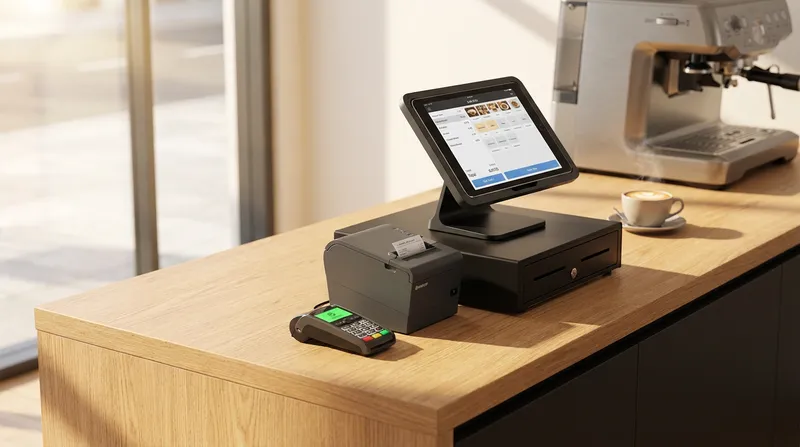
Are you tired of trying to piece together point-of-sale hardware that simply refuses to communicate with your local payment terminal? You are not alone. It is incredibly frustrating when hard-working owners of restaurants, cafes, massage shops, beauty salons, and food trucks invest in a beautiful iPad stand, a receipt printer, and a cash drawer, only to discover they are locked out of seamless payment integration. They are either forced into expensive, restrictive proprietary ecosystems or left manually typing transaction amounts into an unconnected terminal, which inevitably leads to costly human errors.
In this comprehensive guide, we will break down exactly what you need to build the perfect iPad POS hardware bundle in New Zealand. We will cover everything from secure stands and reliable cash drawers to mastering local EFTPOS integration, ensuring your business runs smoothly, looks professional, and keeps your customers coming back.
What is an iPad POS System (And Why Do NZ Businesses Need One)?
An iPad POS (Point of Sale) system replaces bulky, outdated cash registers with a sleek, cloud-based application running on an Apple iPad. Instead of a massive computer monitor taking up half your counter space, you get a slim, intuitive touchscreen that handles everything from order entry and table management to inventory tracking and customer loyalty.
The shift toward mobile and tablet-based point-of-sale solutions is accelerating rapidly. According to GlobalData, the New Zealand card payments market is forecast to reach NZD 106 billion by 2026, driven by a strong consumer migration toward electronic payments and well-established digital infrastructure. To keep up with this demand, your business needs hardware that can process transactions in seconds.
Traditional legacy tills are expensive to maintain, difficult to update, and take up valuable real estate. An iPad POS bundle offers unparalleled flexibility. You can update your menu from home, check real-time sales data on your phone, and train new staff in hours rather than days. For a deeper dive into the software side of things, check out our guide on Cloud POS for NZ Small Businesses: Cut Admin, Boost Sales - Lazygrid Blog.
Actionable Tip: Audit your current counter space today. Measure the dimensions of your existing legacy till to see exactly how much room you can reclaim by switching to a compact iPad stand. You can use that extra space for high-margin impulse purchase items or a cleaner, more welcoming customer interaction area.
Mastering NZ EFTPOS Integration: The Missing Link
The biggest mistake New Zealand business owners make when buying POS hardware bundles is ignoring the payment integration until the very end. An iPad cash register hardware setup is virtually useless if your staff still have to manually type every single transaction amount into a separate EFTPOS terminal.
Manual entry is slow, prone to errors, and creates frustrating bottlenecks during your busiest hours. Imagine a staff member accidentally typing $52.50 instead of $25.50. The customer notices, the transaction must be voided, the queue backs up, and the customer experience is ruined.
Furthermore, consumer habits have changed permanently. Data from Payments NZ reveals that contactless card transactions have become the dominant payment method across the country, and the demand for tap-and-go efficiency continues to grow exponentially. Your hardware must support fast, integrated contactless payments.
To achieve this, your iPad POS software must communicate directly with local providers like EFTPOS NZ, Windcave, or Smartpay. As noted by EFTPOS NZ, integrating your terminal directly with your POS removes re-keying, eliminates mismatched totals, and drastically speeds up the checkout process. Lazygrid holds direct EFTPOS NZ certification, trusted by over 50,000 NZ merchants, ensuring your payments are fast, secure, and perfectly synced.
Actionable Tip: Before purchasing any iPad hardware or software, explicitly ask the provider: "Does this system offer direct, certified integration with New Zealand EFTPOS terminals?" If the answer is no, walk away. You need a system that automatically pushes the total to the terminal and automatically closes the sale when the payment is approved.
Essential iPad POS Hardware Components
Building the ultimate POS hardware bundle in NZ requires four main components: the iPad itself, a secure stand, a receipt printer, and a cash drawer. Let us look at how to choose the best options for your specific needs.
Lazygrid iPad POS Hardware Bundles
To eliminate the guesswork, Lazygrid offers pre-configured hardware bundles designed specifically for the New Zealand market:
- Starter Package ($999 or just $79/month on lease): Perfect for small cafes and mobile setups. Includes a secure iPad stand, network receipt printer, and a heavy-duty cash drawer.
- Standard Package ($1,999): Built for high-volume venues. Includes premium stands, multiple receipt printers, a robust cash drawer, and seamless EFTPOS integration hardware.
Receipt Printers and Cash Drawers
A reliable receipt printer and cash drawer bundle is the engine room of your checkout. For iPad systems, you need a network-capable thermal receipt printer. The most popular and reliable models are EPSON thermal printers with ethernet connections or Xprinter wireless models. These connect directly to your local WiFi router, and the iPad communicates with them over your local network.
Your cash drawer connects directly to the back of the receipt printer using a standard RJ11 or RJ12 cable. When a cash transaction is finalized on the iPad, the software tells the printer to print the receipt, and the printer sends an electrical pulse through the cable to pop the cash drawer open automatically.
Secure iPad POS Stands
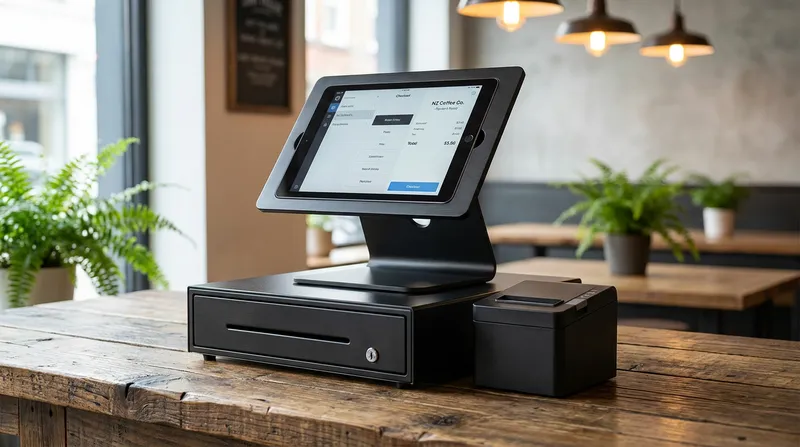
Your iPad stand is the most visible piece of technology in your venue. It needs to be secure enough to prevent theft, durable enough to withstand thousands of screen taps a day, and sleek enough to match your brand aesthetic.
The best iPad stands for POS offer swivel bases. This allows your staff to enter the order and smoothly flip the screen around to face the customer for tipping, digital receipt entry, or loyalty program sign-ups. Look for stands constructed from high-grade aluminum or steel, featuring locking mechanisms that keep the tablet safe while allowing it to be removed for maintenance.
Networking and Cable Management
A major complaint about DIY POS setups is the messy web of cables. Because network printers communicate wirelessly with the iPad, you only need to manage the power cable for the iPad and the power/network cables for the printer.
Actionable Tip: To achieve a completely cable-free aesthetic, drill a small grommet hole directly beneath your iPad stand and your receipt printer. Route the power cables straight down through the counter. Use zip ties under the counter to keep everything organized.
Best Hardware Setup by NZ Business Type
Not all businesses operate the same way. A bustling Auckland cafe needs a different hardware bundle than a mobile food truck in Wellington or a quiet massage shop in Christchurch. Here is how to segment your cloud POS equipment based on your industry.
The Cafe POS Setup
Cafes live and die by the morning rush. Speed is your ultimate metric. For a cafe POS system in NZ, you need a multi-station setup.
Your bundle should include a primary iPad on a swivel stand, a high-speed ethernet thermal printer, a heavy-duty cash drawer, and a fully integrated EFTPOS terminal. This setup thrives on the Lazygrid Standard plan ($59/month), which includes a built-in loyalty program so your regulars earn stamps automatically. Additionally, cafes benefit massively from adding a Kitchen Display System (KDS) or a secondary barista printer. For more strategies on handling peak hours, read our guide on Cafe POS & Kiosks: Beat the NZ Morning Rush - Lazygrid Blog.
Actionable Tip: Position your EFTPOS terminal on a dedicated pivot stand facing the customer. This prevents staff from having to hand the terminal back and forth, shaving precious seconds off every transaction.
The Food Truck Mobile Bundle
Food trucks operate in tight spaces with unpredictable internet and limited power. Your iPad till system must be compact and resilient.
Opt for an iPad Mini or a standard iPad on a low-profile fixed stand. Instead of a bulky cash drawer, consider a compact 13-inch drawer. Use a Bluetooth receipt printer to save space and minimize wiring. The Lazygrid Lite plan ($24/month) is perfect here, offering a robust offline mode so you can continue trading even if your mobile hotspot drops out. Learn more about optimizing mobile setups in Beyond Square: NZ Food Truck & QSR Tech Stack Guide - Lazygrid Blog.
Actionable Tip: Invest in a high-capacity uninterruptible power supply (UPS) battery backup for your router and iPad. If the generator fails, your POS system will stay online long enough to process the queue.
The Restaurant and Bar Ecosystem
Full-service restaurants require a decentralized hardware approach. You need a central iPad terminal for the host stand, mobile devices for servers to take orders at the table, and multiple receipt printers routing specific items to the bar and the kitchen.
Paired with the Lazygrid Premium plan ($149/month), you unlock advanced inventory management and online ordering. For the kitchen, paper tickets are becoming obsolete. A digital KDS screen mounted on the wall is far superior for tracking prep times. Discover how to build this infrastructure by reading KDS Printers NZ: Your Guide to a Bulletproof Hybrid Kitchen Setup - Lazygrid Blog.
Actionable Tip: Set up your POS software to automatically print a duplicate receipt at the bar whenever a server enters a drink order from the floor. This allows the bartender to start preparing the drinks before the server even leaves the table.
The Beauty Salon and Massage Shop Setup
For salons and wellness centers, aesthetics and client management are the top priorities. You do not need industrial kitchen printers or massive cash drawers.
Your ideal bundle includes a premium white or silver iPad stand that complements a clean, calming interior. A compact Bluetooth printer hidden under the desk is perfect for the occasional physical receipt. Your software must include a robust booking system and automated SMS/email reminders to prevent costly no-shows, which are standard within the Lazygrid ecosystem. See how tailored systems compare in Looking for Toast POS in NZ? Comparison & Best Alternatives - Lazygrid Blog.
Actionable Tip: Utilize the customer-facing display feature on your iPad. When checking out a client, flip the screen to show them their total, prompt them to rebook their next appointment, and offer a discreet tipping option.
How to Set Up Your iPad POS in New Zealand
Setting up your POS hardware bundles in NZ does not require an IT degree. Follow these clear steps to get your system running smoothly.
- Secure the Hardware: Mount your iPad stand to the counter using the provided adhesive pads or screws. Insert the iPad and lock it. Connect the iPad to power.
- Network the Printer: Plug your thermal receipt printer into power. Run an ethernet cable from the back of the printer directly into your WiFi router. Turn the printer on.
- Connect the Cash Drawer: Take the RJ12 cable attached to your cash drawer and plug it into the specific port on the back of your receipt printer.
- Configure the Software: Open your iPad POS app. Navigate to the hardware settings, search for local printers, and select your model. Do a test print. The drawer should pop open.
- Integrate the EFTPOS: In your POS settings, navigate to payment integrations. Enter the IP address of your NZ EFTPOS terminal to pair the devices. Process a $1.00 test transaction to ensure the total pushes to the terminal automatically.
Actionable Tip: Always assign a static IP address to your receipt printer and your EFTPOS terminal. If you leave them on dynamic IP settings, your router might assign them new addresses after a power outage, causing your iPad to lose the connection right in the middle of a busy shift.
Cloud POS Equipment vs. Legacy Systems
Many business owners hesitate to switch to cloud POS equipment because they worry about internet reliability in New Zealand. What happens if the Chorus network goes down during the Friday dinner rush?
| Feature | Cloud POS (Lazygrid) | Legacy POS Systems |
|---|---|---|
| Upfront Cost | Low (Hardware bundles from $999) | High (Often $5,000+) |
| Server Requirement | None (Cloud-based) | Requires bulky back-office server |
| Offline Capability | Yes (Local caching) | No (Fails if server crashes) |
| Updates | Automatic and free | Manual and expensive |
This is where modern hybrid cloud systems outshine legacy systems. A high-quality iPad POS system caches your menu and product data locally on the device. If the internet drops, the system automatically enters offline mode. You can continue taking orders, printing tickets to the kitchen, and opening the cash drawer. Once the internet connection is restored, the system silently syncs all offline transactions back to the cloud.
Legacy systems require a massive back-office server. If that server crashes, your entire restaurant comes to a halt. Cloud systems remove the need for expensive local servers while providing the resilience needed to survive internet dropouts. For smaller retail environments looking for extreme mobility, you can even run your entire business from a smartphone. Read Best iPhone POS Systems NZ: The Ultimate Guide for Cafes & Retail - Lazygrid Blog to learn how.
Actionable Tip: Test your POS system's offline mode proactively. Once a month, unplug your router from the wall before you open for the day. Process a test cash transaction to ensure your printers and cash drawer still function perfectly without an active internet connection.
Conclusion
Upgrading your hospitality or retail business with an iPad POS hardware bundle does not have to be a frustrating puzzle of incompatible parts. By focusing on certified NZ EFTPOS integration, choosing the right stands and printers for your specific business type, and utilizing smart cable management, you can build a checkout experience that is as beautiful as it is efficient.
Remember, the goal is to speed up service, eliminate manual entry errors, and give your staff the tools they need to provide exceptional customer experiences.
Ready to see how Lazygrid works? Stop fighting with mismatched hardware and choose a system designed specifically for the New Zealand market. Book a free demo or explore our hardware packages today. With transparent pricing, seamless local EFTPOS integration, and robust offline capabilities, Lazygrid provides the ultimate POS foundation for your business to thrive.
Frequently Asked Questions
Can I use any iPad model for my POS system?
Lazygrid requires an iPad running iPadOS 15 or later. This generally includes the iPad 5th generation and newer, all iPad Air models, all iPad Pro models, and the iPad Mini 5th generation and newer. Using an older device can lead to slow performance, app crashes during peak hours, and security vulnerabilities. It is highly recommended to invest in a current-generation iPad to ensure your hardware bundle remains supported for at least the next four to five years.
How do I connect my iPad POS to a New Zealand EFTPOS terminal?
You must choose a POS software provider that has built a certified integration with NZ terminal providers like EFTPOS NZ, Smartpay, or Windcave. Once confirmed, you connect both the iPad and the terminal to the same local WiFi network. You then enter the terminal's IP address into the POS application settings. This allows the two devices to communicate locally, automatically pushing transaction totals from the iPad to the card reader without any manual entry.
What is the best secure iPad POS stand for a food truck?
For a food truck, you want a low-profile, fixed stand that bolts directly into the counter. Avoid tall swivel stands, as the constant movement of the truck can cause them to tip or vibrate loose while driving. Look for heavy-duty steel enclosures that protect the edges of the iPad from bumps, spills, and grease. Brands that offer screw-mounted bases and lockable faceplates are ideal for mobile hospitality setups.
Do I need a special receipt printer for an iPad POS?
Yes, you cannot use a standard USB printer or a regular home office printer. You need a network-capable thermal receipt printer. Ethernet printers are the most reliable because they hardwire directly into your router, while Bluetooth or WiFi printers offer more flexibility for mobile setups where cabling is difficult. EPSON and Xprinter are the industry standards for iPad compatibility in New Zealand.
Can an iPad POS system work offline if my internet drops?
Yes, premium iPad POS systems feature a robust offline mode. Because your local hardware (the iPad, network printer, and cash drawer) communicates over your internal WiFi router, it does not rely on the outside internet to function. As long as your router has local power, you can continue to take orders, print kitchen tickets, and open the cash drawer. However, integrated EFTPOS payments may need to revert to a standalone mode until your internet connection is restored.