
NZ Allergen Compliance 2026: POS & KDS Setup Guide
Introduction: The Hidden Risk in Your Daily Service
Every hospitality owner knows the pressure of a busy Saturday brunch rush. When the venue is full and orders are flying, a new staff member can easily forget to pass a verbal allergy note to the kitchen. Managing the risk of an allergic reaction, legal liability, or a Ministry for Primary Industries (MPI) recall is a heavy responsibility. Relying on human memory or handwritten dockets to track dietary requirements is no longer a viable risk management strategy.
In New Zealand, the regulatory standards for allergen management are strict. PEAL rules have applied to newly labelled food since 25 February 2024, and the final stock-in-trade grace period ended on 25 February 2026, so every allergen declaration must now use the PEAL format.
If you own a restaurant, cafe, or food truck, you need a reliable, consistent system to prevent undeclared allergen recalls. This guide will show you how to update your technology stack to keep your customers safe and your business compliant.
What the PEAL Rules Mean for NZ Hospitality
Plain English Allergen Labelling (PEAL) was a major update to food safety regulations. As outlined by Food Standards Australia New Zealand (FSANZ), FSANZ Standard 1.2.3 mandates that allergen information must be declared using simple, everyday terms. The goal is to help consumers make safe food choices without needing a degree in food science to read a menu.
As confirmed by the Ministry for Primary Industries (MPI), the three-year transition ended on 25 February 2024, and the two-year stock-in-trade period for food packaged and labelled before that date ended on 25 February 2026. There is no grace period left.
Here are the core requirements your venue must follow:
- No more scientific names: You must use plain English terms. For example, you must declare "milk" instead of "casein" or "whey".
- Specific tree nut declarations: According to Allergy & Anaphylaxis Australia, you can no longer group ingredients under the generic term "tree nuts". You must specifically name almond, Brazil nut, cashew, hazelnut, macadamia, pecan, pine nut, pistachio, or walnut.
- Wheat vs Gluten: Wheat must be declared separately from gluten to protect those with specific wheat allergies versus coeliac disease.
Updating your menu is only the first step. You must also ensure these practices are reflected in your daily operations, which is a critical part of your NZ Food Control Plan Verification: Complete Audit Checklist.
Why Traditional POS Systems Fail at Allergen Safety
Many older point-of-sale systems treat allergens as an afterthought. They rely on basic open-text modifiers where a server types a custom note like "no dairy" at the bottom of a docket.
This creates several significant risks for your business:
- Chefs miss the text: In a busy kitchen, a small line of black text at the bottom of a faded paper ticket is easy to overlook.
- Rushed order entry: During a lunch rush, servers tap through ordering screens as quickly as possible. Without structured modifier options, important dietary details can be left off the ticket.
- Inconsistent naming: One staff member types "nut allergy", another types "no almonds", and another types "N/A". This inconsistency confuses the kitchen and leads to dangerous assumptions.
To maintain strong POS allergen compliance, you need a system that standardises how dietary notes are recorded and displayed. If you are currently evaluating posBoss (Bustle) Alternatives NZ: Add-On vs All-in-One POS, prioritise a platform that treats dietary requirements as a core operational feature.
4 Steps to Bulletproof Your Allergen Workflow
Maintaining a PEAL-compliant workflow does not have to be overwhelming. Modern POS technology can make these safety checks part of your everyday workflow. Check which of the steps below your system supports. Here is a practical, four-step guide to checking your systems match PEAL requirements.
1. Standardise Allergen Modifiers on Your POS
Your POS system should act as a clear communication bridge between the customer and the kitchen.
Actionable steps to configure your POS:
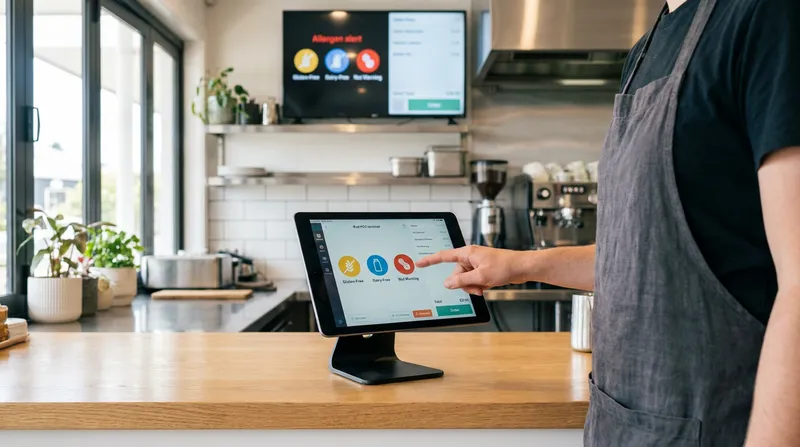
- Use Structured Modifications: Use order modifications and notes to record allergy requirements clearly on every order.
- Standardise your allergen names to the FSANZ list: Ensure your modifier buttons use exact PEAL naming conventions, such as specific tree nuts ("almond", "cashew"), wheat, barley, oats, rye, gluten, crustacea, mollusc, fish, egg, milk, peanut, sesame, soy, lupin, and sulphites.
2. Display Clear Allergen Information on Self-Ordering Kiosks
Self-service technology is great for reducing wait times, but it shifts the process of checking ingredients directly to the customer. Your kiosk interface must be crystal clear to help guests order safely.
Actionable steps for kiosk configuration:
- Use PEAL-Compliant Descriptions: Show allergen information for each menu item on your self-service kiosk, using PEAL names (for example "almond" or "cashew" rather than "nuts", and "wheat" listed separately from gluten).
By keeping your digital menu descriptions clear and accurate, you can safely manage high volumes of self-service orders. For more tips on managing volume, read our guide on Order Pacing & Scheduled Pickup POS: Crush the NZ Rush.
3. Use CRM to Store Permanent Customer Allergy Notes
A modern POS system with a built-in Customer Relationship Management (CRM) tool allows you to save important dietary information alongside a regular customer's profile.
Actionable steps for CRM integration:
- Create Dietary Profiles: When a regular customer mentions an allergy, create a profile for them and add their specific dietary requirement.
- Use Notes and Tags: Record the allergy in the customer's profile notes and tags so staff can check it when they look up the customer.
- Secure the Data: Health information is sensitive. Ensure your CRM is compliant with local privacy laws. Learn more about securing customer data in our post on the NZ Privacy Act IPP 3A (2026): Ditch 3rd-Party Data for POS.
This workflow helps support attentive service and builds trust with your regular guests.
4. Highlight Critical Modifiers on Your Kitchen Display System (KDS)
The final and most important step in the workflow happens in the back of house. If the front-of-house staff record the allergy accurately, the kitchen still needs to see it clearly on the ticket.
Actionable steps for KDS safety:
- Ditch the Paper: Paper dockets get lost, stained, or misread. Transition to a digital KDS.
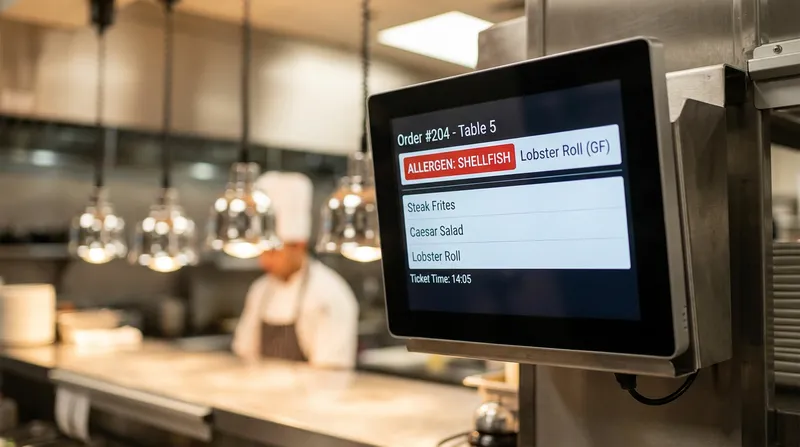
- Use Highlighted Warnings: Use your KDS's highlighted allergen warnings so allergy information stands out on every ticket, alongside urgency colour-coding to keep the kitchen organised.
This clear visual presentation is a strong defence against allergen cross-contact incidents during a busy Friday night service.
Handling Unpackaged Food and Cafe Cabinet Signage
Much of the guidance surrounding PEAL focuses on packaged retail goods and barcode scale labels. However, cafes and restaurants serving unpackaged food have specific requirements too.
According to the Allergen Bureau, unpackaged food in hospitality venues must still be supported by accurate allergen declarations. The information must be provided either upon request, displayed with the food, or accompanying the food.
Actionable steps for cabinet food:
- Update Physical Signage: Review your cafe cabinet food allergen signage. Ensure you are no longer using vague terms. Replace "Contains Nuts" with "Contains Almonds and Cashews".
- Keep Menus and Signage Consistent: Keep your cabinet signage and online menu allergen information consistent. Menu changes in your POS sync to your online ordering menu, but printed cabinet labels need to be updated separately.
- Update Your Food Control Plan: Your Food Control Plan's allergens section must reflect these naming conventions and staff training protocols.
Mobile businesses must also follow these rules. If you run a mobile operation, check out our guide on Offline POS in 2026? NZ Food Trucks & Rural Venues Can Go Online to ensure your tech stack works reliably anywhere you trade.
Conclusion: Protect Your Customers and Your Business
The last PEAL grace period ended in February 2026, so now is the time to check your allergen workflow is fully compliant. Relying on handwritten notes and verbal communication alone is an avoidable risk for both your customers and your business.
By upgrading to a modern system like Lazygrid POS, you can bring consistency to these critical safety checks. From clear order notes at the counter to allergen information on your self-service kiosk and highlighted allergen warnings on your Kitchen Display System, technology helps reduce the risk of miscommunication.
Take the time now to audit your menu, review your POS configurations, and train your staff on the PEAL requirements. For more insights on optimising your hospitality technology, explore the Lazygrid Blog.
Frequently Asked Questions
What is the PEAL deadline for New Zealand hospitality businesses?
PEAL requirements have applied since 25 February 2024. The two-year stock-in-trade period for food packaged and labelled before then ended on 25 February 2026, so all food sold in New Zealand must now comply with the naming requirements in FSANZ Standard 1.2.3 and Schedule 9.
Do PEAL regulations apply to unpackaged food in cafes and restaurants?
Yes. While unpackaged food does not require a traditional printed barcode label, accurate and PEAL-compliant allergen information must still be provided upon request, displayed clearly next to the food in the cabinet, or accompany the meal. Your internal Food Control Plan must reflect these updated procedures.
How should specific tree nuts be listed on a menu under the PEAL rules?
You can no longer use the generic, catch-all term "tree nuts". Under the regulations, you must declare the specific nut present in the food. This includes explicitly naming almond, Brazil nut, cashew, hazelnut, macadamia, pecan, pine nut, pistachio, or walnut.
Can a Kitchen Display System (KDS) help prevent allergen cross-contact?
Absolutely. A Kitchen Display System that highlights allergen warnings on screen makes allergy information harder to miss than on faded or lost paper dockets.
What is the most secure way to track regular customer allergies?
A practical method is using a built-in CRM within your POS system to save a customer's dietary requirements directly to their digital profile using notes and tags. Staff can check the customer's profile notes when taking their order or booking, but always confirm allergies verbally as well.