
Switch Your NZ POS System Without Losing Revenue
Introduction: The Hidden Cost of Clinging to Your Old POS
You are standing behind the counter on a busy Friday night. The docket printer is jamming, the touchscreen requires three hard taps to register a flat white, and your staff are growing frustrated. You know it is time for a hospitality POS upgrade in New Zealand, but a paralyzing fear holds you back. What if unplugging your clunky legacy software results in catastrophic data loss? What if the new system crashes during your busiest service, costing you thousands in lost weekend revenue?
Many Kiwi business owners stick with outdated, server-based systems simply because they are terrified of the transition process. Everyone wants to sell you on the shiny features of a new setup, but nobody talks about the messy reality of ripping out the old one.
The truth is that clinging to an outdated system is a massive risk. Hardware failure during peak hours, lack of modern integrations, and staff burnout from inefficient workflows are actively costing you money. Moving from a legacy POS to a cloud POS does not have to be a nightmare. In this guide, we provide a pragmatic, step-by-step playbook to ensure a stress-free transition that protects your weekend revenue and minimizes downtime to near zero.
Why Upgrading from Legacy POS to Cloud POS is Non-Negotiable
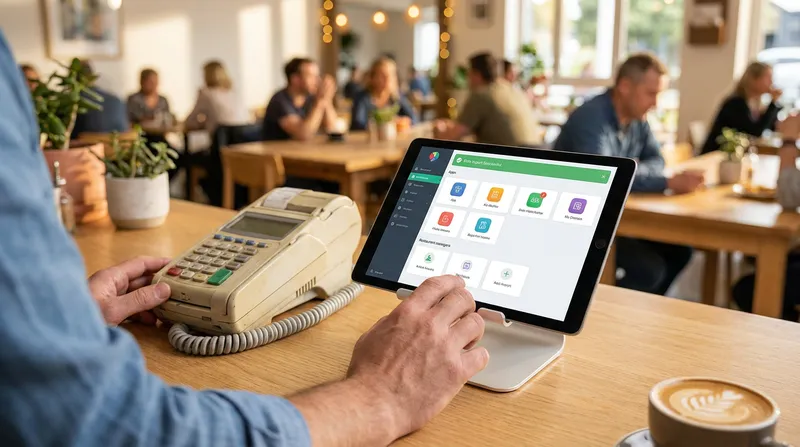
To understand why you need to make the switch, we first need to look at the fundamental differences between legacy systems and modern cloud architecture. Older systems run on local servers hidden in your back office. They require manual software updates, expensive hardware maintenance, and physical backups to protect your data. If the server fails, your entire business grinds to a halt.
Cloud-based systems, on the other hand, store your data securely on remote servers and run on standard devices like iPads. They update automatically and allow you to manage your business from anywhere. According to the Ministry of Business, Innovation and Employment, adopting cloud technology allows New Zealand businesses to redirect resources from maintaining expensive physical computing equipment to focusing on core growth and customer service. For a busy cafe or restaurant owner, this means spending less time playing IT support and more time focusing on your menu.
Furthermore, insights shared by the Restaurant Association of New Zealand highlight that while Kiwi diners highly value the personal touch, technology is essential for running efficient back-of-house operations and filling skills gaps. Upgrading your system allows your front-of-house staff to process orders rapidly, routing them directly to the kitchen without a single shouted instruction.
Quick Comparison: Legacy POS vs. Cloud POS
| Feature | Legacy POS | Cloud POS (Lazygrid) |
|---|---|---|
| Data Storage | Local back-office server | Secure remote cloud servers |
| Software Updates | Manual and costly | Automatic and free |
| Hardware | Bulky, expensive custom terminals | Standard Apple iPads |
| Reliability | Entire system fails if server crashes | Offline mode continues processing locally |
| Integrations | Requires paid third-party add-ons | Built-in loyalty and online ordering |
If you want to see how this looks in practice, check out our guide on the Best POS for NZ Restaurants & Bars: Dual Workflows to understand how cloud architecture streamlines both your counter and kitchen operations.
The Ultimate POS System Changeover Checklist
The secret to a seamless cloud POS migration in NZ is a phased approach. If you try to swap your hardware, train your staff, and import your menu all on the same day, you are setting yourself up for failure. Preparation is your best defense against weekend disasters.
By following a structured POS system changeover checklist, you can break the intimidating process down into manageable steps. We recommend dividing your migration into three critical phases: planning, data export, and training.
Phase 1: Pre-Migration Planning and Hardware Audit
Before you purchase any new software, you must audit your existing hardware. You might be surprised to learn that a salon POS system transition or a food truck mobile POS NZ upgrade does not always require buying everything brand new. Cloud systems run on standard Apple iPads, but many of your existing peripherals can be repurposed.
Take an inventory of your current setup:
- Receipt Printers: Check if your existing thermal printers (like Epson or Xprinter models) have ethernet or wireless capabilities. If they do, they can likely connect to your new cloud network.
- Cash Drawers: Most standard cash drawers use an RJ11 or RJ12 connection that plugs directly into the receipt printer. These rarely need replacing.
- Payment Terminals: Map out your necessary integrations. Ensure your new software supports EFTPOS NZ certified terminals.
As noted by Retail NZ, integrating payments directly with POS systems is critical to reducing overheads and simplifying daily operations for businesses. A fully integrated terminal means your staff never have to manually type the total amount into the EFTPOS machine, eliminating human error entirely. For more details on building the perfect hardware stack, review our Takeaway POS System NZ Guide.
Phase 2: How to Export POS Historical Data Safely
One of the biggest anxieties owners face is losing years of valuable customer and sales data. To export POS historical data safely, you need to locate the reporting or back-office section of your legacy software.
For systems like H&L or Ideal POS, the process usually looks like this:
- Log into your back-office manager portal with admin credentials.
- Navigate to the "Reports" or "Database Management" tab.
- Select "Customer Database" and "Inventory/Menu List".
- Look for an option labeled "Export" and choose the CSV (Comma Separated Values) or Excel format.
- Save these files securely to a backup hard drive or secure cloud storage folder.
Before you import customer data to a cloud POS, take this opportunity to clean house. Delete outdated menu items you no longer sell and remove duplicate customer profiles. The Office of the Privacy Commissioner advises that under the New Zealand Privacy Act 2020, keeping only essential personal information reduces your liability and protects your customers. Only transfer the customer data you actively use for marketing or loyalty programs.
Phase 3: Mid-Week Staff Training Strategies
The golden rule of hospitality tech is simple: never launch a new system on a Friday or Saturday. To switch POS with minimal disruption, schedule your staff training for your absolute quietest days, which are typically Monday or Tuesday.
Set up the new iPads in the back room or on a spare counter. Create a "sandbox" or training mode where staff can practice ringing up complex orders, splitting bills, and processing refunds without affecting live sales data. Give them real-world scenarios to work through. Have them practice modifying an order (like a burger with no tomato, add extra bacon) so they build muscle memory before a real customer is standing in front of them.
For specific tips on training baristas and front-of-house staff to handle high volume, read our guide on Coffee Shop POS: Beat the Morning Rush & Boost Sales.
Running Parallel Systems: The Secret to a Stress-Free Weekend
Even with thorough mid-week training, the first busy weekend service with a new system can induce panic. This is where the "parallel run" strategy comes in. It is the ultimate safety net for a cloud POS migration in NZ.
Instead of completely removing your old till, keep the legacy system plugged in and accessible right next to your new iPads. For the first few days, run your new cloud software as the primary system. All new orders, payments, and kitchen tickets should go through the iPad.
However, if a staff member panics during the Friday night rush, the old system is right there as a backup. You can seamlessly switch to the legacy till to process a transaction, ensuring the queue keeps moving and you do not lose a single dollar of weekend revenue.
Additionally, modern cloud solutions are built for resilience. Even if your internet drops mid-service, Lazygrid's offline mode continues processing orders locally and syncs automatically when the connection is restored. Once you have successfully navigated one full weekend service using only the new cloud system, you will have the confidence to officially unplug and remove the legacy hardware. To see how this parallel strategy works in fast-paced environments, explore our insights on the Bar POS System NZ.
Evaluating Ideal POS Alternatives and H&L Replacements
When you are finally ready to search for Ideal POS alternatives or an H&L POS replacement, you need to look beyond basic transaction processing. Replacing heavy, server-bound software with an agile cloud solution opens up a world of built-in features that were previously impossible or prohibitively expensive.
At Lazygrid, we have designed our cloud POS specifically to replace outdated legacy systems with powerful, built-in tools. The best POS for cafes and salons in NZ will offer integrated online ordering, QR code table ordering, and self-service kiosk capabilities right out of the box. You no longer need to pay third-party developers to bolt these features onto your legacy system.
A report from Digital Identity NZ emphasizes that the most valuable retail opportunities in the next decade will require a foundation of trusted digital rails. By moving to the cloud with Lazygrid, you are future-proofing your business. You gain the ability to launch a digital loyalty program that lives directly in your customers' Apple Wallets, or an online ordering page that syncs directly to your Kitchen Display System (KDS) without paying hefty commission fees.
Discover how to reclaim your profit margins by reading about our Online Ordering System NZ.
Ready to Make the Switch?
Stop letting the fear of a messy transition hold your business back. Moving to a modern system is easier than you think when you have the right partner. Book a free demo with the Lazygrid team today, and we will help you map out a stress-free migration plan tailored specifically to your venue, ensuring your data is safe and your weekend revenue is protected.
Conclusion: Take the Leap with Confidence
Switching your point of sale software does not have to be a terrifying ordeal. By committing to a phased migration, exporting your historical data safely, training your staff mid-week, and running a parallel system during your first busy weekend, you can execute a hospitality POS upgrade in New Zealand seamlessly.
The hidden costs of maintaining an old, inefficient system far outweigh the temporary effort of transitioning to the cloud. You will save money on hardware maintenance, speed up your service times, and gain access to powerful tools that drive revenue growth.
If you are ready to see how Lazygrid makes the switch simple, check out our comprehensive guide on the Best POS System for NZ Cafes: 7 Non-Negotiable Features or reach out to our Wellington-based team to start your free trial today.
Frequently Asked Questions
How long does a cloud POS migration typically take in NZ?
The physical setup of iPads and printers takes only a few hours. However, data export, menu building, and staff training should be spread over a 2 to 3 week planning period to ensure a smooth, stress-free transition.
Can I keep my existing hardware when switching POS systems?
Yes, in many cases. While cloud POS systems run on standard iPads or iPhones, you can often reuse your existing thermal receipt printers with ethernet connections, standard cash drawers, and Bluetooth barcode scanners.
What happens if my internet goes down during service?
This is a common fear, but modern systems have you covered. Lazygrid features a robust offline mode. If your internet connection drops, the system continues to process orders, print kitchen dockets, and operate locally. Once the internet is restored, all data automatically syncs to the cloud.
How do I export historical sales data from my legacy POS?
You need to access the reporting or back-office dashboard of your old system. Look for the database management tools to export your sales history, inventory lists, and customer data as CSV or Excel files, which can be saved for accounting purposes.
What is the best day of the week to switch POS systems?
Always schedule your live switch for a Monday or Tuesday, or whichever day is historically the quietest for your business. This gives your staff a low-pressure environment to adjust to the new interface before the weekend rush hits.
Will I lose my customer loyalty data during the transition?
No. Customer lists, contact details, and current loyalty point balances can usually be exported as a CSV file from your legacy software and imported directly into your new cloud CRM, ensuring your regulars keep their hard-earned rewards.