
How iPad Restaurant POS Software Cuts Staff Training from Days to Hours
Imagine this scenario: you have just spent two grueling weeks training a new front-of-house staff member. You shadowed them during the busy lunch rush, patiently explained the complicated button layouts on your till, and corrected their order mistakes. Then, just as they finally start to get the hang of it, they hand in their notice.
You are back to square one, and your bottom line takes another hit.
For many business owners, this is the painful reality of the hospitality industry. You cannot always control when an employee decides to move on, but you absolutely can control how much time, money, and energy you spend bringing the next person up to speed.
By upgrading to modern restaurant POS software New Zealand, you can transform your onboarding process. In this guide, we will explore how an intuitive iPad POS system for restaurants solves the massive staff turnover problem by reducing training time from several days to just a few hours.
The Hidden Cost of Staff Turnover in New Zealand Hospitality
Staff turnover is not just an inconvenience; it is a massive financial drain on your business. When an employee leaves, you are not just paying for job advertisements and interviews. The true cost lies in the lost productivity of your management team and the slower service your customers experience while a new hire learns the ropes.
According to data from the Ministry of Business, Innovation and Employment (MBIE), respondents working in restaurants and cafes have the highest turnover intention in the sector at 41 percent. This means nearly half of your workforce is actively considering leaving at any given time.
To make matters worse, research from MyHR highlights that the hospitality industry in New Zealand experiences turnover rates as high as 88 percent. The average cost to hire a new recruit can reach an astonishing $23,860 when factoring in all hidden costs.
When you rely on hospitality POS systems NZ that require a 20-page manual to understand, you are actively increasing that replacement cost. Reducing restaurant staff turnover starts with providing your team with tools that make their jobs easier, not harder.
Legacy vs Cloud POS Systems: Why Old Tech Slows You Down
If your business is still running on a legacy POS system, you are likely familiar with the steep learning curve. These older, server-based systems were built for a different era of technology.
Here is why legacy systems drag out your training timelines:
- Complex Navigation: Legacy interfaces often feature cluttered screens with hundreds of tiny, color-coded buttons that require pure memorization.
- Code Heavy: Staff frequently need to remember specific PLU (Price Look-Up) codes for common items.
- Anxiety Inducing: The fear of pressing the wrong button and crashing the system or sending the wrong order to the kitchen causes new hires to second-guess every tap.
- Difficult to Update: Changing a menu item requires a manager to go into a back-office computer, meaning staff are often dealing with outdated buttons on the front lines.
When comparing legacy vs cloud POS systems, the difference in user experience is night and day. A cloud-based restaurant POS centralizes your data and presents it in a clean, modern interface that updates instantly across all your devices. This user-friendly approach extends beyond hospitality, making it just as effective for businesses needing robust retail POS features to manage inventory and sales.
How an iPad POS System Slashes Training from Days to Hours
The secret to fast onboarding is leveraging technology that your staff already know how to use. An iPad POS system for restaurants does exactly this by utilizing the iOS environment, a platform that is universally understood.
When you hand a new employee an iPad, their anxiety drops immediately. They know how a tablet works. They know how to scroll, tap, and navigate back to a home screen. This intuitive restaurant POS design means you spend less time teaching them how to use a computer, and more time teaching them how to provide excellent customer service.
For a deep dive into how these devices handle everything from inventory to customer tables, check out our guide on how to manage bookings, sales & stock with an iPad POS NZ.
Familiar Touch Gestures for All Workers
Your staff already know how to use a tablet. Whether they grew up with smartphones or have adopted them over the years, the iOS interface removes the learning curve entirely. An iOS POS system for hospitality takes advantage of this built-in muscle memory.
Instead of navigating clunky dropdown menus, staff can use familiar gestures:
- Swiping: Quickly move between different menu categories (like Breakfast, Lunch, and Drinks).
- Tapping: Add items to a cart just like they would on a consumer shopping app.
- Pinching: Zoom in on table floor plans to assign orders accurately.
This level of familiarity is especially crucial for businesses with limited physical space. A mobile POS for food trucks, for example, relies heavily on fast, intuitive gestures to keep the queue moving when there is no room for a traditional till setup.
Visual Menus and Foolproof Order Modifiers
One of the hardest parts of training a new barista or server is teaching them all the possible variations of an order.
Modern systems use visual grids and high-quality images to help find items instantly. More importantly, the best POS system for cafes NZ will utilize "forced modifiers.".
If a customer orders a flat white, the system automatically prompts the new hire with a pop-up screen asking for the milk type (Standard, Oat, Soy, Almond) and size. The staff member does not have to remember to ask; the iPad reminds them. This completely eliminates the dreaded scenario of a barista guessing an order and having to remake a coffee.
Learn more about how forced modifiers help you track beans & milk down to the gram to save your cafe money.
The Financial ROI of Faster Restaurant POS Training
Let us look at the hard numbers. According to the Cornell University Center for Hospitality Research, the damage to productivity caused by the inexperience of new employees is the greatest contributor to the overall costs of turnover.
Imagine you are paying a new hire the New Zealand minimum wage ($23.95 per hour from 1 April 2026).
If it takes 20 hours of shadowing and restaurant POS training to get them comfortable on a legacy system, that is $479 in wages paid before they can independently serve a single customer.
Now, factor in the manager's time. If your manager earns $30 an hour and spends 10 of those hours actively babysitting the new hire at the till, that is another $300. You have just spent nearly $800 on training alone.
By switching to an intuitive small business POS New Zealand, you can reduce that training time to just 2 hours.
- New hire wages (2 hours): $47.90
- Manager wages (1 hour): $30.00
- Total Training Cost: $77.90
You save over $700 per new hire. If you hire five new staff members a year, that is $3,500 kept directly in your pocket, simply by upgrading your software. Plus, your reporting dashboard shows you exactly how long each transaction takes, so you can measure training progress in real time.
Streamlining the Front-of-House to Kitchen Connection
Training front-of-house staff is only half the battle. When a new server struggles with a complicated POS, the ripple effects are felt immediately in the kitchen.
Illegible handwritten dockets, missing allergy notes, and items rung up under the wrong table number lead to kitchen chaos, food waste, and frustrated chefs.
An iPad POS ensures that every order sent to the kitchen is perfectly formatted and easy to read. When combined with a Kitchen Display System (KDS), the training time for your back-of-house staff decreases as well. Orders appear instantly on digital screens, color-coded by urgency.
To see how this completely transforms your service speed, read our KDS Configuration Guide to optimise your NZ kitchen flow.
Your 60-Minute Restaurant Staff Training Plan
Time is your most valuable asset. A report by Opus Training highlights that ongoing training for hourly restaurant employees has decreased to just one hour per month. Operators are forced to maximize efficiency during very limited training windows.
With an iPad POS, you can execute a comprehensive restaurant staff training plan in just 60 minutes. Here is your actionable checklist to use with your next new hire:
Minutes 0 to 15: Basic Navigation and Setup
- Show the employee how to log in securely using their personal PIN.
- Demonstrate how to clock in and out for their shift.
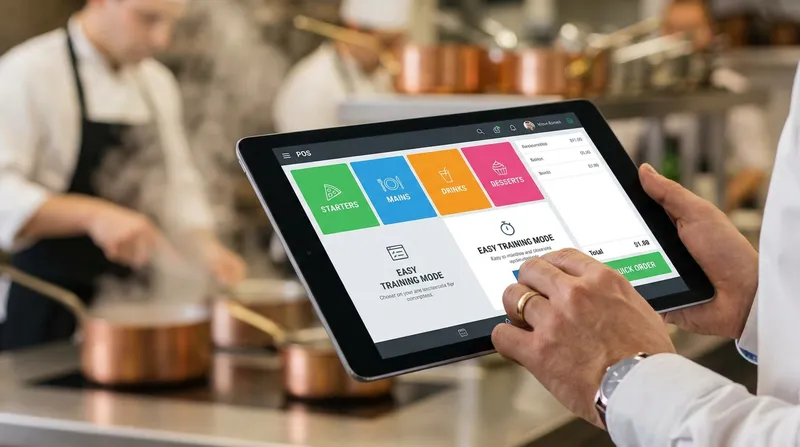
- Give a brief tour of the visual menu layout (e.g., where to find drinks, mains, and desserts).
Minutes 15 to 30: Order Entry and Modifiers
- Roleplay three common customer orders.
- Show them how the forced modifiers prompt them to ask the right questions (milk type, meat temperature, allergy notes).
- Demonstrate how to void an item or cancel an order if they make a mistake.
Minutes 30 to 45: Payments, Loyalty, and Splitting Bills
- Process a mock cash payment and show how the till calculates change.
- Process a mock EFTPOS transaction.
- Show how to apply a customer reward using the built-in Loyalty Programme so your new hire can handle returning regulars instantly.
- Demonstrate how to easily split a bill evenly between two customers using the touch screen.
Minutes 45 to 60: Table Management and Troubleshooting
- Show them the digital floor plan and how to assign an order to a specific table.
- Explain how to move a party from one table to another in the system.
- Review how to change the receipt printer paper.
That is it. In one hour, your new staff member is ready to take orders. For more actionable advice on running your operations smoothly, explore our POS Tips & Insights NZ.
What About Migrating From Your Current System?
A common concern for hospitality owners is the perceived downtime of switching software. However, moving to a cloud-based system is straightforward. Your existing menu data can be easily imported, and the Lazygrid team provides dedicated onboarding support to ensure your transition is seamless. You do not have to worry about losing your historical data or facing a complicated setup.
Conclusion: Stop Babysitting the Cash Register
Staff turnover is an unavoidable part of the hospitality industry. However, the anxiety, lost productivity, and massive financial drain associated with training new employees are entirely preventable.
By replacing clunky legacy systems with an intuitive iPad POS system, you empower your staff from day one. They can rely on familiar touch gestures, visual menus, and smart prompts to guide them through their shifts confidently. And if your internet drops during a busy service? Lazygrid keeps working in offline mode, so your newly trained staff never face an unexpected system outage on their first week.
A modern restaurant POS software New Zealand solution frees you and your management team from babysitting the cash register. You can finally get back to what you do best: growing your business, improving your menu, and delivering incredible experiences to your customers.
Ready to see how easy training can be? Book a free 15-minute demo and see how Lazygrid can get your next hire serving customers in under an hour.
Frequently Asked Questions
How long should it take to train a new restaurant employee on a POS system?
With legacy systems, it can take anywhere from a few days to a full week of shadowing. However, with a modern, intuitive iPad POS system, basic order entry and payment processing can usually be taught in under an hour.
Why is an iPad POS better for cafes and restaurants in New Zealand?
An iPad POS offers mobility, a familiar touch interface that staff already understand, and cloud-based backups. This makes it perfect for fast-paced NZ cafes and food trucks that need reliable, easy-to-learn technology without the massive upfront cost of traditional hardware.
Can a new POS system actually reduce staff turnover?
While a POS cannot fix all turnover issues, an intuitive system heavily reduces workplace stress for new hires. When staff feel confident and make fewer mistakes during service, they are much less likely to quit out of frustration during their first month on the job.
How do cloud-based restaurant POS systems differ from legacy systems?
Legacy systems store data locally on a back-office server and often feature outdated, button-heavy interfaces that are hard to update. Cloud-based systems store data securely online, offer real-time reporting from anywhere, and feature modern, app-like interfaces that are much easier to navigate and update instantly.
What is the best way to train temporary or seasonal hospitality staff?
The best approach is to use a visual, cloud-based POS with forced modifiers, limiting the amount of menu memorization required. Pair this technology with a short, 60-minute hands-on checklist rather than forcing them to read a long, complicated training manual.