
Stop POS Fraud & Mate's Rates: NZ Till Security Guide

You count the float at 9:00 PM, and the cash drawer balances to the cent. You breathe a sigh of relief, lock the front door, and head home. Yet at the end of the month, your bank settlement and gross profit margins tell a completely different story.
If you run a cafe, restaurant, food truck, massage clinic, or beauty salon in New Zealand, watching your razor-thin profits silently evaporate at the counter is maddening. When your whole team shares a single 1234 till PIN and your physical EFTPOS merchant refund card lives in the top slot of the cash drawer, your point-of-sale system becomes an anonymous honour system. You have zero visibility into who is handing out unapproved 'mate's rates' comps, voiding paid cash treatments after clients walk out, or processing sneaky terminal refunds.
In a 2026 article, Westpac New Zealand warned that internal fraud often hides in everyday processes like refunds and cancellations. Meanwhile, the 2025 Remuneration Survey released by the Restaurant Association of New Zealand reveals that hospitality wage costs now average 40% of total revenue before you even pay for ingredients, rent, or power.
You do not want to bottleneck your morning coffee rush or make honest staff feel accused of theft. This guide to preventing employee theft at point of sale shows you exactly how to configure POS role-based access control, individual staff PIN logins, integrated EFTPOS security, and a 5-minute weekly audit log routine that locks down your counter without slowing down service.
The 4 Silent Margin Killers at Kiwi Counters
Internal shrinkage rarely looks like a staff member stuffing $50 notes into their apron while staring up at a CCTV camera. According to Retail NZ's 2023 Retail Crime Report, retail crime costs New Zealand retailers around $2.6 billion a year.
Before you can lock down your POS settings, you need to understand the four specific loopholes that drain net margins across hospitality and wellness counters.
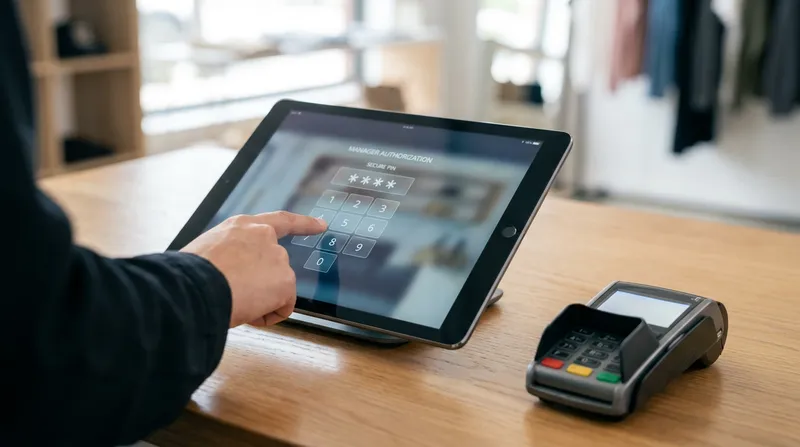
1. Standalone EFTPOS Refund Fraud & Unsecured Merchant Cards
In New Zealand, standalone payment terminals rely on either a physical Worldline (formerly Paymark) Merchant Refund Card or a numeric Verifone/Eftpos NZ refund passcode to authorise money flowing backward out of your bank account. In far too many Kiwi venues, that plastic refund card sits in the coin tray of the till, or the passcode is written on a sticker underneath the terminal.
Internal refund fraud occurs when staff swipe the merchant refund card during a quiet period and tap their own personal debit card (or a friend's card) to transfer funds directly out of your daily merchant settlement account. Because nothing was rung into the POS software, your POS sales report and your physical cash drawer still match at closing time.
Alternatively, staff may process a fake EFTPOS refund onto their own card for $40, and then ring up $40 of legitimate cash sales without putting the cash into the drawer, keeping the notes instead.
What to do today:
- Remove physical refund cards from the counter immediately: The BNZ Merchant Service Guide advises keeping refund cards in a secure location that only authorised staff can access. Store your Worldline Merchant Refund Card in a locked office safe or on the duty manager's physical keyring.
- Enforce strict bank refund compliance: Follow the official merchant rules from Westpac New Zealand Merchant Services Agreement, which states that you must never give cash refunds for card transactions, never refund more than the original purchase amount, and only refund back onto the exact card used for the original sale.
2. The Post-Payment Cash Void Scam
A customer walks up to your food truck or cafe counter, orders a $24 burger combo, and hands over exact cash. Because the customer does not ask for a printed tax receipt, the cashier hands over the food, leaves the order open on the POS screen, and waits until the customer walks away. Then, the cashier taps Void Order or Delete Items and slips the $24 cash into their pocket.
Cancelling legitimate sales to pocket the cash is one of the most common ways insiders abuse routine system access. Because the order was deleted from the POS before tender completion, your end-of-day Z-report expects $24 less in the drawer. Your till balances perfectly, fooling you into thinking nothing is wrong.
This scam hits hospitality and wellness businesses in two very different ways:
- Inventory Shrinkage (Cafes, Restaurants & Food Trucks): Eventually, you might notice you are going through burger buns, coffee beans, or cans of drink faster than your POS sales report says you should.
- Service Shrinkage (Massage Shops & Beauty Salons): If a walk-in client pays $90 cash for a 60-minute deep tissue massage or gel manicure and the receptionist deletes the booking from the calendar afterward, there is zero missing physical stock to alert you. You lose 100% of the revenue and still pay the therapist's hourly wage. When evaluating software for your studio, check our breakdown of Fresha vs Kitomba vs Lazygrid: NZ Salon POS Costs in 2026 to see why unified booking and POS audit logs are vital for treatment businesses.
What to do today:
- Disable order deletion after an item is saved or sent: Once an order prints to the kitchen, appears on a Kitchen Display System (KDS), or is checked in from a booking calendar, frontline staff accounts should be blocked from deleting it without a manager override.
3. 'Mate's Rates' Creep and Sweethearting at the Register
In the POS industry, giving away free or under-charged items to friends, family, or favourite regulars is called sweethearting. In New Zealand, we usually call it 'mate's rates'.
It starts small: a barista rings up a $5.50 regular flat white while handing their flatmate a $7.50 large oat mocha and an $11.50 cabinet toastie. Or a beauty therapist adds a $25 brow tint upgrade during an appointment without adding it to the client's invoice at reception. Worse, if your POS has an open-ended manual % Discount button, staff start tapping 25%, 50%, or 100% discounts for their mates all week.
Let's do the math. With wages taking up 40% of revenue as reported by the Restaurant Association of New Zealand, many Kiwi cafes and restaurants run on thin net margins (often single digits).
If a staff member gives away just $30 worth of unapproved food, coffee, or salon add-ons during a shift, your business has to generate hundreds of dollars in new legitimate sales just to replace the net profit lost on that single shift.
If you are already tightening up software expenses across your venue, read our guide on MOBI, Bopple & Order Meal vs All-in-One POS Costs NZ (2026) to make sure you aren't losing margin on both tech fees and uncontrolled discounting.
What to do today:
- Delete open manual discount buttons: Remove the ability for staff to type in custom dollar or percentage discounts.
- Create named, fixed-value promo buttons: Replace open discounts with specific buttons like
Staff Shift Meal (100%),Staff Coffee, orVIP Local (10%)that automatically log the staff member's PIN and the exact item discounted.
4. The 'No-Sale' Cash Drawer Pop & Floating Cash Stash
Every cash drawer connected to a receipt printer has a kick-solenoid triggered by the POS software. When a cashier taps No-Sale or Open Drawer (usually claiming they need to break a $20 note for a customer or check for coins), the drawer pops open without recording a financial transaction.
Dishonest staff use the No-Sale button to run a 'floating cash stash'. When a customer pays $10 cash for two coffees, the staff member hits No-Sale, drops the $10 into the drawer without ringing up the coffees, and keeps a tally on their phone (or places five $1 coins in the far-right compartment of the till as a physical counter). At the end of the shift, right before cashing up, they pull the accumulated $60 or $80 lump sum out of the drawer.
What to do today:
- Lock the
No-Salebutton behind a manager PIN: Frontline cashiers should only be able to open the cash drawer when tendering an actual cash sale. - Require a mandatory reason code: If you must allow senior staff to pop the drawer for change, require a mandatory on-screen prompt (
Breaking Change,Float Top-Up,Receipt Roll Check) that logs a timestamped alert in your shift report.
How to Set Up POS Role-Based Access Control
When we talk to Kiwi cafe and food truck owners about turning off shared passwords, the number one fear is speed: "If three staff members have to type in a password for every flat white and scone at 8:15 AM, the queue will back up down the street."
That is a completely valid concern if you are using clunky legacy software that requires full email-and-password logins. Modern iPad POS systems solve this with role-based access control (RBAC) paired with fast-switch PIN pads. Tapping a PIN on a responsive touchscreen takes a moment. Each staff member logs in with their own PIN, so every transaction is tied to a person.
More importantly, separating duties protects your honest workers. According to Xero New Zealand's guide on preventing employee theft (which cites National Crime Check NZ data showing that 25% of Kiwi employers have experienced workplace theft, alongside Serious Fraud Office findings that fraud is the country's most prevalent crime), clear separation of duties and individual system logins are your strongest internal controls. When every transaction is tied to an individual PIN, honest staff never have to worry about being blamed when a shared drawer comes up $50 short.
If you want to keep your queue moving even faster while tightening security, combine individual POS logins with smart workflow tools from our guide on Order Pacing & Scheduled Pickup POS: Crush the NZ Rush.
The Ready-to-Use POS Permission Matrix for NZ Small Businesses
You do not need to invent security rules from scratch. Use this matrix as a policy template for your team. Lazygrid supports role-based permissions for staff sub-accounts. Check with our team which of these controls you can set in your plan. In Lazygrid POS, our Standard Plan ($59/month) includes your main owner account plus 2 staff sub-accounts, while our Premium Plan ($149/month) gives you your main account plus 4 sub-accounts, allowing you to assign distinct permissions by job role.
| POS Action / Permission | Frontline Staff | Senior Therapist / Receptionist | Shift Duty Manager | Venue Owner (Main Account) |
|---|---|---|---|---|
| Ring Up Sales & Take Card/Cash Payments | ✅ Allowed | ✅ Allowed | ✅ Allowed | ✅ Allowed |
| Remove Item Before Order is Saved/Sent to Kitchen | ✅ Allowed | ✅ Allowed | ✅ Allowed | ✅ Allowed |
| Void Order After Printed to Kitchen / KDS / Checked In | ❌ Manager PIN Required | ❌ Manager PIN Required | ✅ Allowed (With Reason Code) | ✅ Allowed |
| Apply Pre-Set Promo / Staff Meal Button | ❌ Manager PIN Required | ✅ Allowed (Logged) | ✅ Allowed (Logged) | ✅ Allowed |
| Apply Custom Manual % or $ Discount | ❌ Disabled | ❌ Disabled | ✅ Capped at 20% | ✅ Allowed |
| Pop Cash Drawer via 'No-Sale' Button | ❌ Disabled | ❌ Manager PIN Required | ✅ Allowed (Logged) | ✅ Allowed |
| Trigger EFTPOS or Cash Refund | ❌ Disabled | ❌ Disabled | ✅ Allowed (Matched Receipt Only) | ✅ Allowed |
| View Expected Cash Total During Shift (X-Report) | ❌ Disabled (Blind Count) | ❌ Disabled (Blind Count) | ✅ Allowed | ✅ Allowed |
| Access Full Customer CRM & Export Contact Data | ❌ Disabled | ❌ View Only (Booking Info) | ❌ Disabled | ✅ Allowed |
Notice the final row regarding customer contact data. Restricting staff from exporting your client list doesn't just stop a departing massage therapist or stylist from poaching your database; it also keeps your business compliant with New Zealand privacy laws. Read our breakdown of NZ Privacy Act IPP 3A (2026): Ditch 3rd-Party Data for POS to see how locking down customer profiles protects your venue legally.
Configuring Manager Override PINs & Mandatory Void Reason Codes
To keep service smooth during a hectic brunch service, you must distinguish between a pre-send tap mistake and a post-send void:
- Allow pre-send corrections freely: If a customer orders a cappuccino and immediately changes their mind to a latte while standing at the till before the cashier hits
SendorPay, let the cashier tap the bin icon to fix the line item. No stock has been made, and no payment has been taken. - Lock post-send voids behind a Manager Override PIN: If your POS supports it, removing an item after the order has been sent to your kitchen printer or KDS should trigger a pop-up asking for the Shift Duty Manager's override PIN. This takes two seconds for a nearby manager to tap.
- Enforce mandatory drop-down reason codes: If your POS system allows, force the system to record a preset reason whenever a manager approves a void or comp (
Customer Changed Mind,Dropped/Spilled in Venue,Kitchen Remake, orWalk-Out). (If dine-in walk-outs are hurting your weekend revenue, see our guide on Stop NZ Brunch Walk-Outs: The No-Bookings POS Strategy.)
Locking Down the EFTPOS Loop: Integrated Terminals & Blind Cash-Ups
Even the strictest POS permissions won't save you if your EFTPOS terminal sits on the counter operating in 'standalone mode' where anyone can key in numbers manually.
1. Close the Loop with Integrated EFTPOS
When you connect your POS to an EFTPOS NZ certified terminal (trusted by over 50,000 New Zealand merchants), card payments are recorded against the sale in your POS. Pair this with terminal refund passcodes and limits so that any refund keyed directly on the terminal still needs a manager passcode, and check terminal refunds against POS refunds every week.
Furthermore, Eftpos New Zealand (Verifone NZ) allows Kiwi merchants to configure role-based security directly on their payment network, including:
- Separate Manager and Cashier Passcodes: Set a 6-digit manager passcode and a 4-digit cashier passcode on the terminal, each with distinct per-transaction dollar refund caps.
- Daily Refund Limits: Your merchant bank sets a daily refund limit that applies on top of your terminal's per-transaction caps. Ask your bank to lower it if you rarely issue refunds.
2. Switch to 'Blind Cash-Ups' at Closing Time
In many cafes and salons, the staff member closing the till prints an X-report first, sees that the POS expects $450.00 in cash, and then counts the drawer.
Think about the incentive that creates:
- If the drawer actually has $480.00 in it (because a rushed customer overpaid or a change error occurred earlier), a dishonest staff member sees the $30 overage, pockets the extra $30, and hands you a perfectly balanced $450.00 float.
- If the drawer is short, a staff member with void permissions knows the exact dollar amount they need to void from the day's cash receipts to cover up the discrepancy.
By disabling the View Expected Cash permission for frontline staff if your system supports it, you enforce a Blind Cash-Up. At the end of the night, the staff member counts the physical notes and coins and types the total into the POS without knowing what the computer expects. Lazygrid's automated daily email report keeps you across your sales wherever you are.
Note for Mobile & Rural Operators: Because Lazygrid is a live cloud POS, it requires an active internet connection to process orders, validate permissions, and run integrated payments (cached data remains viewable during an outage, but new transactions cannot be made offline). If you operate a food truck or rural venue, make sure your connection is rock-solid so staff are never tempted to fall back on manual cash boxes during a dropout. Check out our practical connectivity guide in Offline POS in 2026? NZ Food Trucks & Rural Venues Can Go Online to see how affordable 4G/5G wireless routers or Starlink Business (from NZ$92/month for 50GB) keep your cloud audit trail live everywhere.
The 5-Minute Weekly Audit Log Checklist for Time-Poor Owners
You did not open a hospitality or wellness business to spend three hours every Sunday night squinting at spreadsheets. Once your role-based permissions and individual PINs are active, you only need five minutes on a Friday afternoon to review your POS exception reports.
Follow this 4-step weekly audit checklist:
- Filter for 'Post-Print Voids' & 'Cancelled Bookings' by Staff Member: Look for patterns rather than isolated mistakes. Every barista accidentally rings up the wrong milk once in a while. However, if Staff Member A logs 14 post-send cash voids a week while Staff Member B and C log only 1 or 2 on the exact same shifts, you have an immediate red flag.
- Cross-Check EFTPOS Settlement Totals Against POS Card Refunds: Compare the daily refund line on your bank's EFTPOS settlement statement against the refund report inside your POS dashboard. Those two numbers should be identical. If your bank settlement shows $120 in card refunds on Tuesday, but your POS shows $0 in refunded receipts, someone swiped a standalone refund directly on the EFTPOS terminal.
- Audit 'No-Sale' Drawer Opens & Cash-to-Card Ratios: In New Zealand, most hospitality and retail payments are now made by card or contactless. If your venue averages 20% cash sales, but whenever a specific employee works a solo afternoon shift your recorded cash sales drop to 4% alongside six
No-Saledrawer opens, cash sales are almost certainly going unrecorded. - Review the 'Staff Discount & Comp' Summary: Check the total dollar value of
Staff MealandVIP Promobuttons used over the past seven days to verify that 'mate's rates' haven't crept outside your team policy.
A Crucial Note on NZ Employment Law
If your POS audit trail uncovers clear evidence of cash void scams or unauthorized EFTPOS refunds, do not fire the employee on the spot.
Under New Zealand's Employment Relations Act 2000, summary dismissal without a fair, formal investigation process will expose your business to a costly personal grievance claim, even when you have proof of theft. As outlined by Employment New Zealand, your timestamped POS activity logs, individual PIN records, and EFTPOS settlement printouts serve as the objective documentary evidence you need to put formal allegations to the employee in writing, invite them to bring a support person to a disciplinary meeting, and consider their response in good faith. If criminal fraud has occurred, preserve your digital logs and follow the official reporting steps on the New Zealand Police Business Crime Prevention page via 105.
Conclusion: Protect Your Margins and Your Honest Staff with Lazygrid POS
Effective POS role-based access control and preventing employee theft at point of sale isn't about treating your team with suspicion. In fact, clear system boundaries do the exact opposite: they protect your honest staff from false blame when a till doesn't balance, and they give young baristas, cashiers, and receptionists an easy, objective excuse when pushy friends ask for 'mate's rates' at the counter ("Sorry mate, the iPad needs a manager PIN for discounts!").
With Lazygrid POS, you don't need expensive legacy hardware to get enterprise-grade security. Running on iPads and iPhones you already own, Lazygrid gives you role-based staff sub-accounts (included on our Standard and Premium plans), PIN logins, activity logging, EFTPOS NZ certified terminal integration, and automated daily email reports so you can see exactly what is happening at your counter from anywhere.
Ready to stop silent shrinkage and lock down your till without slowing down your queue? Explore Lazygrid POS features and pricing today or get in touch with our Wellington-based team for a quick walkthrough tailored to your cafe, restaurant, food truck, or salon.
Frequently Asked Questions
How do I stop staff from using my Worldline/Paymark or Eftpos NZ refund card without permission?
Never leave physical Merchant Refund Cards in the cash drawer or write passcodes on the bottom of the terminal. Lock physical refund cards in the manager's safe, enable integrated EFTPOS so refunds can only be pushed from the POS software by an authorised manager login, and configure separate 4-digit cashier and 6-digit manager passcodes with strict per-transaction dollar limits through Eftpos NZ or Worldline.
Will individual staff PIN logins slow down my cafe or food truck during a busy rush?
No. Modern iPad POS systems use a fast-switch PIN screen that is quick to tap. For peak morning coffee rushes, you can also dedicate one iPad at the counter to a single designated cashier for that shift hour while baristas work off a Kitchen Display System (KDS), ensuring 100% accountability on the cash drawer with zero login friction.
How can I prevent cash theft in a massage shop or beauty salon where there is no physical stock to count?
Service businesses must link their appointment booking system directly to their POS checkout. Require every calendar booking to be closed against a payment tender or a manager-approved cancellation code, block reception/therapist sub-accounts from deleting past appointments, and enable automated SMS/email booking confirmations and digital receipts so clients always expect an official digital record.
What is a 'blind cash-up' on a POS system and how does it reduce till shrinkage?
A blind cash-up hides the POS system's 'Expected Cash' figure from the staff member counting the float at the end of the shift. The staff member simply counts the physical notes and coins and enters the final number. Because they cannot see the target figure, they cannot pocket cash overages or manufacture matching voids to hide a cash shortage.
Can I fire an employee immediately in New Zealand if my POS audit log shows suspicious voids or discounts?
No. Under New Zealand's Employment Relations Act 2000, you must follow a fair and formal disciplinary process even in cases of suspected serious misconduct like theft. Your POS activity logs, individual staff PIN timestamps, and EFTPOS settlement reports give you the objective evidence needed to initiate a formal investigation or file a 105 report with NZ Police.